Medical Record Naming Conventions: A Simple System That Works
Learn how to name medical record files so they sort by date and stay easy to find: a simple pattern, examples for family and pets, and what to keep out of names.

Medical Record Naming Conventions: A Simple System That Works
A good medical record naming convention puts the date first, then the person, the document type and a short detail, with no spaces or special characters. Pick one pattern, use it for every file, and you can find a lab result in seconds instead of scrolling through “scan0012.pdf”. If you would rather not rename files by hand, MedFiles organizes uploaded documents automatically, so the pattern below also works as a guide for what a clean record looks like.
TL;DR
- Start every filename with the date in YYYY-MM-DD or YYYYMMDD format so files sort in time order.
- Follow with person, document type and a short detail, separated by underscores or dashes.
- Skip spaces and special characters, and keep names short.
- Keep Social Security numbers and other sensitive identifiers out of filenames.
- Write the rule down once and apply it to everyone in the family, pets included.
Table of Contents
- Why a naming convention matters for medical records
- Why the date goes first
- A simple pattern you can copy
- What real health organizations do
- Examples for every kind of record
- What to keep out of a filename
- Organizing for a family, a caregiver or a trip
- Perspective: naming is the start, not the whole job
- Put it into practice with MedFiles
- FAQ
- Sources
Why a naming convention matters for medical records
Harvard Medical School’s data management team defines a file naming convention as a framework for naming files that describes what they contain and how they relate to other files. It says conventions help you stay organized, identify files quickly, and avoid misplaced or lost content.
For health records the stakes are practical. You may need a vaccine record at a new school, an MRI report at a specialist visit, or a medication list in an emergency room. A pile of files named “Document (3).pdf” fails you exactly when you are stressed.
Harvard also advises setting the convention before you collect files. Renaming a backlog of hundreds of scans is far harder than naming each new file properly on the day you get it.
Why the date goes first
Computers sort files by name, character by character. Harvard’s guidance says the most important information should come first, and that if you want to find files by date, the date leads.
The National Archives adds a second reason. Files get moved out of their folders, by email, download or upload, so a filename has to make sense on its own. If the date matters, it belongs in the filename, not only in the folder name.
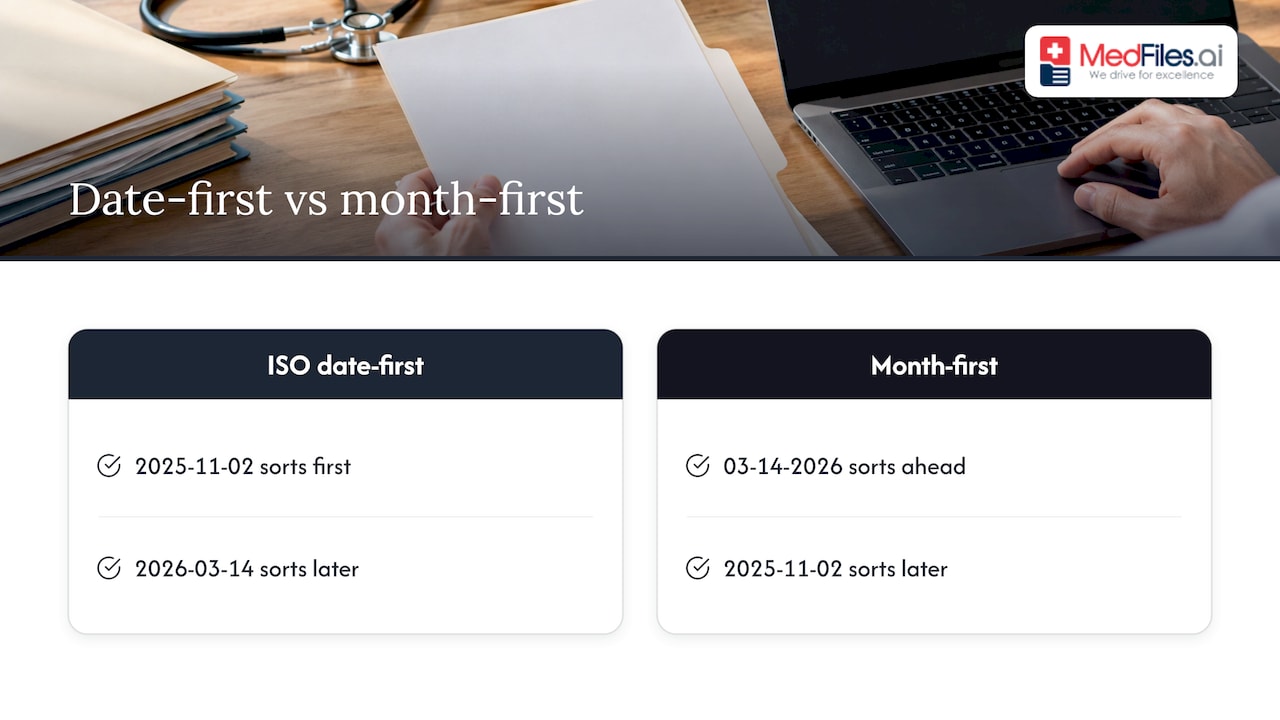
Use the ISO 8601 format: year, month, day. Harvard recommends YYYYMMDD or YYYY-MM-DD. A name starting 2026-03-14 always sorts after 2025-11-02. A name starting 03-14-2026 does not sort that way, because the month comes first.
A simple pattern you can copy
Here is a pattern built from the guidance above:
YYYY-MM-DD_Person_DocumentType_Detail
- Date: the date of service or the date on the report, not the day you scanned it. The Patient Advocate Foundation also advises including the date of service and choosing a name anyone who finds the file could understand.
- Person: last name and first name, or first name and initial for family use. Alberta Health Services’ file-naming norm puts the last name first for personal names.
- Document type: a short, fixed word list, such as Labs, Rx, Visit, Imaging, Discharge, Insurance, Vaccine.
- Detail: the test, body part, doctor or medication, in one or two words.
Rules for characters and length
- No spaces. Alberta Health Services notes that file names often become part of web addresses, and browsers swap spaces for codes like %20. Use underscores between parts and dashes between words.
- Avoid special characters. Harvard lists characters such as ~ ! @ # $ % ^ & * ; : < > ? , [ ] { } and quotation marks as ones to avoid. The Alberta norm says it is safest to stick to alphanumeric characters.
- Keep it short. Harvard suggests 40 to 50 characters. Other health organizations set limits from 25 to 150 characters, so short is safe everywhere.
- Use leading zeros for numbers in a sequence (001, 002) so they sort correctly.
- Put versions last. If you correct or update a file, add v2 at the end, as Harvard recommends.
What real health organizations do
Clinics and public health agencies already name files this way, which shows the idea scales.
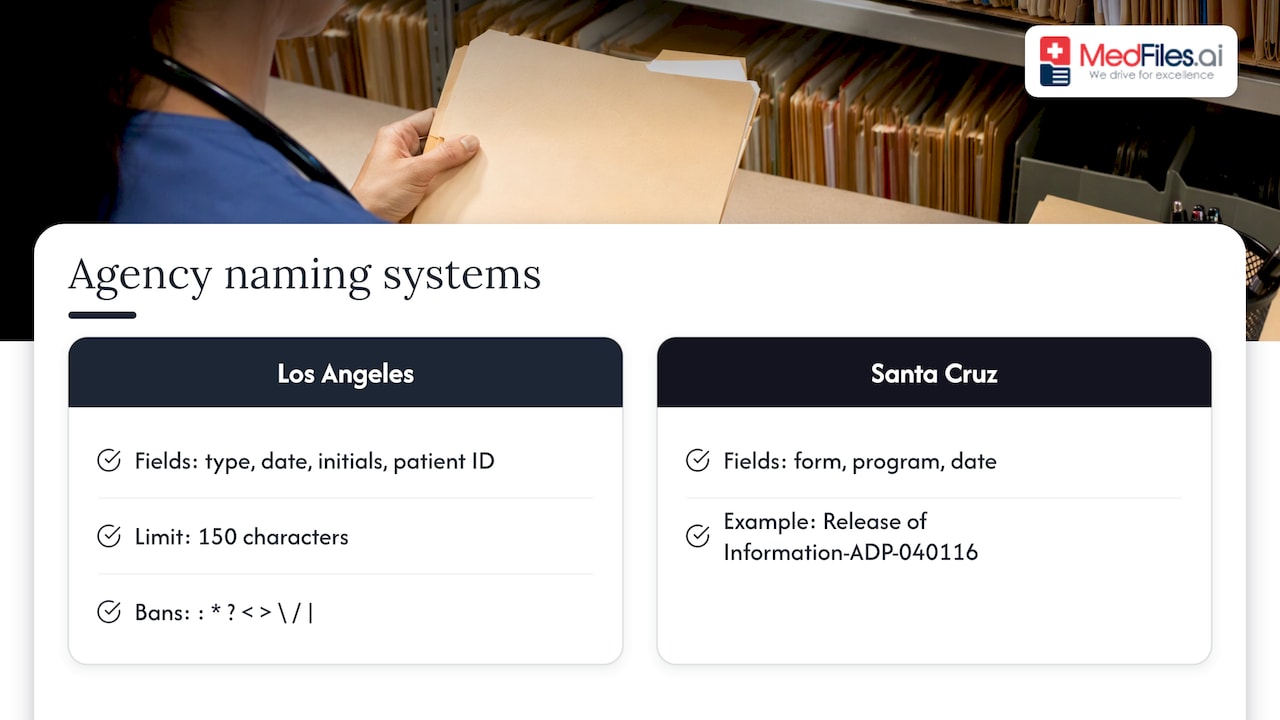
Los Angeles County’s Sage system asks providers to name attachments by document type, date, patient initials and patient ID, caps names at 150 characters, and bans characters such as : * ? < > \ / and |.
Santa Cruz Health’s scanning guide builds names from the form, program and date, for example Release of Information-ADP-040116.
These systems put the date in different places. That is fine for an office with one fixed rule. For personal records, date first is the most useful choice, because you will most often search by “what happened recently” or “what happened in 2024”.
Examples for every kind of record
These are illustrations of the pattern, not real patients.
| Record | Example filename |
|---|---|
| Blood test | 2026-02-10_Rivera-Ana_Labs_Lipid-Panel.pdf |
| Prescription | 2026-03-01_Rivera-Ana_Rx_Lisinopril-10mg.pdf |
| Visit summary | 2026-04-18_Rivera-Ana_Visit_Cardiology.pdf |
| Imaging report | 2025-09-22_Rivera-Ana_Imaging_Knee-MRI-Report.pdf |
| Imaging images | 2025-09-22_Rivera-Ana_Imaging_Knee-MRI-Images.zip |
| Discharge papers | 2025-12-05_Rivera-Ben_Discharge_Appendectomy.pdf |
| Vaccine record | 2024-08-15_Rivera-Ben_Vaccine_School-Form.pdf |
| Insurance form | 2026-01-05_Rivera-Ana_Insurance_Plan-Card.pdf |
| Pet record | 2026-05-03_Rivera-Biscuit-Dog_Vet_Rabies-Booster.pdf |
Notice what repeats: the same order, the same document-type words, and nothing that needs explaining. Putting “Dog” in the pet’s name keeps it from mixing with human records.
What to keep out of a filename
Filenames travel. They show up in email subject lines, upload screens, shared links and backups. HHS lists name, address, birth date and Social Security number among the common identifiers in individually identifiable health information under the HIPAA Privacy Rule.
So, as safe practice:
- Leave out Social Security numbers, full birth dates and addresses.
- Use a first name and initial, or a short family code, rather than a full legal name when you share files.
- Put diagnoses in the file, not in the name, when you might forward it to others. “Labs_Lipid-Panel” says less than a condition name would.
- Never put passwords or account numbers in a filename.
Security also covers where files live. A guide to secure telehealth and digital privacy is a good companion read for backups and for who else can reach your accounts.
Organizing for a family, a caregiver or a trip
The VA Caregiver Support Program’s Patient File Checklist says a patient file builds a health-care history, saves time because information is easy to find, and should be updated after every encounter with the health care team.
The University of Arkansas Cooperative Extension suggests that the first page of your medical file list your name, date of birth, blood type and a table of contents, with records organized by category and by date, and the past year’s documents kept within reach.
Put that into practice:
- One folder per person. Name it Last-First, and do the same for each pet.
- Same pattern inside every folder. Anyone who steps in to help can read it.
- Keep recent items handy. Johns Hopkins physician Alicia Arbaje recommends keeping the past year’s documents easy to reach: visit and discharge summaries, pharmacy printouts, supplement lists, test results, insurance forms and emergency contacts.
- Share access. The same Johns Hopkins guidance suggests sharing logins with a backup contact if you use online tools, and the Patient Advocate Foundation says to make sure someone you trust knows how to reach your accounts.
- Keep a medication list. Arbaje notes that in a study of patients on blood pressure drugs, about 40 percent could not name a single one. A medication list checklist for families shows how to build one.
For trips and emergencies, a short name that starts with the date and type lets a doctor or relative find the right file quickly, even on a phone.
Perspective: naming is the start, not the whole job
We built MedFiles because a naming convention only works if you keep using it. Most people begin with good intentions, then a busy month, a new doctor and three kids’ vaccine forms later, the system is gone.
That is why we focus on automatic organization. You upload a lab result, a prescription or a report, and MedFiles sorts it for you, so your records stay in order without a renaming routine. You can keep separate profiles for each family member and for pets, and share securely with a doctor or relative when it matters.
Your habits still count. A clear date, a clear person and a clear document type make any record easier to trust. Our approach is to take that discipline and make it the default, so your whole medical history is there when you need it, in your pocket.
Team
Put it into practice with MedFiles
If you want the order without the effort, MedFiles stores lab results, prescriptions, reports and images in one place, organizes them automatically and gives you profiles for each family member and pet. Our Understand Your Health plan costs $2.99 per month and Protect Everyone costs $4.99 per month, and you can start free without a credit card. See the plans and pricing.
For deeper reading, see our guides on a digital medical records workflow for families, combining medical records while preserving metadata and keeping records safely for the long term. You can also read how we handle security and privacy.
FAQ
What is the best file naming convention for medical records?
Date first in YYYY-MM-DD format, then person, document type and a short detail, separated by underscores. Files then sort in time order and stay readable out of context. Add v2 at the end for updated versions.
Should I use the date of the visit or the date I scanned the file?
Use the date of service or the date printed on the document. The Patient Advocate Foundation advises including the date of service in the name. Your scan date shows in the file’s own properties.
Which characters should I avoid in filenames?
Avoid spaces and symbols such as # % & * ? < > : / \ and quotation marks. Stick to letters, numbers, dashes and underscores. This keeps files working across devices, email and web links.
How do I name records for a pet?
Use the same pattern, with the pet’s name and species in the person slot, such as 2026-05-03_Rivera-Biscuit-Dog_Vet_Rabies-Booster. Keep pet records in their own folder or profile.
Sources
- File Naming Conventions, Harvard Medical School Data Management
- Best Practices for File Naming and Organizing, National Archives
- Your New Best Friend, Patient Advocate Foundation
- Connect Care Norm, Alberta Health Services
- Sage attachment naming convention, LA County Public Health
- Naming Conventions for Scanning, Santa Cruz Health
- Summary of the HIPAA Privacy Rule, HHS
- Patient File Checklist, VA Caregiver Support Program
- Organizing Medical Files, University of Arkansas Cooperative Extension
- Medical Records: Getting Organized, Johns Hopkins Medicine