Manage Your Parents' Medical Records With 15 Minutes a Week
Caregiving first playbook: secure HIPAA access, build an ER ready summary, name a 'medical memory,' and keep records current with 15 minutes a week.
Manage Your Parents’ Medical Records With 15 Minutes a Week
The fastest path to legal access is a signed HIPAA authorization or a health care proxy naming you as their representative; Medicare requires its own separate form. Once you have signed documents, request release forms from every provider, export or request portal records, and build a one-page ER summary with a master medication list. If your parent can’t sign anything, start the medical power of attorney or guardianship process now, and ask each provider what they require.
TL;DR:
- Most families need both a health care proxy and a HIPAA authorization to access an adult’s medical records legally, as Medicare’s form is separate.
- Digital patient portals and direct provider contacts are the fastest ways to retrieve patient’s medical records, with a focus on discharge summaries and current medication lists.
- Regularly updating a master medication list and an ER summary, and storing them both digitally and physically, prevents chaos during emergencies.
- Assigning clear roles for medication updates, appointment tracking, and document management ensures records stay current without confusion.
- Using secure, HIPAA-compliant platforms like MedFiles.ai simplifies access sharing, revocation, and multi-profile management, reducing manual effort and errors.
Table of Contents
- Legal Access: HIPAA, Health Care Proxy, and Medicare Forms
- How to Request and Collect Records From Every Provider
- Building a Master List Your Family Can Actually Use
- Sharing Records Without Creating a Privacy Mess
- A Weekly Rhythm That Keeps Everything Current
- Why a “Medical Memory” Role Beats a One-Time Filing Project
- What the Conventional Advice Gets Wrong
- Try MedFiles.ai to Run This System Without the Spreadsheet
- Sources
- FAQ
Legal Access: HIPAA, Health Care Proxy, and Medicare Forms
You cannot walk into a doctor’s office and demand your parent’s chart just because you’re their kid. Under HIPAA, family members can access an adult’s protected health information only if the patient signs an authorization, or if the family member qualifies as a personal representative under state law. That’s the rule most families run into first, usually at the worst possible moment: mid crisis, in a hospital hallway.
Three documents solve most of it. AARP names them directly: a health care proxy (also called a health care power of attorney), a HIPAA authorization, and Medicare’s own disclosure form.
- HIPAA authorization: A signed form naming you, specifying what records you can see, and for how long. Most hospitals and clinics use their own version, so plan on signing several, not one.
- Health care proxy / durable power of attorney for health care: This grants you decision-making authority, not just viewing rights. HHS notes that state law determines who qualifies as a personal representative, so having both a proxy and HIPAA release closes gaps a single document leaves open.
- Medicare Authorization to Disclose Personal Information: Medicare doesn’t recognize your hospital paperwork. You need CMS form 10106, or you can add yourself as an authorized representative through your parent’s online Medicare account.
If your parent already has dementia or another condition that prevents them from signing, none of this works retroactively. You’ll need a court-appointed guardian or conservator instead. Talk to an elder law attorney early. Waiting until a hospital admission to sort this out adds weeks to a process that should take days.
How to Request and Collect Records From Every Provider
Start with what’s already digital. Patient portals from clinics, hospitals, and pharmacies usually offer a “download my records” or export option, often in a format called a Continuity of Care Document. Electronic health records are designed to travel across providers, unlike older provider-specific charts, so a portal export is often the fastest way to get a real medical history instead of a single visit summary.
For anything not in a portal, you’re calling or emailing the medical records department directly. Here’s the sequence that actually works:
- Identify the record holder. Not “the hospital,” but the specific facility or lab that generated the file.
- Complete their release form. Most departments require their own, even if you already have a signed HIPAA authorization.
- Specify exactly what you want and the date range. Naming the precise document type, like a discharge summary or imaging report, avoids repeated back and forth with records staff.
- Ask about fees and turnaround time. Some offices charge per page; some offices take several business days.
Prioritize discharge summaries, current medication lists, imaging reports, lab results, advance directives, durable medical equipment orders, and immunization records. Old paper files deserve care too. Request certified copies when the records matter for insurance or legal claims, and when scanning documents yourself, name files consistently (provider, date, document type) and run them through OCR so text becomes searchable later. Our step-by-step guide to setting up caregiver access walks through the permission side of this in more detail.
Pro Tip: Call before you email. Records departments often move faster on phone requests, and you can confirm exactly which release form they need while you’re on the line, saving a mailing round trip.
Building a Master List Your Family Can Actually Use
Scattered records don’t help anyone in an emergency. You need one canonical version, and it starts with a master medication list. Every entry should include the drug name, dose, frequency, prescribing doctor, start date, and any notes on side effects or reasons it was stopped.
Pair that with a one-page ER-ready summary. Hospital caregiver guides recommend keeping this simple: full name, date of birth, allergies, active medications, current diagnoses, primary emergency contact, and insurance information, all on a single sheet that anyone can grab in thirty seconds.
Storage works best as a hybrid. Keep a digital master copy in one shared location, whether a family folder or a dedicated family records platform, and back it up with a printed binder at your parent’s home plus a card on the refrigerator listing allergies and emergency contacts. Remote siblings get instant access; anyone physically present during an emergency gets a paper copy that doesn’t depend on WiFi.
| Role | Responsibility | Backup person |
|---|---|---|
| Medication lead | Keeps the master med list current after every prescription change | Sibling or spouse with portal access |
| Appointment coordinator | Tracks upcoming visits, shares summaries after each one | Whoever attends the appointment |
| Document manager | Uploads new records, maintains the folder structure | Any family member with edit access |
Assigning these roles in writing prevents the common failure mode: everyone assumes someone else updated the list, and nobody did.
Sharing Records Without Creating a Privacy Mess
Providers increasingly let you add authorized representatives directly inside their patient portal, which keeps records inside their secured system rather than floating around as email attachments. That’s usually the safer route when it’s available. Exported files or secure sharing links work better when you need to hand a document to a new specialist who isn’t on the same portal network.
A few habits matter more than people think:
- Put an expiration date or scope limit on HIPAA authorizations rather than leaving them open ended.
- Document every consent and revocation in writing, including the date and what was granted or withdrawn.
- Use two-factor authentication and strong, unique passwords for any account holding medical files.
- Never send protected health information over SMS or a public file-sharing link.
“HIPAA-ready” isn’t a marketing phrase when it’s used correctly. It means encrypted storage, access logs showing who viewed what and when, and controls that let you revoke access instantly if a caregiving arrangement changes.
Pro Tip: Before sharing a new specialist’s portal login with a sibling, check whether the provider offers a proxy account instead. It avoids sharing your parent’s actual password, which most portals technically prohibit.
A Weekly Rhythm That Keeps Everything Current
Records rot fast if nobody touches them between crises. A short, recurring routine prevents the scramble that usually happens at 2 AM in an emergency room.
- Reconcile medications weekly. Fifteen minutes, cross-checking pill bottles against the master list.
- Confirm upcoming appointments and note who’s attending.
- Scan and file any new documents the moment they arrive, not the following month.
- Verify insurance cards and Medicare details are current, especially after open enrollment.
Certain events should trigger an immediate update, not a wait for the next weekly check: hospital discharge, a medication change, a new specialist referral, or a new diagnosis. Keep a printed version of this checklist in the binder and a digital copy in the shared folder so either version can prompt the update.
Why a “Medical Memory” Role Beats a One-Time Filing Project
Records fall apart when everyone assumes someone else is tracking them. Treating this as an ongoing role, not a weekend project, is what keeps information usable months later. Multi-profile management, access logs, and secure sharing reduce the errors that come from five different people keeping five different versions of the same list.
What the Conventional Advice Gets Wrong
Most guidance on this topic treats records management as a paperwork problem: sign the forms, request the files, done. That misses the harder part. The real failure point isn’t legal access, it’s maintenance. Families get the HIPAA authorization and the Medicare form, pull everything into a folder once, and then let it go stale for eight months until a hospital admission exposes how outdated the medication list actually is.
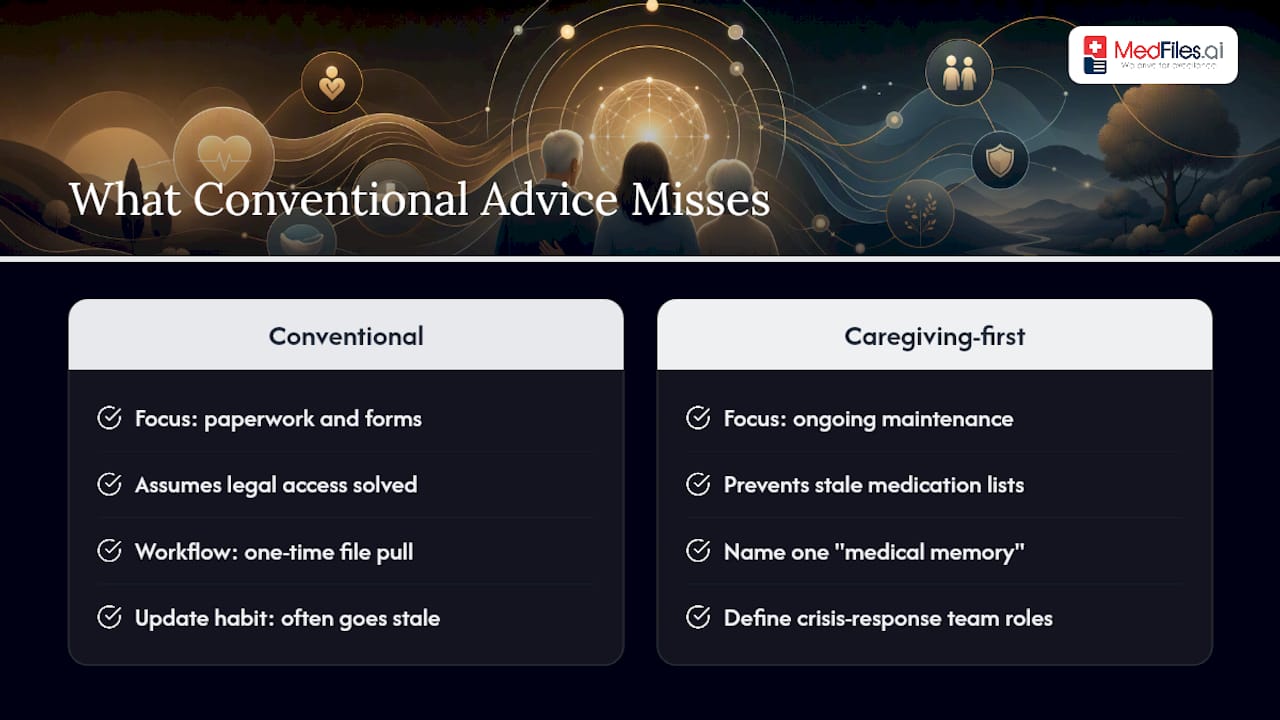
The caregiving-first approach means naming one person as the “medical memory,” supported by clearly defined crisis response team roles for caregivers and school staff, with a real backup, and running the fifteen-minute weekly check even when nothing seems urgent. That’s the unglamorous work that actually prevents crisis-mode scrambling.
Where a HIPAA-ready platform earns its keep isn’t the initial upload. It’s the fact that when your sibling needs the current med list at 11 PM from another state, it’s already there, already current, and already legible. Paper binders and shared drives can technically do this too. Most just don’t, because nobody keeps them updated without a system nudging them to.
— Team
Try MedFiles.ai to Run This System Without the Spreadsheet
Everything above works with a shared drive and a printed binder, but it depends entirely on someone remembering to update both every week. MedFiles.ai removes that dependency: one secure family profile holds your parent’s medications, imaging, discharge summaries, and insurance details, with instant access from any device during a hospital visit or travel emergency.

Multi-profile management means you can track a parent, a spouse, even a pet, under one account, with each person’s records staying separate and controlled. Sharing with a new specialist or a sibling doesn’t mean emailing PDFs into the void. You grant access, set the scope, and revoke it as needed when circumstances change. Providers can review shared records directly through the platform’s Doctor Center, which keeps clinical communication inside a secured channel instead of scattered email threads.
Start with the free plan to see how the automatic document organization handles your parent’s first batch of records. If you need broader family coverage and deeper AI-powered health summaries, Understand Your Health runs $2.99 a month, and Protect Everyone, built for full multi-profile family and pet management, runs $4.99 a month. Check current pricing and plan details and start your free account today.
Sources
- HHS: When can a family member access an individual’s protected health information?
- HHS: Personal representatives under HIPAA
- CMS: Authorization to Disclose Personal Information (CMS-10106)
- AARP: Documents to make healthcare decisions for your parent
- Johns Hopkins Medicine: Medical records — getting organized
FAQ
How can I access my parent’s medical records?
You need either a signed HIPAA authorization from your parent or legal status as their personal representative, such as a health care proxy. Medicare requires its own separate authorization form, which you can submit online or through CMS form 10106.
How do I organize family medical records?
Build a master medication list, a provider contact roster, and a one-page ER-ready summary, then store a digital master copy in a shared location backed up by a printed binder at home. Platforms built for family medical records can centralize this automatically across multiple people.
What are the 5 C’s of medical record entries?
Definitions vary across health systems, and there’s no single agreed-upon standard for this framework, so it’s best not to rely on a specific version. Focus instead on completeness, accuracy, and timeliness when documenting or requesting records, which every provider guide agrees on.
At what age do parents lose control over their own medical records?
Age has nothing to do with it. Adults retain control over their own medical records for life, regardless of age, unless a court determines they lack capacity and appoints a guardian or conservator. Access for family members always depends on signed authorization or legal representative status, never on the parent’s age alone.
What should I do if a provider denies my request for records?
Ask specifically which document they need, since many providers require their own release form even when you already have a signed HIPAA authorization. If the denial persists, confirm your legal status (health care proxy or personal representative) is documented correctly, since HHS guidance notes that state law determines who qualifies.