One Page Emergency Summary to Organize Pediatric Records for Parents
Organize your child's health records with one indexed care notebook and a one page emergency summary. Choose binder, digital, or hybrid and download free...

One Page Emergency Summary to Organize Pediatric Records for Parents
The fastest way to be ready for any appointment or emergency is one indexed care notebook, physical or digital, with a single one-page emergency summary on the front. List your child’s meds, allergies, key diagnoses, and provider contacts on that page. Update the notebook after every major visit and audit it once a year.
TL;DR:
- A care notebook should start with essential details like child identifiers, medications, allergies, and a problem list, updated regularly for emergencies.
- Families managing multiple providers benefit from a hybrid system: a physical binder for in-person visits and a digital archive for ongoing management.
- Request missing records via patient portals or formal requests, and store them securely to maintain a complete, up-to-date profile.
- Avoid sharing sensitive information through unsecured channels by using encrypted links and locking devices with strong authentication.
- MedFiles.ai complements paper notebooks by offering secure, searchable digital storage with multi-profile management and automatic organization.
Table of Contents
- How Do You Organize Pediatric Records for Your Child?
- Physical Binder, Digital System, or Hybrid: Which Fits Your Family?
- Steps to Build, Index, and Maintain the Notebook
- How Do You Request and Consolidate Missing Records?
- Sharing Access Safely: Permissions and Privacy Basics
- What Supplies and Tools Actually Help?
- How MedFiles.ai Fits Into a Care-Notebook System
- A Brief Note From the Team at MedFiles.ai
- A Digital Backup That Works Alongside Your Binder
- Care-Notebook Templates and Family Resources to Download
- Sources
- FAQ
How Do You Organize Pediatric Records for Your Child?
A pediatric care notebook works because it forces every scattered document into one place. Special-needs and family-support organizations call this a “Care Notebook,” and it’s built to consolidate diagnoses, medications, surgeries, and provider contacts so you can hand it to a new specialist or a substitute teacher without a scramble, according to the University of Utah’s TRiP program. Here’s what belongs inside, roughly in order of urgency.
- Child identifiers and emergency contacts. Full name, date of birth, insurance ID, and at least two emergency contacts.
- Medications, allergies, and vaccine records. Note the drug name, dose, and start date for every medication, plus any allergy and its severity.
- Chronological problem list. Diagnoses, surgeries, hospitalizations, and visit summaries in date order, which makes second opinions and specialist visits far easier to prepare for, per Blood Cancer United’s guidance.
- Provider directory. Names, specialties, phone numbers, and portal logins for every doctor your child sees.
- School and therapy paperwork. IEP or 504 plans, therapy notes, and signed consent or authorization forms.
- Insurance and billing. Insurance cards, prior authorizations, and a running log of major expenses.
Start with the first three categories. The rest can wait a weekend.
Physical Binder, Digital System, or Hybrid: Which Fits Your Family?
A physical binder is low tech and works everywhere. No login, no dead battery, and pediatricians are used to flipping through a tabbed binder in the exam room. Understood recommends organizing pages by topic first, then by date within each section, plus keeping copies of anything irreplaceable.
A digital system is searchable, backed up automatically, and shareable with a co-parent or grandparent in seconds. It’s the better fit once your child sees three or more providers regularly.
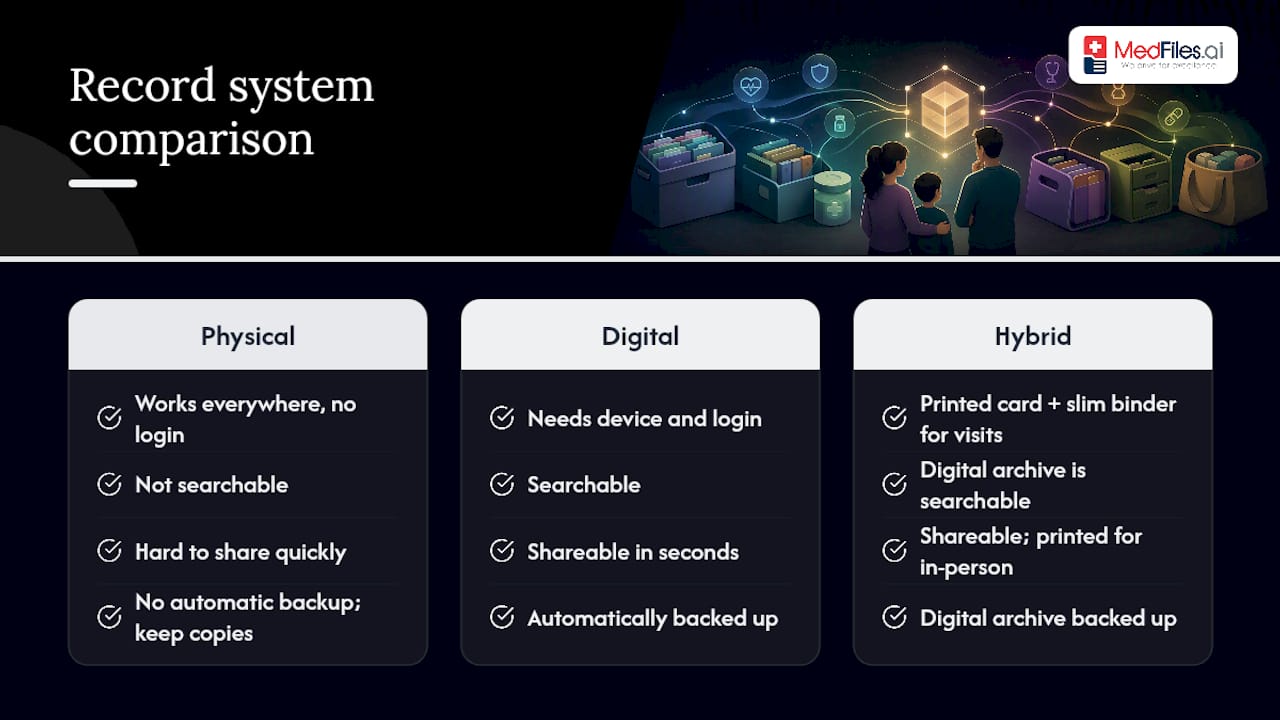
A hybrid approach often wins for families managing complex or chronic conditions: a printed emergency card and slim binder for in-person visits, paired with a complete digital archive for everything else. Families with more complex needs frequently do best with exactly this split, according to the Medical Home Portal.
Ask yourself: How many providers does my child see? How often? Who else needs access? How badly would it hurt to lose the paper version?
Pro Tip: If you’re unsure which system fits, start with a hybrid. You can always drop the binder later, but rebuilding a lost paper-only archive is much harder than deleting a digital one.
Steps to Build, Index, and Maintain the Notebook
You can assemble a working notebook in one focused session. Here’s the order that avoids re-sorting everything twice.
- Gather everything first. Pull records from patient portals, call clinics for anything missing, and collect school and therapy paperwork.
- Sort into main categories. Meds, visits, tests, and school records, each ordered chronologically inside its own section.
- Write the one-page summary. This becomes your emergency card: meds, allergies, diagnoses, and provider contacts, front and center.
- Index and date it. Add tabs for each category and a cover sheet noting the last update date, so anyone can tell at a glance how current it is.
- Scan and back up. Store critical originals safely, keep digital copies of everything, and carry photocopies when you travel.
- Set a recurring reminder. Audit the notebook after every major visit and once a year, minimum.
How Do You Request and Consolidate Missing Records?
Most families are missing more paperwork than they realize, usually because it’s scattered across three or four separate portals. Check your patient portal first. Portals like the MyChart-style systems many pediatric practices use let you download visit summaries, lab results, and immunization records directly, often faster than any written request.
For anything not in a portal:
- Submit a written records request to the clinic or hospital, including your child’s full name, date of birth, and the treatment dates you need.
- Ask specialists for imaging as a digital file transfer rather than a CD, since most radiology departments now support this.
- Request IEP or 504 plans and therapy notes directly from the school district’s special education office and from any outside therapists.
- Expect two to four weeks for standard records requests. Follow up in writing if you haven’t heard back after three weeks, and keep a copy of every request you send.
Sharing Access Safely: Permissions and Privacy Basics
Only a parent or legal guardian typically has proxy access to a child’s records in most pediatric patient portals, though rules on age limits and adolescent privacy vary by state and by practice. Confirm proxy access directly with your pediatrician’s office rather than assuming it’s automatic.
- Share sensitive files through encrypted links or a platform’s built-in sharing controls, never through unprotected email attachments.
- Lock every device that holds health information with a passcode and two-factor authentication, and back up encrypted copies rather than relying on one phone.
- Keep a version of your emergency summary that includes only what a caregiver or babysitter truly needs, not the full archive.
- When switching providers, ask the two offices to exchange records directly through a secure transfer instead of routing paperwork through you.
Pro Tip: Before you hand a babysitter or grandparent the emergency card, strip out anything you wouldn’t want on a lost phone, like full insurance numbers. Meds, allergies, and contacts are usually all they need.
What Supplies and Tools Actually Help?
A sturdy three-ring binder, tabbed dividers, plastic sleeves for loose papers, a label maker, and a portable file envelope cover the physical side for under fifty dollars total. Keep this even if you go fully digital. It’s a fast fallback when a phone battery dies mid-appointment.
On the digital side, look for secure medical record storage platforms, your provider’s patient portal, encrypted cloud backup, and a PDF scanner app on your phone.
- For fillable templates, medical-home and family-support organizations publish free care-notebook PDFs, including bilingual versions from the University of Utah’s TRiP program.
- Pediatric plan-of-care resources like Opulent Private Care’s templates offer copy-ready pages for ongoing condition tracking.
- Name scanned files consistently: date, document type, and provider (example: “2026-03-12-labresults-drchen.pdf”) so nothing gets lost in a folder of “scan001” files.
How MedFiles.ai Fits Into a Care-Notebook System
A paper binder solves the in-person problem. It doesn’t solve the “I need this from my car in a doctor’s parking lot” problem. That’s where a digital layer matters, and MedFiles.ai builds around exactly this gap.
- Multi-profile management lets you organize records for each child and parent separately, under one family account.
- Automatic document organization sorts uploads by type as you add them, so you’re not manually re-filing every scanned lab result.
- Secure sharing controls let you send specific documents to a new provider without emailing your child’s entire history.
The publisher’s suggested workflow mirrors the six steps above: gather, sort, summarize, index, back up, and audit, applied inside the platform instead of a binder. Behind it sits HIPAA-ready infrastructure and end-to-end encryption. A reasonable next move is importing a small batch of recent documents, then building your emergency summary as the first thing in your profile.
A Brief Note From the Team at MedFiles.ai
Families who consolidate scattered records into one system consistently report saving real time at appointments and during emergencies, because nobody’s hunting for a fax from three offices ago. Start smaller than you think you need to. Write the one-page emergency summary today. Everything else can be added over the following weeks.
— Team
A Digital Backup That Works Alongside Your Binder
Medfiles is built for the exact gap a paper binder leaves open: the moment you need a record and you’re not near the folder. Where a physical notebook depends on you carrying it, a digital archive on Medfiles stays searchable and shareable from any phone, and it backs up automatically so a lost binder never means lost history.
You can start with the free tier and import a handful of documents to see how automatic organization handles your first batch, no credit card required. From there, the Understand Your Health plan runs $2.99 per month, and Protect Everyone, built for full family and multi-profile management, runs $4.99 per month. Before uploading anything sensitive, take two minutes to check your privacy and sharing settings so you control exactly who sees what. If your child sees multiple specialists, set up family profiles and start with the emergency summary first.
Care-Notebook Templates and Family Resources to Download
A few free, fillable resources cover most families’ starting needs:
- TRiP’s Care Notebook templates, available in English and Spanish, cover emergency information, medication logs, and provider pages.
- Wapave’s document organization tips walk through building a grab-and-go emergency packet.
This article is general information, not a substitute for advice from a qualified doctor. Consult a qualified healthcare professional about your own circumstances before acting on anything here.
Sources
- Care Notebook: Organizing Complex Medical Information – TRiP (University of Utah)
- Tips to Organize Your Child’s Medical and School Documents — Wapave
- Understood
FAQ
What Are the 5 C’s of Medical Record Entries?
The “5 C’s” typically refer to clinical documentation standards used by providers: clear, concise, complete, chronological, and correct. These describe how a provider should write a chart note. They’re not a framework parents need to apply to their own care notebook, though chronological order is worth borrowing for your own files.
What Is the Best Way to Organize My Child’s Health Records?
Use one indexed care notebook, physical or digital, organized by topic and then by date within each topic. Keep a one-page emergency summary at the front listing medications, allergies, diagnoses, and provider contacts, and update it after every major visit.
How Long Do Pediatric Medical Records Need to Be Kept?
Retention rules vary by state and by provider type, so check with your pediatrician’s office for their specific policy. As a family, it’s generally worth keeping vaccine records, major diagnoses, and surgical history permanently, since schools and future providers may request them years later.
What Are the HIPAA Rules for Storing Medical Records?
HIPAA sets rules for how healthcare providers and their business associates protect and share patient health information, not for how a parent stores personal copies at home. If you use a digital platform, look for one built on HIPAA-ready infrastructure with encryption, like the setup MedFiles.ai uses, so shared files stay protected in transit and storage.
Does MedFiles.ai Replace My Physical Binder?
Not necessarily. Many families keep a slim physical emergency card for in-person visits and use MedFiles.ai as the searchable, backed-up archive for everything else. The two work well together rather than as a strict either-or choice.