Six Step Checklist for Clinicians to Email Medical Records Securely
A practitioner focused operational checklist for emailing PHI. Six steps to verify recipients, require a BAA, use message level encryption, and prevent...

Six Step Checklist for Clinicians to Email Medical Records Securely
Yes, you can securely email medical records, but only when specific safeguards are in place. The HIPAA Security Rule permits it once you layer in encryption, a signed Business Associate Agreement with your email vendor, and documented consent or minimum-necessary review. Missing any of those three, skip the email and use a secure portal or an encrypted attachment with a password sent through a separate channel.
TL;DR:
- Sending PHI via email requires layered safeguards, including encryption, a signed Business Associate Agreement, and documented patient consent or review.
- Message content must be minimized, avoiding patient identifiers in subject lines and including only necessary information, regardless of the method used.
- Technical protections like TLS are suitable for verified providers, but end-to-end encryption methods or secure portals are needed for external or sensitive records.
- Staff must verify recipient identities with two identifiers, use automatic encryption features when available, and log all disclosures to ensure compliance.
- The biggest risk comes from workflow errors such as misdirected messages or human forgetfulness, making zero-step encryption and recipient verification critical.
Table of Contents
- Which Email Methods Actually Meet HIPAA Standards?
- How Do You Send Medical Records by Email Step by Step?
- What Technical Controls Should IT Enforce for PHI Email?
- What Policies and Documentation Does an Auditor Expect?
- What Do You Do When a Medical Record Email Goes to the Wrong Person?
- What Do Practitioners Get Wrong About Secure Email in Practice?
- Where the Standard Advice on Secure Email Falls Short
- How MedFiles.ai Reduces the Risk of Emailing Records at All
- Sources
- FAQ
Which Email Methods Actually Meet HIPAA Standards?
Not every “secure” email option protects the same thing. Some encrypt the pipe the message travels through. Others encrypt the message itself, no matter where it lands.
Transport Layer Security (TLS) encrypts data while it moves between mail servers, but it only protects the message in transit. Once it reaches the recipient’s inbox, TLS offers no protection at all. It works fine for provider-to-provider exchanges overtrusted, verified domains where both sides run modern mail infrastructure.
S/MIME and PGP encrypt the message content itself, so the protection travels with the email regardless of where it sits. These are message-level protocols, and they matter most when you can’t guarantee the receiving server’s configuration.
Portal-based secure messaging skips email entirely. The provider posts documents to a secured, authenticated web session and sends the patient a notification, not the file. For high-sensitivity records like mental health notes or HIV status, a portal is almost always the safer call.
- TLS: good default for verified provider-to-provider transmission, not sufficient alone for sensitive content
- S/MIME or PGP: protects content end-to-end, better for external or unverified recipients
- Secure portal: best for patient-facing delivery and highly sensitive records
- Encrypted attachment with a separate passcode: workable fallback when no portal exists
Whichever method you pick, apply the Minimum Necessary standard: never put a patient’s name, diagnosis, or record number in the subject line, and keep the message body to a bare instruction like “see attached documents.”
How Do You Send Medical Records by Email Step by Step?
Treat every PHI email as a small compliance event, not a routine send. This sequence catches the mistakes that cause most disclosures.
- Confirm the legal basis. Verify the disclosure fits treatment, payment, operations, or a documented patient request, and limit the content to what’s actually needed.
- Verify the recipient. Confirm the exact email address using two identifiers (name plus date of birth, or name plus medical record number) rather than trusting an address book entry.
- Choose your delivery method. Use TLS for verified internal or partner domains; use S/MIME, PGP, or a portal for external or highly sensitive disclosures.
- Confirm the vendor has a BAA on file and, where available, turn on zero-step encryption so protection applies automatically instead of depending on staff remembering to click it.
- Encrypt attachments with AES-256 and send the password through a different channel, such as a text message or phone call, never inside the same email thread.
- Log the disclosure. Record what was sent, to whom, and when, and file it according to your organization’s retention schedule.
Pro Tip: Build the recipient verification step into your EHR workflow as a required field, not a mental checklist. The moment address confirmation becomes optional, it gets skipped during a busy shift.
What Technical Controls Should IT Enforce for PHI Email?
Policy documents don’t stop breaches. Server configuration does. IT teams need specific, testable settings, not general encouragement to “be careful with PHI.”
- Require TLS 1.2 or higher with modern cipher suites for all outbound mail, and enforce mandatory TLS for domains of trusted partners and referral networks
- Deploy message-level encryption (S/MIME or PGP) or route sensitive disclosures through a secure portal instead of relying on TLS alone, since transport encryption only protects data in transit, not at rest in the recipient’s inbox
- Enable multi-factor authentication, unique user IDs per staff member, encryption of mailboxes at rest, automatic session timeouts, and remote wipe capability for any mobile device that syncs email
- Configure data loss prevention (DLP) rules to scan outbound mail for PHI patterns and automatically encrypt or quarantine flagged messages, and enforce DKIM, SPF, and DMARC to block spoofed sender domains
- Archive email in a system with immutable audit logs that record who accessed what, and when
NIST’s guidance on electronic mail security lays out the underlying cryptographic recommendations these controls are built on, including which algorithms and protocol versions actually hold up against modern attacks. Most breach investigations trace back to a configuration gap, not a sophisticated attack, which is why testing these settings quarterly matters more than writing a longer policy.
What Policies and Documentation Does an Auditor Expect?
Technical safeguards protect the message. Administrative safeguards protect the organization when something goes wrong anyway. Auditors look for paper trails as much as they look for encryption.
- A documented risk analysis explaining why your chosen email safeguards are reasonable and appropriate for your organization’s size and risk profile
- Signed Business Associate Agreements with every vendor that creates, receives, stores, or transmits PHI on your behalf, covering breach notification and subcontractor obligations
- A patient consent process for cases where a patient requests unencrypted email after being warned of the risks, following the model Yale’s PHI email guidance uses
- Workforce training on address verification, phishing recognition, and the minimum necessary rule, refreshed at least annually
- Clear retention and legal-hold procedures, including how archived email gets pulled during litigation or an audit
Retention policy extends past the inbox, too. Old devices, backup drives, and decommissioned servers holding PHI need the same discipline you’d apply to paper charts, which is where HIPAA-compliant destruction guidance for retired hardware becomes relevant.
What Do You Do When a Medical Record Email Goes to the Wrong Person?
Speed matters more than perfection here. A fast, documented response limits both harm and liability.
- Contain it immediately. Try to recall the message, revoke any portal links, and call the recipient to request deletion, confirmed through a different channel than the original email.
- Assess the exposure. Determine how sensitive the PHI was, how many records were involved, and how likely it is the recipient actually opened or forwarded it.
- Notify compliance and legal right away, and start the clock on breach-notification timelines, coordinating with any vendor BAA obligations along the way.
- Document the remediation. Note what caused it, whether it was a stale address book entry or an auto-complete error, and update DLP rules or contact lists accordingly.
- Retrain and communicate. Retrain the staff member involved and notify affected patients if required, based on your risk assessment.
What Do Practitioners Get Wrong About Secure Email in Practice?
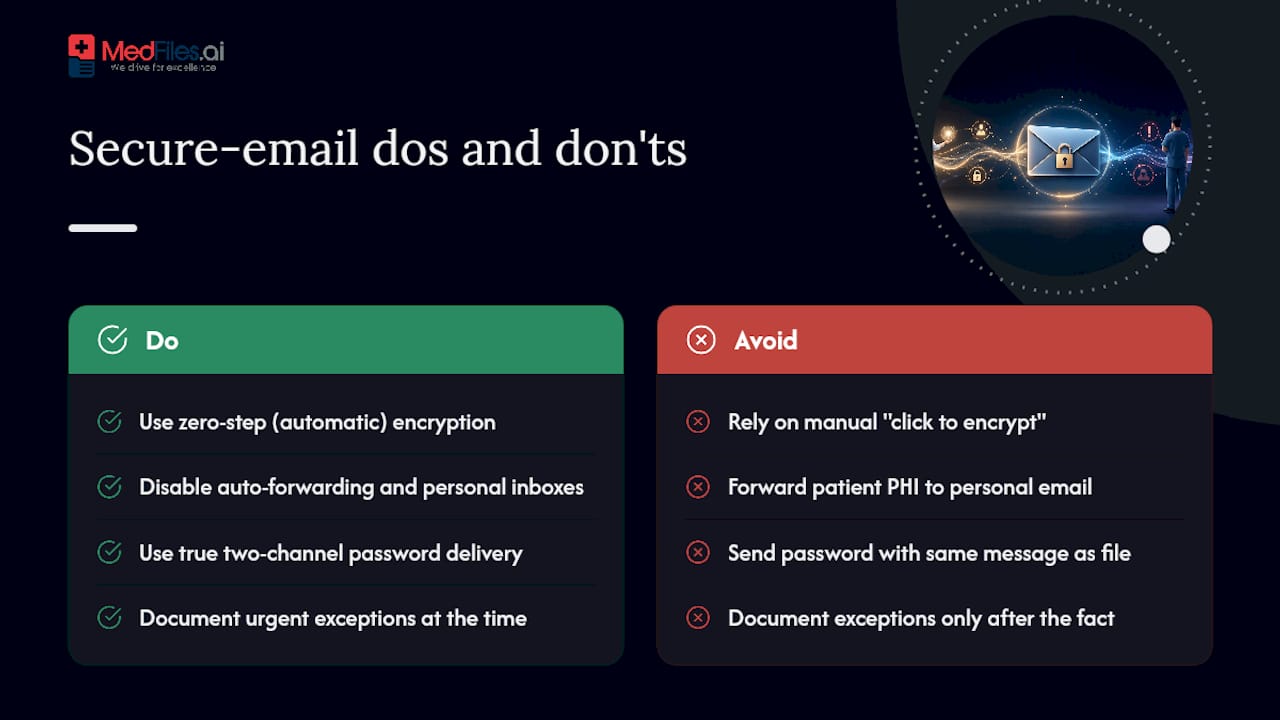
Most PHI email failures aren’t cryptographic failures. They’re workflow failures. Zero-step encryption, where protection applies automatically to every outbound message, removes the single biggest point of human error: the sender who forgets to click “encrypt” during a rushed shift change.
Auto-forwarding rules and personal email accounts are the quiet hazard nobody flags until an audit finds them. A clinician who forwards patient results to a personal inbox for convenience creates an unmanaged copy of PHI outside every control your organization built.
Two-channel password delivery isn’t optional friction, it’s the difference between an encrypted attachment and a locked box with the key taped to the outside. When clinical urgency genuinely justifies skipping a step, document the decision and the reasoning at the time, not after the fact.
Where the Standard Advice on Secure Email Falls Short
Most compliance guides treat email security as a checklist: enable TLS, sign a BAA, done. That framing undersells the real failure mode, which is almost never a hacker intercepting an unencrypted message mid-transit. It’s a staff member typing the wrong name into an auto-complete field, or a password sitting in the same thread as the file it unlocks.
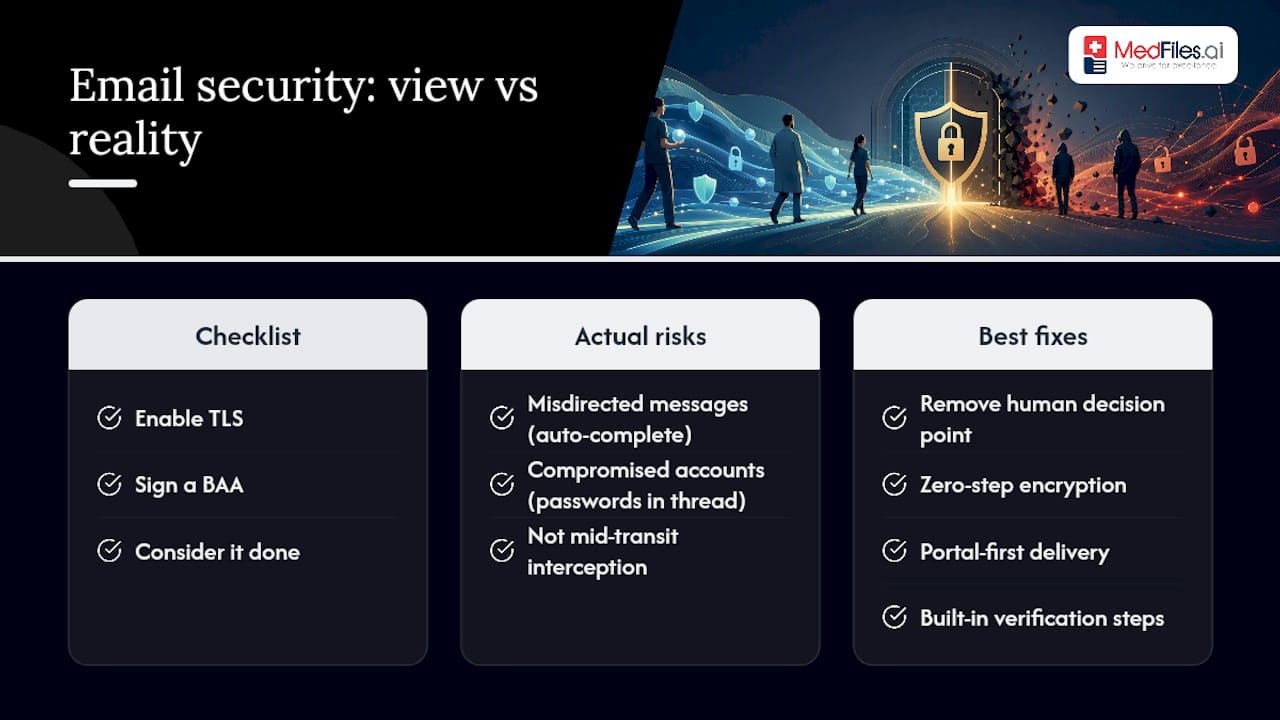
The research on this is consistent: misdirected messages and compromised accounts, not sophisticated interception, drive most PHI email incidents. That means the highest-leverage fix isn’t a better encryption algorithm. It’s removing the human decision point entirely, through zero-step encryption, portal-first delivery, and verification steps built into the workflow instead of left to memory.
If you take one thing from this guide, prioritize the administrative side before the technical side. A perfectly encrypted email sent to the wrong patient is still a breach. Get recipient verification and minimum-necessary discipline right first, then layer the cryptography on top.
— Team
How MedFiles.ai Reduces the Risk of Emailing Records at All
The safest PHI email is often the one you never have to send. A secure sharing option that skips the inbox entirely can reduce risks associated with emailing PHI.

Records can be stored in an encrypted, HIPAA-ready system rather than scattered across email threads and attachments. Secure sharing lets you grant a clinician or family member access to exactly the documents they need, with end-to-end encryption and a full audit trail showing who viewed what and when. Consent and access decisions may be recorded automatically, removing the need for separate password texts or attachment verification before sending. This approach reduces two major sources of email risk: misdirected messages and forgotten encryption steps. Review the security documentation and start a free trial to see how sharing records without email actually works.
This article is general information, not a substitute for advice from a qualified doctor. Consult a qualified healthcare professional about your own circumstances before acting on anything here.
Sources
- Does the HIPAA Privacy Rule permit health care providers to use e-mail to discuss health issues and treatment with their patients? — HHS
- Guidance on the Use of Email Containing PHI — Yale University
- NIST Special Publication: Electronic mail security (SP 800-45 ver2)
- HIPAA Compliance for Email - Updated for 2026 — HIPAA Journal
FAQ
Is It Safe to Send Medical Records Over Email?
It can be, but only with safeguards in place: encryption, a signed BAA with your email provider, verified recipient addresses, and minimum necessary content. Without those, standard email is not considered safe for PHI.
What Is the Most Secure Way to Send Medical Records?
A secure, authenticated portal is generally the lowest-risk option for patient-facing disclosures, since nothing sensitive ever sits in the message itself. A platform like MedFiles.ai offers this kind of portal-based sharing with encryption and access logs built in.
Are There Any Free HIPAA Compliant Email Services?
Some providers offer limited free tiers with encryption, but a BAA is required regardless of cost, and many free consumer email services will not sign one. Verify the BAA before assuming any “free” option is actually compliant.
Are Any Emails HIPAA Compliant?
Standard consumer email is not compliant on its own. An email service becomes HIPAA compliant only when the provider signs a BAA and the organization applies encryption, access controls, and audit logging on top of it.
Do I Need Patient Consent to Email Medical Records?
Yes, if the patient is requesting unencrypted email after being informed of the risks, get that consent in writing. Documented consent reduces regulatory friction if the email is ever questioned later.