Access to Medical Records: A Secure PHR Guide for Families
Discover how a secure personal health record can give you quick and reliable access to your medical records anytime, anywhere.

Access to Medical Records: A Secure PHR Guide for Families
The fastest way to get reliable access to medical records is a secure, user-controlled personal health record (PHR) platform like Medfiles. It aggregates every provider, test, and prescription into one place you control.
Here’s why this approach beats scattered patient portals:
- Instant access, anywhere. Emergency rooms and pharmacies can pull up your history in seconds, not days.
- One home for scattered records. Your labs, imaging, and prescriptions from every provider live in a single, searchable account.
- Built on real safeguards. HIPAA-ready infrastructure and BAA availability back the platform, and a 2022 systematic review covering 1,639,556 participants found digital health records improved treatment adherence in 56% of analyzed cases.
Key Takeaways
A secure, interconnected personal health record gives families faster emergency access, centralized records across every provider, and HIPAA-ready protection in one platform.
| Point | Details |
|---|---|
| Choose interconnected PHRs | They aggregate records across providers automatically, unlike standalone or tethered types. |
| Verify security first | Confirm encryption, MFA, audit logs, and BAA availability before uploading any records. |
| Build an emergency summary | Keep allergies, medications, and chronic conditions on a downloadable, offline-ready page. |
| Expect tiered pricing | Free plans cover basics; paid tiers add storage, AI analysis, and multi-profile family management. |
| Medfiles fits the full checklist | Medfiles offers HIPAA-ready infrastructure, encryption, multi-profile management, and a free trial with no credit card required. |
Table of Contents
- What Counts as Access to Medical Records Today?
- Which Features Actually Matter in a Trustworthy PHR?
- How Do You Verify a PHR’s Security Before Trusting It?
- How Long Does It Take to Set Up a Personal Health Record?
- How Do You Share Records Safely and Stay Emergency-Ready?
- What Stops Families From Actually Using a PHR?
- What Does a Personal Health Record Cost?
- What Should You Do Right Now?
- Why This Matters to Real Families
- Get Your Family’s Records Organized in One Place
- Frequently Asked Questions
- Sources
What Counts as Access to Medical Records Today?
A personal health record is a file you own and control, not one that belongs to a hospital system. It typically holds lab results, prescriptions, imaging, visit notes, and vaccination history, and you decide who sees it. That distinction, custodianship, is what separates a PHR from a hospital’s electronic health record, according to StatPearls, which defines PHRs as maintained by the individual or caregiver with patient control.
There are three flavors, and the differences matter:
- Standalone PHRs live independently of any provider. You enter or upload data yourself. Full control, but manual work.
- Tethered PHRs are patient portals tied to one health system, like a hospital’s app. Automatic updates, but locked to that one provider.
- Interconnected PHRs pull from multiple providers and devices into a single record. This is the model most families actually need, since it combines automation with the portability a standalone record offers.
The tradeoff across all three comes down to portability versus automation. A standalone record travels anywhere but takes effort to keep current. A tethered one updates itself but strands you the moment you switch doctors or need records during travel.
Which Features Actually Matter in a Trustworthy PHR?
Not every feature carries equal weight. Here’s how to prioritize, from must-have down to nice-to-have.
Must-have:
- End-to-end encryption, both in transit and at rest
- HIPAA-ready infrastructure with BAA availability
- Multi-factor authentication
- Emergency access controls that work when you can’t unlock your phone
Strongly recommended:
- Audit logs that show exactly who viewed or edited a record
- Multi-profile management for spouses, kids, aging parents, even pets
- Easy import for PDFs, photos, and DICOM imaging files
Nice-to-have:
- API or FHIR/HL7 support for provider-to-provider data exchange
- Single-patient export so you can hand a full file to a new specialist instantly
Why this ranking? Emergency access controls matter because a car accident doesn’t wait for you to remember your password. Multi-profile management matters because a family managing a toddler’s vaccine schedule and a parent’s cardiology follow-ups needs one dashboard, not four separate logins. And audit logs matter because you should be able to see, at a glance, whether a record was shared with the right provider or accessed at all.
Pro Tip: If you have to choose between convenience and maximum security, choose security first, then look for a platform that layers convenience on top of it. A platform with weak encryption but a slick interface is a liability wearing a nice coat.
How Do You Verify a PHR’s Security Before Trusting It?
The HIPAA Security Rule requires regulated entities to implement administrative, physical, and technical safeguards to protect electronic protected health information (ePHI), including risk assessments, audit controls, and access management. That’s the baseline. Anything short of it is a gap.
Run through this checklist before you upload a single document:
- Encryption confirmed for data in transit and at rest
- Multi-factor authentication required at login
- Device encryption and automatic session time-outs
- Audit logs that are tamper-evident, not just a simple activity feed
- Regular, documented risk assessments (the Health IT Playbook recommends tools like the ONC Security Risk Assessment)
- A business associate agreement available on request
- Export or backup options so your data is never trapped
Look for platforms that publish a dedicated security page, not just a line in the terms of service. Medfiles’s security page lays out exactly which safeguards apply and why.
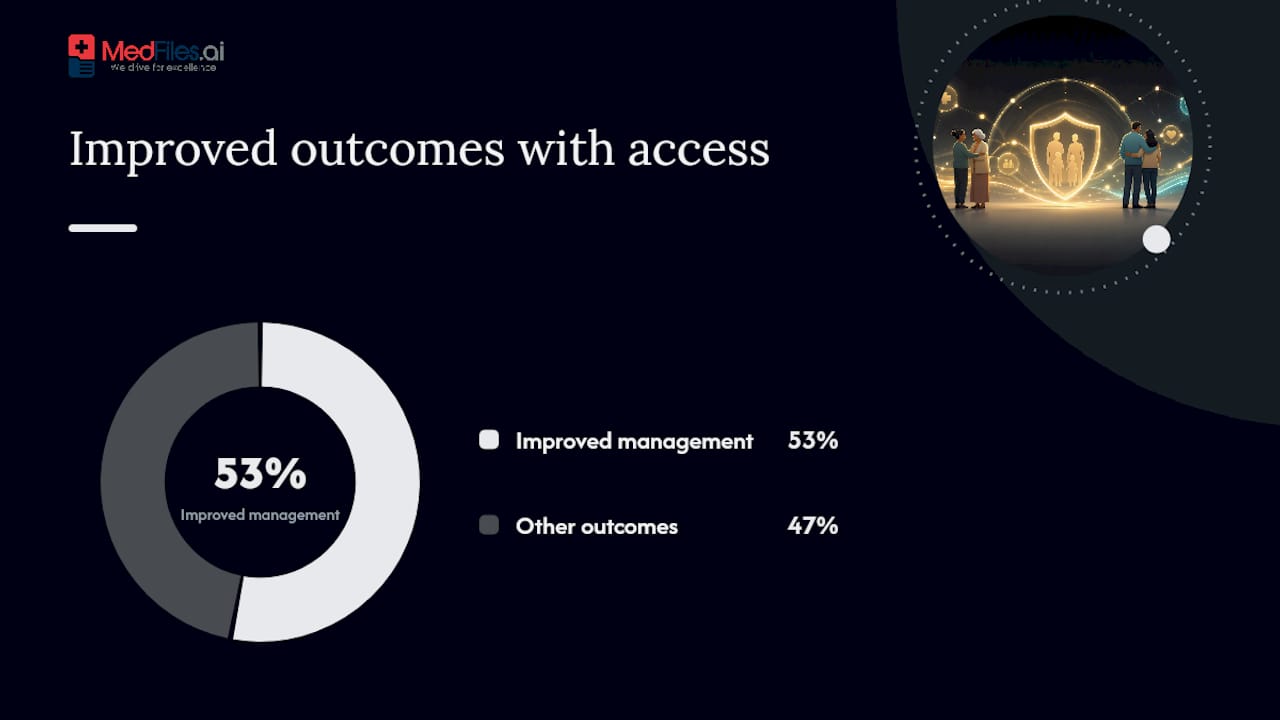
A number worth remembering: that same 2022 review of 1,639,556 participants found self-management and efficacy improved in 53% of analyzed cases when patients had structured digital access to their own health data. Security isn’t just about protection. It’s the foundation that makes those outcomes possible.
How Long Does It Take to Set Up a Personal Health Record?
Most people can build a usable PHR in under an hour. Here’s the sequence.
- Create your account and enable MFA (5 minutes). Set a strong password and turn on multi-factor authentication immediately.
- Set up family profiles (10 minutes). Add a profile for each family member or pet you’re tracking.
- Enable emergency access (5 minutes). Designate who can view your critical summary without waiting for you to grant permission.
- Upload your first records (15 to 30 minutes). Direct upload works for PDFs and photos; connecting a provider portal or API pulls data automatically where supported.
- Request a summary export from your provider if older records aren’t digitized yet. Most clinics can generate one within a few business days.
- Scan and label remaining documents, attaching DICOM files for imaging if your platform supports them.
One snag to watch for: when importing across multiple providers, names, birthdates, or patient IDs sometimes don’t match exactly. Double check identifiers before merging records so nothing gets misfiled under the wrong profile.
How Do You Share Records Safely and Stay Emergency-Ready?
The safest approach uses time-limited links, role-based permissions, and a dedicated emergency-access profile, not a shared login or a mailed CD of images.
- Create an offline export or printable emergency card with your critical information
- Pre-authorize trusted caregivers and clinicians before you need them, not during a crisis
- Use one-click, time-limited access links for new specialists instead of permanent sharing
- Set up revocation controls and audit alerts so you know the moment access changes
Medfiles’s secure sharing tools build these controls in directly, so a link you send today can expire automatically tomorrow.
Pro Tip: Build a one-page “critical summary” listing allergies, current medications, and chronic conditions, and pin it to load first in your account. Make sure it’s downloadable for offline access. If your phone has no signal in an ambulance, a saved PDF still works.
What Stops Families From Actually Using a PHR?
Four barriers show up again and again: low digital literacy, fragmented provider data, privacy worries, and information overload.
- Fragmented data → use an interconnected PHR and do a quarterly manual audit to catch anything that didn’t sync.
- Digital literacy gaps → run a short onboarding session and delegate a caregiver account for family members who need help. Groups like When Doctors Don’t Listen document how much usability affects whether patients actually engage with their own records.
- Information overload → keep a one-page summary and use tags instead of scrolling through years of files.
Pro Tip: Put a recurring reminder on your calendar every three months to review and update your records. A PHR is only as useful as it is current.
What Does a Personal Health Record Cost?
Most PHR platforms offer a free tier covering basic storage, then charge for the features families actually end up needing.
Price typically climbs with:
- Storage size and number of uploaded documents
- Number of family or pet profiles
- AI-powered document analysis
- Clinician review or clinical integration features
- Business-tier features like BAAs for provider partners
A free tier works fine for a single healthy adult with light needs. Once you’re managing multiple family members, sharing records with several providers, or traveling internationally, a paid tier earns its cost fast.
What Should You Do Right Now?
A HIPAA-ready, user-controlled PHR remains the most practical way to get real access to medical records, on your terms, wherever you are.
- Create your account and turn on multi-factor authentication.
- Import one critical record and build your emergency summary.
- Pre-authorize one trusted caregiver today, before you need them.
Follow that sequence with a platform that meets the security checklist above, and your records stay both protected and instantly usable.
Why This Matters to Real Families
We’ve watched families scramble for a pediatrician’s records mid-flight, dig through glove compartments for a parent’s medication list at an ER intake desk, and lose hours during caregiver handoffs because nobody had the full picture. That’s exactly why multi-profile management and emergency access exist. They turn a chaotic moment into a two-tap lookup, backed by the same encryption and audit protections that protect the record when nothing urgent is happening at all.

Get Your Family’s Records Organized in One Place
Medfiles was built around the exact checklist this guide just walked through: HIPAA-ready infrastructure, end-to-end encryption, multi-profile family management, and emergency access that works when you need it most.

Upload a prescription, connect a provider, or set up a profile for your kids in the time it takes to make coffee. Medfiles Inbox automates the import process, so you’re not manually retyping every lab result from scratch. Every subscription tier scales with what your family actually needs, from a single profile to full multi-person, multi-pet management, and you can start a free trial with no credit card required to see your dashboard before committing to anything. Check the security and privacy details if you want the technical specifics first. Either way, the next step is the same: create your account and upload your first record today.
Frequently Asked Questions
How do I get my medical records online? Sign up for an interconnected PHR platform, upload existing documents directly, or connect your provider portals where supported. Most people have a usable record within an hour.
Can I view my medical records online for free? Yes. Most PHR platforms, including Medfiles, offer a free tier for basic storage. Paid tiers unlock larger storage, multi-profile family management, and advanced sharing.
How do I transfer medical records between providers? Request a summary export from your current provider, or use a PHR platform’s single-patient export feature to hand your complete file to a new specialist instantly.
What should I do to prepare for emergency access to health records? Build a one-page critical summary with allergies, medications, and chronic conditions, make it downloadable for offline access, and pre-authorize a trusted caregiver in advance.
Sources
- Patient-centered digital health records systematic review (2022)
- Hhs
- Personal Health Record - StatPearls - NCBI Bookshelf
- Privacy & Security - Health IT Playbook