Healthcare Portals for Patients: Pick a HIPAA-Ready PHR
Discover secure healthcare portals that empower you to control your personal health records and enhance your medical experience.

Healthcare Portals for Patients: Pick a HIPAA-Ready PHR
A healthcare portal, in the sense that matters here, is a patient-owned personal health record (PHR): a HIPAA-ready digital vault you control, not a hospital login that you’re locked out of once you switch doctors. Use one when you need your records portable, complete, and yours. Systematic reviews back this up: one covering 81 studies and 1.6 million participants found positive effects on healthcare utilization in 77% of studies, and 56% saw improved adherence and engagement. MedFiles matches this checklist directly.
Before you sign up for anything, confirm the portal offers:
- Secure, encrypted storage you own, not the clinic
- Patient-controlled sharing, not automatic provider access
- An audit trail showing who viewed what, and when
Key Takeaways
Patient-owned PHRs work best when they combine HIPAA-ready security, patient-controlled sharing, and standards-based portability, with tools like MedFiles built to meet all three.
| Point | Details |
|---|---|
| Choose the right architecture | Integrated PHRs give the most complete picture, but confirm FHIR/CCDA support before trusting the label. |
| Evidence supports adoption | 77% of studies in a 2022 review found improved healthcare utilization from patient-centered records. |
| Prioritize five core features | Encryption, controlled sharing, audit trails, export rights, and multi-profile support come first. |
| Plan for friction, not failure | Interoperability gaps and provider adoption lag behind the technology, so build backups into your routine. |
| MedFiles matches the checklist | MedFiles offers HIPAA-ready encryption, controlled sharing, multi-profile management, and exportable records. |
Table of Contents
- What Are Healthcare Portals? Definition and Types
- Do Healthcare Portals Actually Improve Health Outcomes?
- What Features Should a HIPAA-Ready Portal Have?
- How Do You Choose and Set Up a Patient-Owned PHR?
- What Are the Risks and Limitations of Healthcare Portals?
- When Does a Patient-Owned Portal Matter Most?
- What It’s Like Using a Patient-Owned Portal Day to Day
- How MedFiles.ai Fits the HIPAA-Ready Portal Checklist
- Sources
What Are Healthcare Portals? Definition and Types
A patient-owned PHR is a digital vault where you store, organize, and share your own medical records, independent of any single clinic’s system. You decide what goes in, who sees it, and how long it stays.
There are three architectures, and they behave very differently in practice.
Stand-alone PHRs rely on manual entry. You upload or type in your own data. Full control, but tedious upkeep. Tethered PHRs connect to one provider’s electronic health record. Convenient at that single practice, but useless the moment you see a specialist across town. Integrated PHRs aggregate records across multiple providers into one longitudinal file. This is the architecture most PHR research points to as ideal, though it demands stronger data standards and remains rarer in practice than tethered systems.
| Type | Control | Data completeness | Portability |
|---|---|---|---|
| Stand-alone | High | Depends on your effort | High |
| Tethered | Low | Limited to one provider | Low |
| Integrated | High | Broadest available | High |
Pro Tip: Ask a vendor directly which type they are. “Integrated” gets used loosely in marketing, so ask whether they support standards-based imports like FHIR or CCDA before you trust the label.
Do Healthcare Portals Actually Improve Health Outcomes?
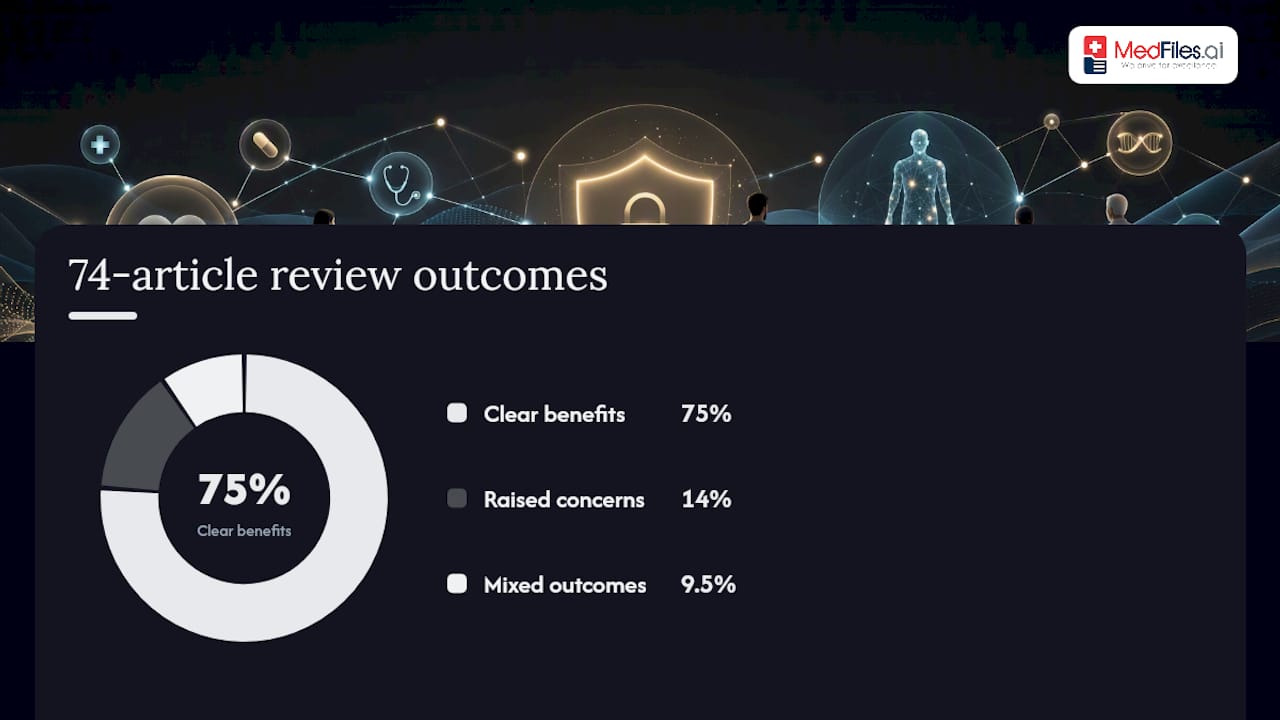
Yes, according to multiple systematic reviews, though the size of the benefit varies by study. A 2022 review of 81 studies found positive effects on healthcare utilization in 77% of cases, with 56% showing gains in treatment adherence and patient engagement. A separate review of 74 articles found comparable results: 75% identified clear benefits from patient access to health records, while 14% raised concerns and 9.5% reported mixed outcomes.
For a household, those numbers translate into something concrete:
- Fewer avoidable ER visits when families can check symptoms against an accessible medication and allergy history
- Better chronic disease tracking, since patients reviewing their own labs and trends tend to become active participants rather than passive recipients in their care
- Higher satisfaction scores tied to feeling informed rather than left in the dark between appointments
A 2024 JMIR review reached a similar conclusion for chronic conditions specifically, linking patient-centered records to better utilization and self-management, while flagging that study quality still varies widely across the field.
None of this means rollout is frictionless. A RE-AIM implementation study in rural primary care found PHRs delivered a genuinely comprehensive longitudinal health story, but real-world adoption stalled on interoperability gaps and inconsistent provider buy-in. The technology works. Getting every clinic to plug into it consistently is the harder problem.
Pro Tip: Don’t judge a portal by whether your current doctor uses it. Judge it by whether you can pull your own data out and hand it to the next one.
What Features Should a HIPAA-Ready Portal Have?
The must-haves, in order: end-to-end encryption, patient-controlled sharing, a visible audit trail, export and portability, multi-profile support, and standards-based import and export through formats like FHIR or CCDA.
Each one solves a specific failure point. Encryption keeps your records unreadable to anyone without the key, including in transit. Patient-controlled sharing means you approve each connection instead of a system defaulting to open access. An audit trail records every view and download, so if something looks off, you can trace it. Export and portability guarantee you’re never trapped: if you leave a service, your data leaves with you, in a usable format. Multi-profile support lets one account manage a spouse, kids, aging parents, or pets without mixing records together. Standards-based interoperability, meaning FHIR or CCDA compatibility, determines whether a new provider’s system can actually read what you send them instead of treating it as a dead PDF.
Use this order when evaluating vendors:
- Confirm HIPAA-ready infrastructure and encryption in writing
- Verify you can export everything, anytime, in a standard format
- Check sharing controls: can you revoke access after granting it?
- Confirm multi-profile support if you manage care for family members
- Ask whether the platform supports FHIR/CCDA imports from other providers
Pro Tip: Ask any vendor to name their encryption standard and show you their security page. If they can’t answer in one sentence, that’s your answer about their security and privacy posture.
How Do You Choose and Set Up a Patient-Owned PHR?
Pick the portal that matches how much control you want over your data and that proves its security claims rather than just stating them.
Before committing, ask a vendor:
- What happens to my data if I cancel my subscription?
- Can I share records with a provider without giving them my login?
- Is there an audit trail I can review myself?
Ask your own clinician, too, since sharing boundaries matter as much as the technology:
- Which formats do you accept for uploaded records?
- Do you want lab results only, or full clinical notes?
Once you’ve picked a portal, onboarding usually follows this sequence:
- Gather your IDs and a list of current providers
- Request records directly from each provider (ask for CCDA or PDF exports, not just a portal printout)
- Upload or import everything into your new PHR
- Review for completeness, especially medications and allergies
- Set sharing permissions for each family member or provider
- Designate an emergency contact with limited, pre-approved access
Most people finish this in under an hour for a single adult profile. Families with multiple members and years of records take longer, mostly because gathering the paperwork from old providers is slower than the upload itself.
What Are the Risks and Limitations of Healthcare Portals?
The real risks aren’t dramatic. They’re mundane: interoperability gaps, inconsistent provider adoption, and the occasional emotional jolt of reading a raw clinical note that wasn’t written for a patient audience.
Watch for these specific failure points:
- Data loss or gaps when a provider’s system won’t export cleanly
- Mislabeled documents from automated imports that misread a scanned form
- Unmanaged sharing links left active long after a specialist visit ends
- Provider workflow friction, since not every clinic has staff trained to receive patient-shared records
- Sensitive-note disclosure, where transparency helps most patients but can complicate care in mental health or highly complex cases
None of these are reasons to avoid a PHR. They’re reasons to set it up carefully.
Pro Tip: Turn on multi-factor authentication immediately, export a full backup quarterly, and set sharing links to expire rather than staying open indefinitely.
When Does a Patient-Owned Portal Matter Most?
The highest-value moments are the ones where paper records fail you: hospital transfers, specialist referrals, family caregiving, emergencies, and travel.
- Chronic disease management: tracking labs and medication changes over years, not just one visit
- Care coordination: reconciling medication lists when a patient moves between a hospital, a rehab facility, and a primary care doctor, a handoff point where errors commonly happen
- Family caregiving: managing records for aging parents or kids from one centralized account
- Emergency access: first responders or ER staff pulling allergy and medication history in seconds instead of guessing
- Travel: accessing your full history from anywhere, no fax machine required
Pro Tip: For multi-member families, tag each document by person and category (labs, imaging, prescriptions) as you upload it. Retroactively organizing six months of untagged records is far more tedious than doing it as you go.
What It’s Like Using a Patient-Owned Portal Day to Day
Managing my father’s post-hospital medication list used to mean three phone calls and a fax machine. Once his records lived in one portal I controlled, I pulled up his full med list at a pharmacy counter in under a minute. The habit that made it stick: uploading discharge paperwork the same day it arrived, before it got buried in a drawer. One boundary worth setting early with any clinician: agree upfront on what gets shared automatically versus what you’ll send manually, especially for sensitive notes.

How MedFiles.ai Fits the HIPAA-Ready Portal Checklist
MedFiles is built around the exact checklist this guide just walked through, not as an afterthought but as the core design. It gives you HIPAA-ready infrastructure with end-to-end encryption, so your records stay yours by default.
Here’s how the features map directly:
- Security: encrypted storage that meets the HIPAA-ready standard covered above
- Sharing: patient-controlled sharing with providers or family, no blanket access
- Multi-profile support: manage records for yourself, your kids, aging parents, and even pets from one account
- AI document organization: uploaded labs, prescriptions, and reports get sorted automatically instead of sitting in a pile
- Export and portability: your data leaves with you if you ever switch tools
If you’ve been putting off organizing years of scattered paper records and old portal logins, start with a Medfiles, no credit card required, and see your full medical history in one place within a day.
Sources
- Systematic review (2022) — patient-centered digital health records study summary
- Review of 74 articles — effects of patient access to EHRs
This article is general information, not a substitute for advice from a qualified doctor. Consult a qualified healthcare professional about your own circumstances before acting on anything here.