Medical Charting for Families: Secure, Simple Steps
Unlock the power of medical charting for your family by creating a secure digital health record that keeps you in control.

Medical Charting for Families: Secure, Simple Steps
Medical charting, in the personal health context, means building and maintaining a digital personal health record (PHR) — a secure, organized collection of your or your family’s health documents that you control. The practical recommendation: use a HIPAA-ready PHR platform or a well-encrypted cloud folder paired with an ER-ready summary card. Before you choose any tool, confirm it checks these four boxes:
- HIPAA-ready status with a signed Business Associate Agreement (BAA)
- End-to-end encryption at rest and in transit
- Activity logs and audit trail so you can see who accessed what
- Multi-factor authentication (MFA) to block unauthorized access
Under HIPAA, covered entities must generally provide your requested records within 30 calendar days — so you have a legal right to get your records, and a clear deadline to hold providers to.
Key Takeaways
Personal medical charting is most effective when you combine a HIPAA-ready PHR, a one-page emergency card per person, and a consistent import habit after every appointment.
| Point | Details |
|---|---|
| HIPAA access deadline | Covered entities must provide your records within 30 calendar days of a written request. |
| Emergency card first | Build a one-page card with medications, allergies, blood type, and contacts — accessible from your phone’s lock screen. |
| Three-level structure | Organize by Family Member → Category → Date for a system that stays manageable as records grow. |
| Vendor security checklist | Confirm HIPAA-ready status, BAA, encryption, MFA, audit logs, and a clear data-closure policy before signing up. |
| Medfiles | Covers every checklist item above with a free trial, AI-powered organization, and multi-profile family support. |
Table of Contents
- What does medical charting cover for personal records?
- Why keeping a personal medical chart changes your care
- How to request and import your records
- How to choose a secure medical charting service
- How to organize records, share them, and prepare for emergencies
- What you need to know about security, privacy, and your legal rights
- How to keep your medical chart accurate over time
- Red flags and how to fix common problems
- Medfiles gives you everything on this checklist
- Why organized personal medical charts matter more than most families realize
- Sources
What does medical charting cover for personal records?
Personal medical charting covers every document that tells the story of your health. That includes:
- Lab results (blood panels, urinalysis, pathology)
- Imaging reports and files (X-rays, MRIs, CT scans in DICOM format)
- Prescriptions and medication lists
- Immunization records
- Visit summaries and discharge notes
- Insurance cards, EOBs, and billing statements
- Advanced directives and living wills
- Mental health and therapy records
- Genetic test results
For file formats, request PDFs for most documents. For structured electronic transfers, ask for a CCD or CCDA file when your provider’s system supports it. Imaging exports typically come in DICOM format. See practical examples of healthcare data and digital records for a fuller picture of what to collect.
This guide covers personal PHR management only. Clinical charting workflows used by physicians and nurses inside EHR systems are a separate subject entirely.
Why keeping a personal medical chart changes your care
The benefits are concrete and immediate.
Emergency readiness. Fewer than 4 in 10 families maintain an ER-ready packet, according to CareNestHQ’s family readiness research. When paramedics or ER staff can see your medications, allergies, and blood type in seconds, critical decisions happen faster.

Fewer duplicate tests. Arriving at a new specialist with a complete chart eliminates the guesswork. Providers order fewer repeat labs when they can see what was already done.
Medication safety. An up-to-date medication list with dosages and allergy flags reduces dangerous interactions, especially when you’re seeing multiple providers.
Simpler insurance handling. Organized EOBs and bills make disputes faster to resolve and tax deductions easier to document.
Caregiver coordination. A nationwide caregiver survey of 608 potential users found that scheduling, document storage, and medication management were the highest-priority features families wanted in a PHR. Shared access with assigned roles cuts the administrative load that burns caregivers out.
How to request and import your records
Follow these steps in order:
- Submit a written access request to your provider’s medical records department. Under HIPAA’s right of access, covered entities must respond within 30 calendar days.
- Specify your preferred format. Ask for a PDF or, when available, an electronic CCD/CCDA file. For imaging, request a DICOM export on a disc or secure download link.
- Scan paper documents the same day you receive them. Use a phone scanner app (Adobe Scan, Microsoft Lens, or Apple’s built-in scanner) at 300 DPI minimum.
- Name files consistently. Use the format
YYYY-MM-DD_Person_Type.pdf— for example,2026-03-15_Maria_LabResults.pdf. This naming convention, recommended by Soka’s digital-first guide, keeps files sortable and searchable. - Upload and tag in your PHR. Create a profile, upload the file, assign a category, and verify that OCR (text recognition) captured the key fields correctly.
Pro Tip: Ask your provider whether they can send records directly to your PHR’s secure inbox. Many patient portals now support direct electronic transfers, which skips the download-and-upload step entirely.
How to choose a secure medical charting service
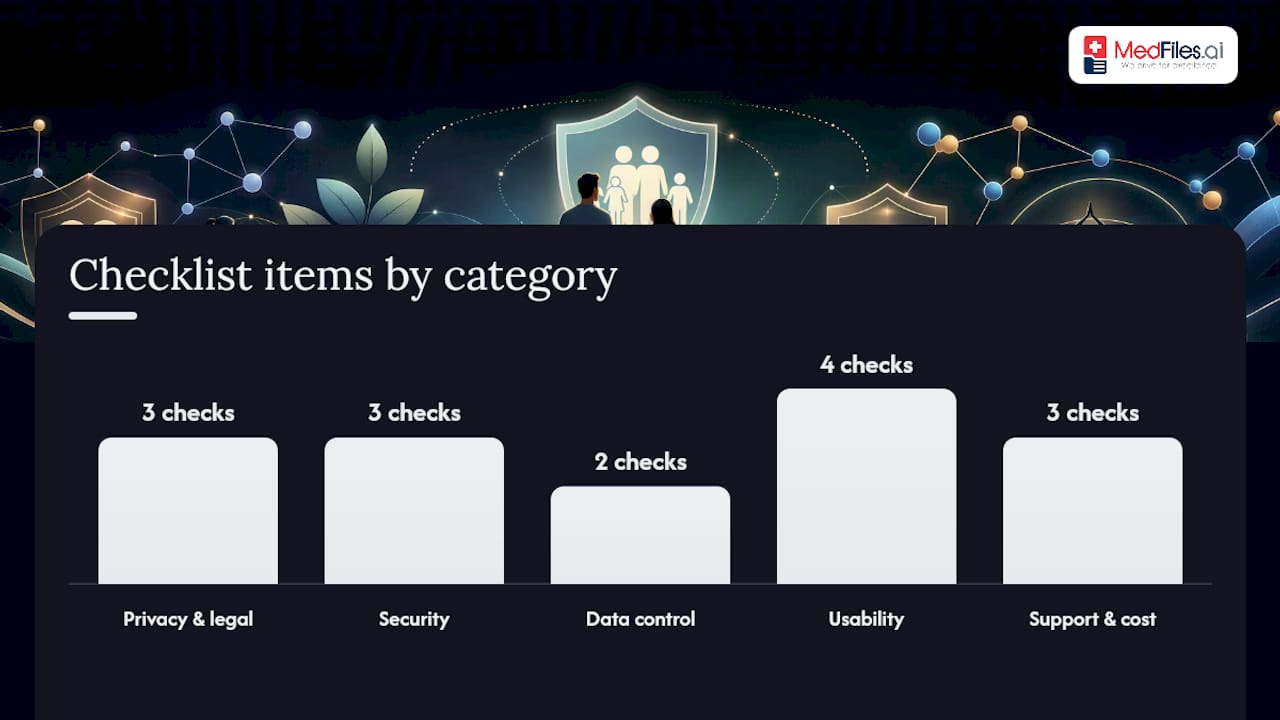
Use this checklist before committing to any PHR platform.
Privacy and legal:
- Does the vendor explicitly claim HIPAA-ready infrastructure?
- Will they sign a BAA?
- Does their model privacy notice explain what happens to your data if you close your account?
Security:
- Encryption at rest and in transit (look for AES-256 and TLS 1.2+)
- MFA on every login
- Audit logs showing access history — per the HIPAA Security Rule, audit controls are a required safeguard for any entity handling electronic protected health information
Data control:
- Can you export your full chart at any time, in a standard format?
- Does the vendor delete your data on account closure, or retain copies?
Usability:
- Multi-profile support for family members and dependents
- Mobile access with offline capability
- Emergency card widget accessible from a locked phone screen
- Selective sharing with time-limited links for providers
Support and cost:
- Free trial available without a credit card
- Subscription tiers that scale with your family’s size
- Import assistance or customer support for first-time uploads
Pro Tip: Read the privacy policy’s data-retention clause before signing up. A vendor that keeps your records after account closure is a red flag, not a feature.
For international readers, note that GDPR applies additional rights around data portability and erasure for users in the EU. For a side-by-side look at how HIPAA and GDPR differ, see this HIPAA vs. GDPR compliance guide.
How to organize records, share them, and prepare for emergencies
Build a three-level folder structure. Organize by Family Member → Category → Date. For example: Maria / Lab Results / 2026-03-15. This structure, recommended by family records guides, stays manageable as records accumulate.
Create one emergency card per person. Each card should fit on a single screen and include:
- Blood type
- Current medications and dosages
- Known allergies
- Primary care provider and emergency contacts
- Insurance ID number
Store it where it opens in under five seconds from your phone’s lock screen.
Sharing workflow:
- For a specialist visit, export only the relevant subset (last 12 months of labs, current med list).
- Use time-limited sharing links when sending to providers electronically.
- For a second opinion, a secure record-sharing workflow protects sensitive data in transit.
- For family caregivers, grant role-based access rather than sharing your full login.
Pro Tip: Assign one person as the “medical admin” for your household. Brief monthly check-ins — updating the med list, confirming insurance details — prevent the backlog that makes records unreliable when you need them most.
What you need to know about security, privacy, and your legal rights
PHR platforms are not automatically covered by HIPAA. A vendor only falls under HIPAA if it operates on behalf of a covered entity. That means you cannot assume legal protection — you have to verify it. Look for explicit HIPAA-ready claims, a signed BAA, and a transparent privacy policy.
The HIPAA Security Rule requires covered entities to implement risk analysis, access controls, audit controls, and authentication safeguards for electronic protected health information. When evaluating a PHR vendor, these same categories are your checklist.
Activity logs matter. An audit trail shows you every login, every document view, and every share event. Without it, you have no way to detect unauthorized access.
For international users, GDPR grants rights to data portability and erasure that go beyond HIPAA’s access provisions. Always confirm which law applies to your situation and your vendor’s data storage location.
How to keep your medical chart accurate over time
Stale records are nearly as dangerous as no records. Build these habits:
- Same-day import. Scan and upload any new document before you leave the parking lot or within hours of an appointment.
- Biweekly medication review. Update your med list after any prescription change.
- Quarterly access audit. Review who has access to your chart and revoke permissions that are no longer needed.
- Annual full export. Download a complete backup and store it in a separate encrypted location. Verify that insurance and emergency contact details are current.
Pro Tip: Practice data minimization — store only what you genuinely need. Fewer records mean a smaller attack surface and faster searches. Keep originals for critical documents like advanced directives and vaccination records.
For long-term retention guidance, maintaining medical records safely covers what to keep, for how long, and how to archive securely.
Red flags and how to fix common problems
Vendor red flags — walk away if you see these:
- Refuses to export your data in a standard format
- Retains copies of your records after account closure
- No BAA available despite claiming HIPAA readiness
- No audit logs or activity history
- Vague or missing privacy policy
Common problems and fixes:
- Missing documents in a provider portal. Request a direct records release in writing; reference your HIPAA right of access and the 30-day deadline.
- Incompatible file formats. Ask for PDF instead of proprietary formats; for imaging, request DICOM.
- Poor OCR results. Re-scan at higher resolution or use a dedicated scanner app. Always verify that key fields (date, provider, test name) were captured correctly.
- Duplicate records. Use consistent file naming from the start; merge duplicates by keeping the most complete version and deleting the rest.
When to escalate: If you suspect a security breach, find records shared without your consent, or receive no response to a formal access request, file a complaint with the HHS Office for Civil Rights at hhs.gov/ocr.
Medfiles gives you everything on this checklist

Medfiles is built for exactly the situation this guide describes: a family or caregiver who needs one secure, organized place for every medical record. The platform is HIPAA-ready with end-to-end encryption, audit logs, MFA, and multi-profile support for family members and pets. Emergency cards, selective sharing with time-limited links, and secure medical document sharing for clinician handoffs are all included.
Upload your first documents and Medfiles automatically organizes and analyzes them using AI-powered document analysis, so you spend minutes, not hours, getting set up. Storage tiers scale from individuals to large families, and a free trial requires no credit card. Start at Medfiles to create your profile and import your first records today.
Why organized personal medical charts matter more than most families realize
Most families assume they’ll remember the details that matter in a crisis. They won’t. The medication name, the dosage, the allergy that was noted three providers ago — these details disappear under stress. What the research and the practical evidence both show is that the families who fare best in medical emergencies are the ones who built their system before they needed it.
The advice in this guide isn’t complicated. A three-level folder structure, an emergency card, a quarterly access review, and a HIPAA-ready platform with audit logs. That’s the whole system. The gap isn’t knowledge — it’s follow-through. Assign a medical admin in your household, set a calendar reminder for your quarterly review, and treat your PHR the way you treat your financial records: something you maintain consistently, not something you scramble to reconstruct in a waiting room.
Sources
- Hhs
- Hhs
- Healthit
- Identifying Caregiver Needs for EHR Functionalities: Insights from a Comprehensive Large Scale Nationwide Study
- How to Organize Medical Records at Home (A Digital-First Guide) | Soka
This article is general information, not a substitute for advice from a qualified doctor. Consult a qualified healthcare professional about your own circumstances before acting on anything here.