How to organize medical records for secure family access
Learn how to organize, digitize, and securely share your family's medical records so critical health information is always ready when you need it most.

How to organize medical records for secure family access
Imagine rushing to the emergency room and the doctor needs your child’s allergy list, medication history, and last lab results. Right now. You know the information exists somewhere, split between a folder in your filing cabinet, a patient portal you haven’t logged into in a year, and a prescription printout buried in a drawer. That moment of panic is avoidable. This guide walks you through everything you need to gather, digitize, organize, and share your family’s medical records so that the next time someone needs them, they’re ready in seconds.
Table of Contents
- What you need to get started: Essential records and tools
- Step-by-step: How to digitize, categorize, and maintain your medical records
- Smart tips for family sharing, privacy, and emergency readiness
- Troubleshooting and automating your medical record organization
- Our take: Why smart digital systems matter more than ever
- Simplify your family’s medical record management with MedFiles.ai
- Frequently asked questions
Key Takeaways
| Point | Details |
|---|---|
| Centralize key documents | Gather all critical health documents and organize them in one secure system for easy access. |
| Go digital for security | Use HIPAA-compliant digital tools to improve safety, sharing, and emergency readiness. |
| Automate and update regularly | Choose smart apps or reminders to keep your family’s medical records current and reduce manual effort. |
| Plan for emergencies | Ensure at least one backup and make ICE (in case of emergency) information quickly accessible to loved ones. |
What you need to get started: Essential records and tools
Organizing your health records starts with knowing what you actually need to collect. Most families are surprised by how many documents they’ve accumulated and how scattered those records really are.
According to Hopkins Medicine, key documents to organize include your doctor directory, visit summaries, test results, medications, immunizations, allergies, and legal documents such as advance directives. That’s a broad list, and it covers every family member, including children, elderly parents, and even pets if you use a system that supports multi-profile management.
Here’s a quick breakdown of the core record types and what tool works best for each:
| Record type | Best tool or format |
|---|---|
| Doctor contacts and referrals | Contact list app or PHR app |
| Visit summaries and discharge notes | Patient portal or cloud storage |
| Lab results and imaging | Secure digital vault or PHR app |
| Prescriptions and medication list | PHR app with medication tracker |
| Immunization records | State registry or PHR app |
| Allergies and reactions | PHR app with alert feature |
| Legal documents (living will, POA) | Encrypted cloud storage |
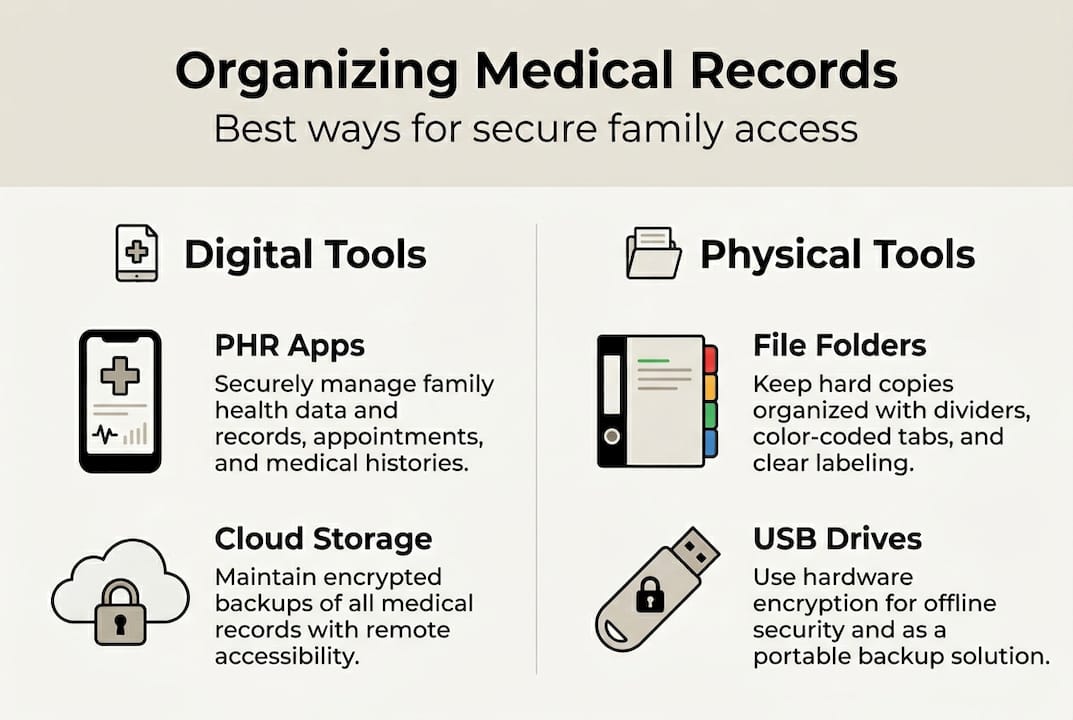
You have three main options for managing these essential medical documents: patient portals tied to specific providers, independent personal health record (PHR) apps, and digital vaults. Patient portals are convenient but limited to one provider network. Independent PHR apps give you more control and flexibility. Digital vaults, especially encrypted ones, add an extra security layer.
To request records from any provider, you have a legal right under HIPAA. The Health IT guide on records confirms you can request electronic format records, which are much easier to store and search than paper copies.
Reviewing using digital PHRs can also help you understand the full value of going digital before you commit to a specific platform.
Pro Tip: Always ask your provider specifically for records in PDF or structured data format. This makes them compatible with virtually any digital storage system and far easier to search later.
The digital health benefits for families go beyond convenience. Faster access, fewer errors, and better coordination with doctors all start with getting the right documents in the right format from the beginning.
Step-by-step: How to digitize, categorize, and maintain your medical records
Once you’ve assembled the right records and tools, here’s how to digitize and organize everything efficiently.
Follow these steps to move from scattered paperwork to a clean, secure digital system:
- Gather everything first. Collect all physical papers, portal printouts, and digital files in one place before sorting anything. This prevents duplication and gives you a clear picture of what you have.
- Scan or upload every document. Use your phone’s camera app or a dedicated scanner. Most modern smartphone apps create clean, readable PDFs automatically.
- Sort by person, then by category. Create a folder for each family member and subfolders for record types: labs, visits, medications, imaging. This mirrors how providers think about your records.
- Label files clearly and consistently. Use a naming system like LastName_FirstName_RecordType_Date. For example: Smith_Jane_LabResults_2025-11. Consistent naming makes searching fast.
- Back up to at least two locations. Store one copy in a cloud system and one on an encrypted external drive or device. Never rely on a single source.
Here’s a comparison of your main storage options to help you pick what fits:
| Method | Pros | Cons |
|---|---|---|
| Cloud storage (PHR app) | Accessible anywhere, shareable | Requires internet access |
| Phone storage | Always with you | Lost if phone is lost or damaged |
| Printed hard copies | No tech needed | Easily lost, damaged, or outdated |
The digital records workflow for families works best when everyone in the household follows the same naming and sorting process. It takes about 20 minutes to set up and saves hours of searching later.

Mayo Clinic recommends keeping multiple accessible copies and updating them regularly, categorizing by condition or family member and logging symptoms for extra context. That means your system isn’t just a file dump. It’s a living document.
Pro Tip: Set a recurring calendar reminder every six months to review and update all records. Remove duplicates, add new visits, and confirm all medication lists are current.
Always use secure document storage that is HIPAA-compliant and password-protected. Free generic cloud apps like standard Google Drive or Dropbox are not built for medical data. Use tools designed specifically for health records.
For a comparison of PHR app options currently available, independent review sites offer detailed breakdowns of features and costs.
Smart tips for family sharing, privacy, and emergency readiness
After digitizing and sorting, take these extra steps to ensure records are shareable, secure, and ready when you need them most.
Sharing access without sacrificing privacy is a real concern for families. Here’s how to handle it well:
- Grant role-based access. Give each trusted person only the access they need. A babysitter might need allergy info. A spouse needs full access. A caregiver for an elderly parent needs their medical history.
- Use HIPAA-compliant sharing features. Not all sharing methods are equal. Emailing a PDF is risky. Use platforms that offer encrypted, permissioned sharing built into the app.
- Set up emergency contacts within your digital system. Most PHR apps allow you to designate people who can access records if you’re incapacitated.
- Create an ICE (In Case of Emergency) document. This should include blood type, allergies, current medications, emergency contacts, and your primary provider’s number. Store it on your phone and print a copy for your wallet.
- Always maintain at least one offline copy. Power outages and internet failures happen. A printed or locally saved version of critical records ensures access no matter what.
“In an emergency, accessible records save lives.”
Well-organized personal health records improve coordination, reduce errors, and directly support emergency preparedness. Seniors with organized PHRs, in particular, experience better care coordination and fewer medication errors during hospital visits.
Understanding the benefits of preserving medical history becomes especially clear when a family member faces a sudden health event. The records you organized last year might be exactly what a doctor needs today.
For more on the advantages of tracking medical history across providers and over time, external healthcare resources offer solid practical guidance.
Troubleshooting and automating your medical record organization
With sharing and privacy handled, what if you hit a snag or want more automation? Here’s what works.
Even well-planned systems run into problems. Here are the most common issues and how to fix them:
- Lost app login credentials. Use a password manager from day one. Store your PHR app login in a trusted vault and share access instructions with a backup person.
- Inconsistent updates across family members. Assign one person as the family records manager or set up shared editing permissions so multiple people can contribute.
- Software lock-in. Before committing to a platform, check that you can export your data. Always choose apps that support standard export formats like PDF or HL7 FHIR.
- Manual entry fatigue. This is real. Typing in years of records is exhausting. Use apps that support document upload and AI-powered parsing to extract data automatically.
- Missing historical records. Contact former providers directly under your HIPAA rights and request complete records going back as far as you need.
Research into medical data management and AI shows that AI-powered apps reduce manual organization burden significantly. Adding patient notes directly inside these apps also gives important context that raw data alone can’t provide.
Pro Tip: Build a two-layer backup: encrypted cloud storage as your primary system and an encrypted USB drive updated every six months as your secondary. This protects against both data loss and platform shutdowns.
When reviewing best medical record software options, look for platforms that offer automatic organization, not just storage. The difference between a file dump and a genuinely useful system is automation.
Exploring choosing digital health solutions will also help you evaluate what features actually matter for your specific family situation.
Our take: Why smart digital systems matter more than ever
Most people think of digital record organization as a project they’ll get to eventually. A nice-to-have. Something to set up after a health scare motivates them. That’s understandable. But it’s backwards.
The families who benefit most from organized records are the ones who set the system up before they needed it. The reality is that medical records touch nearly every major life event: new diagnoses, insurance claims, school enrollments, travel, and emergencies. A fragmented system doesn’t just cause inconvenience. It causes errors.
We’ve seen how automation and family profiles change the equation. When records update automatically and every family member’s information lives in one secure place, routine checkups get easier, chronic care becomes more manageable, and emergencies become less chaotic. That’s not a minor upgrade. That’s a meaningful shift in how your family manages health.
Setting up a proper secure document storage guide system today costs you an afternoon. Not having one could cost far more. Start now. The setup work is temporary. The peace of mind is lasting.
Simplify your family’s medical record management with MedFiles.ai
You now have a clear, practical roadmap for organizing, securing, and sharing your family’s medical records. But if you want to skip the manual setup and go straight to a system built for exactly this purpose, MedFiles.ai is ready for you.

MedFiles.ai is HIPAA-ready, uses end-to-end encryption, and supports multi-profile management for every family member, including pets. You can upload documents instantly, share securely with providers or caregivers, and access everything from any device. Role-based sharing means each person sees only what they need. Check out the plans for patients and explore flexible pricing and plans that fit your family’s needs. Create your free account today and put your family’s health information exactly where it belongs: safe, organized, and always within reach.
Frequently asked questions
What is the safest way to store medical records at home?
The safest approach is using a HIPAA-compliant platform with strong encryption combined with an offline backup like an encrypted USB drive. Avoid storing sensitive health data in general-purpose apps not built for medical use.
How often should I update my personal and family medical records?
Update records after every new visit, test result, or medication change. Review all documents at minimum twice a year to catch outdated information and remove duplicates.
Which documents should always be included in an organized medical record set?
Every record set should include a doctor directory, visit summaries, lab results, prescriptions, immunization records, allergy lists, and legal directives like living wills or powers of attorney.
Is it possible to access medical records from multiple providers in one app?
Yes. Independent PHR apps consolidate records from multiple providers in one place, which patient portals tied to a single health system cannot do.
How do I make sure loved ones can access my records in an emergency?
Designate trusted contacts within your digital system and maintain multiple accessible copies across cloud, device, and print formats. A printed ICE form kept in a wallet adds a critical offline backup.