Organize Pregnancy Medical Records: Simple Hybrid System
Discover how to effectively organize your pregnancy medical records with a simple hybrid system combining digital and physical storage solutions.

Organize Pregnancy Medical Records: Simple Hybrid System
A hybrid system, a phone-accessible digital hub paired with a small physical folder for originals, is the fastest, most reliable way to organize pregnancy medical records right now. Your phone travels with you to every appointment, ER visit, and unexpected trip. A folder protects the handful of documents you’ll need in original form someday.
Start today with two steps:
- Photograph every document you already have (visit summaries, ultrasound printouts, lab results) with your phone camera.
- Create dated digital folders by trimester or by provider, so nothing gets buried in your camera roll.
You can build the rest of the system this week.
Key Takeaways
A hybrid system built on a digital hub plus a small physical folder, maintained after every appointment, is what actually keeps pregnancy records usable when you need them most.
| Point | Details |
|---|---|
| Start with a hybrid model | Photograph documents into dated digital folders and keep originals of consents and genetic reports in one physical folder. |
| Use a date-first filename system | Naming files YYYYMMDD_description keeps exports and scans in chronological order automatically. |
| Request records early | Ask providers for copies soon after appointments or delivery, since archived files take longer to retrieve later. |
| Keep maternal and newborn files separate | Splitting records by person speeds up pediatric visits and postpartum follow-up care. |
| Use Medfiles for the digital half | Medfiles offers automatic organization, secure sharing, and multi-profile support built for exactly this hybrid workflow. |
Where to Find Templates and Provider Guidance
- FIGO’s Fertility Passport offers a standardized template for tracking fertility and pregnancy information across providers.
- Johns Hopkins Medicine’s guide on getting organized with medical records covers requesting and structuring your files.
- Medfiles’s page on family medical records walks through setting up profiles for you and your baby.
Table of Contents
- Physical Binder vs. Digital App vs. Hybrid: Which Should You Use?
- How Do You Organize Prenatal Records Step by Step?
- What Documents Should You Keep During Pregnancy?
- How Do You Request Pregnancy Records From Providers?
- How Do You Summarize Your Medical History for a New Doctor?
- How Does MedFiles.ai Support a Hybrid Pregnancy Records System?
- What Most Pregnancy Record Advice Gets Wrong
- Get Your Pregnancy Records Organized With Medfiles
- Frequently Asked Questions
- Sources
Physical Binder vs. Digital App vs. Hybrid: Which Should You Use?
A physical binder gives you originals you can hand to a new specialist without depending on Wi-Fi. It’s tactile, it can’t be hacked, and hospitals still love paper at check-in. The downside: one binder, one location. Leave it at home during a preterm labor scare and it does you no good.
A digital system solves that problem. Files are searchable, shareable in seconds, and backed up automatically if you pick software with real encryption. Look for HIPAA-ready storage and end-to-end encryption before trusting any app with lab results or genetic reports.
The hybrid model splits the difference. Digitize everything for instant access, but keep original paper for documents with legal or clinical weight, signed consents, operative reports, genetic testing results, in a labeled folder at home.
Pro Tip: If you see more than one provider, travel during pregnancy, or manage records for aging parents alongside your own, hybrid isn’t optional. It’s the only setup that works everywhere you might need it.
How Do You Organize Prenatal Records Step by Step?
Building your system doesn’t require a free weekend. Break it into five short phases.
- Collect. Request copies from every provider, download your patient portal exports, and photograph anything only on paper.
- Sort. Create top-level categories: Prenatal Visits, Lab Results, Ultrasounds, Insurance, Baby Records. Digital folders or binder tabs both work.
- Label and index. Name every file with a date-first convention, like
20260214_20week_ultrasound.pdf. This keeps chronological order automatic, even across providers and devices. Add a short note in the filename or a metadata field: which trimester, which provider, what it’s for. - Secure and share. Store digital copies in encrypted cloud storage, not a random phone folder. Give your partner or a trusted caregiver access, and keep a printed emergency card noting where the binder lives and which email logs into your digital account.
- Maintain. After every appointment, spend two minutes: photograph new paperwork, drop it in the right folder, done. Skip this and the whole system quietly falls apart by month seven.
That five-minute after-appointment habit is the one step most people abandon. It’s also the one that matters most, because organizing prenatal files works only if you keep feeding the system as pregnancy progresses, not just at the start.
What Documents Should You Keep During Pregnancy?
Not every piece of paper deserves equal priority. Start with these, in roughly this order:
- Prenatal visits: visit summaries, growth measurements, blood pressure logs.
- Testing: ultrasound reports, bloodwork, glucose screening, genetic testing results.
- Labor and delivery: operative reports, anesthesia records, any NICU or newborn discharge summaries, and the paperwork tied to your birth certificate.
- Ongoing care: current medication list, allergies, immunization records.
- Administrative: insurance cards, billing statements, receipts, and a contact list for every provider involved.
Maternal and newborn records should stay in separate sections, since a structured record helps with recovery follow-up and makes pediatric visits faster once your baby needs their own file.
Keep genetic testing reports and signed consents as originals. Scan them immediately, but the paper version may matter later for legal or specialist review, and a guide to fetal health testing can help you understand what those genetic and screening reports actually mean before you file them away.

How Do You Request Pregnancy Records From Providers?
Records live in more places than you’d think: your OB practice, the hospital where you delivered, any NICU, outside labs, and separate imaging centers. Getting a full picture means asking each one directly.
- Ask your provider’s office for a release-of-information form, sometimes called an authorization to disclose.
- Specify exactly what you want: prenatal visit notes, labor and delivery records, discharge summaries, imaging, and pathology reports.
- Check whether your patient portal already has digital exports available. This can be faster than a formal written request.
- Follow up in writing if nothing arrives within two to three weeks.
Requesting early matters. Records requested soon after a visit or delivery tend to arrive faster and with fresher clinical notes attached, since archived files take longer to retrieve the further out you wait. Johns Hopkins Medicine recommends requesting copies of key documents proactively, especially when your care is split across multiple providers, rather than waiting until you need them urgently.
How Do You Summarize Your Medical History for a New Doctor?
Busy clinicians don’t need your whole binder. They need your story, told fast. Organize it into three buckets: past, present, and future.
- Past: prior pregnancies, chronic conditions, surgeries, family history.
- Present: current symptoms, medications, allergies, and your most recent test results.
- Future: questions you want answered and decisions you’re weighing, like delivery preferences.
Write this as a one-page visit brief before every new appointment. It saves you from repeating your history from memory under fluorescent lights while a nurse waits.
Pro Tip: Give your partner or backup caregiver access to this same summary. If you’re rushed to the hospital and can’t speak for yourself, someone else needs to be able to hand it over.
How Does MedFiles.ai Support a Hybrid Pregnancy Records System?
Once your system is built, the digital half needs somewhere secure to live. This is exactly where a HIPAA-ready platform pulls its weight inside a hybrid setup.
- Upload photographed or scanned copies of everything except documents you’re keeping physically as originals.
- Let automatic organization sort uploads instead of manually renaming every file yourself.
- Invite your OB, partner, or caregiver with secure sharing instead of emailing PDFs back and forth.
- Set up a separate profile for your baby once they’re born, so newborn records don’t tangle with your maternal file.
- Turn on emergency access so critical records are reachable even if you can’t unlock your phone yourself.
The platform runs on end-to-end encryption and HIPAA-ready infrastructure, which matters when the files involved include genetic testing results and labor notes.
| Point | Details |
|---|---|
| Digitize everything | Upload scans immediately, keep only the highest-value originals in paper form. |
| Separate by profile | Maternal and newborn records stay in distinct sections for easier future access. |
| Share, don’t email | Invite providers and caregivers directly instead of sending unsecured attachments. |
What Most Pregnancy Record Advice Gets Wrong
Most guides treat organizing pregnancy medical records as a paperwork problem. It’s not. It’s a retrieval problem. You don’t need a perfect filing system; you need the right document reachable in under sixty seconds during a 2 a.m. hospital admission or a rushed specialist referral.
That reframes what actually matters. A gorgeous color-coded binder that lives in a closet drawer at home does nothing for you in a triage room. A phone with disorganized screenshots does almost as little, because nobody can find the ultrasound report buried under three hundred photos.
The conventional advice to “just keep everything in one binder” undersells how mobile modern prenatal care actually is. Between OB visits, ultrasound centers, labs, and hospital delivery, your records are already scattered across four or five systems before you’ve done anything wrong. Fighting that with paper alone is a losing game.
Prioritize accessibility over aesthetics. Digitize first, secure it properly, and treat the physical folder as backup for originals only. Everything else in this guide supports that one decision.
Get Your Pregnancy Records Organized With Medfiles
Medfiles gives you the digital half of this hybrid system without the spreadsheet building or folder engineering. Instead of manually renaming ultrasound scans and hunting for the right cloud folder at 11 p.m. before an appointment, Medfiles automatically organizes what you upload and keeps it searchable from your phone.

This fits naturally with what this guide just walked through: photograph your documents, upload them, and let automatic organization handle the sorting instead of you. Set up a family profile so your baby’s newborn records stay separate from your own maternal file, invite your partner or OB with secure sharing, and turn on emergency access so the people who need your records can reach them even when you can’t. The platform’s medical document storage runs on HIPAA-ready, end-to-end encrypted infrastructure, so the sensitive stuff, genetic panels, labor notes, discharge summaries, stays protected while still being one tap away. Start by creating your free account and uploading your first ultrasound report today.
Frequently Asked Questions
What’s the fastest way to organize pregnancy medical records if I’m already several months in?
Don’t try to backfill everything at once. Photograph or upload whatever you have now, starting with your most recent lab results and ultrasound, then request missing records from earlier visits while you build the habit of adding new documents after each appointment.
Should I keep paper copies of everything or switch entirely to digital?
Neither extreme works well. Digitize the bulk of your records for searchability and sharing, but keep physical originals of documents with legal weight, like signed consents, genetic testing reports, and operative reports, in one labeled folder.
How do I get copies of my labor and delivery records after leaving the hospital?
Contact the hospital’s medical records or health information management department, request a release-of-information form, and specify exactly which documents you need: labor notes, discharge summaries, and any NICU records if applicable.
What should I bring to a new OB or specialist appointment?
A one-page summary organized into past history, present symptoms and medications, and questions for the future covers most of what a new provider needs without handing over your entire file.
Is it safe to store pregnancy medical records in a cloud-based app?
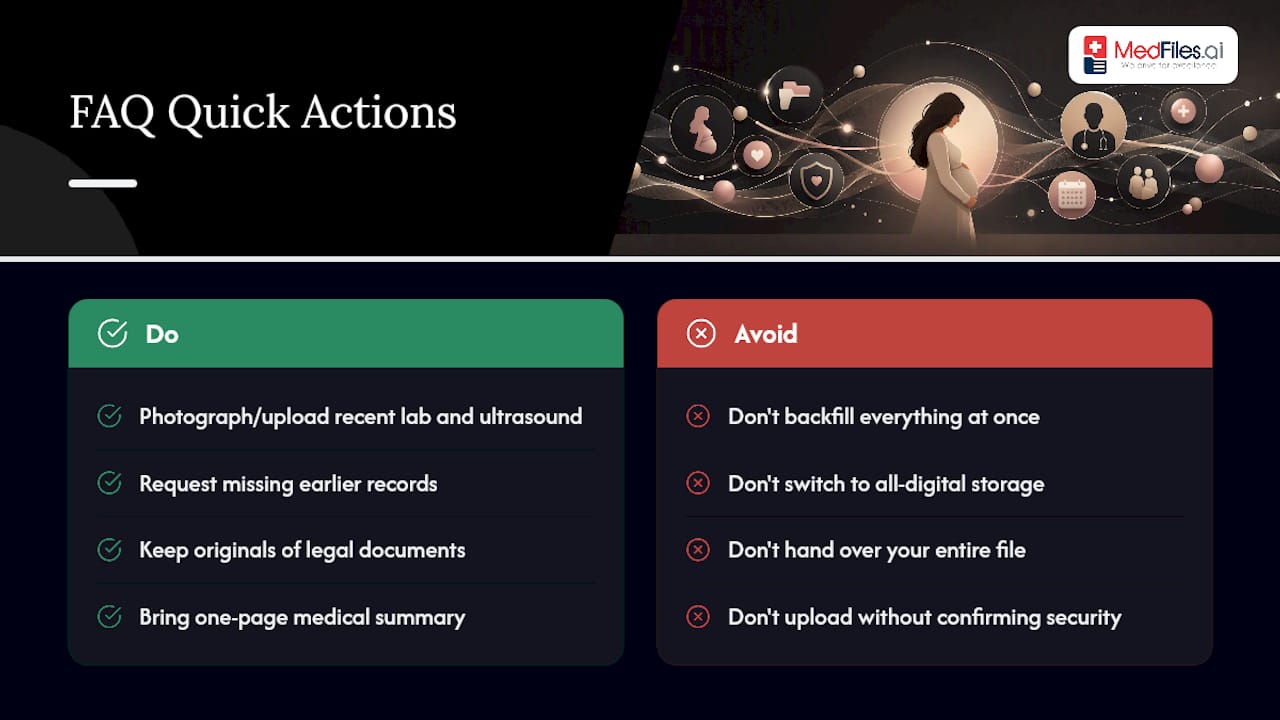
It’s safe when the platform uses real encryption and HIPAA-ready infrastructure. Confirm those security details before uploading sensitive documents like genetic testing results or lab panels.
Sources
- Medical records: Getting organized | Johns Hopkins Medicine
- The FIGO Fertility Passport | FIGO
- After a difficult birth: How mothers can organize records, monitor recovery, and get answers | Women In Balance