Patients: Transfer Dental Records in 30 Days, Keep Copies Secure
Use HIPAA’s 30-day rule to request dental records, avoid fees and delays, and ensure X-rays and CBCT scans transfer securely as usable files.
Patients: Transfer Dental Records in 30 Days, Keep Copies Secure
Yes. You can request copies of your dental records or have them sent directly to a new dentist. Under HIPAA rules, the office has a standard 30-day period to respond, with one permissible extension for an additional 30 days if notified in writing. Your next move: contact the releasing office for their release form, or simply sign an authorization at your new dentist’s office and let them request the records for you.
TL;DR:
- Most dental offices will include basic records like chart notes, X-rays, and treatment history automatically, but require specific requests for imaging or photographs.
- Requests can be made directly by the patient or through the new dentist, with direct requests often being faster and fee-free for professional transfers.
- Offices have 30 days to respond to records requests under HIPAA, with a possible 30-day extension if properly notified, making timely follow-up essential.
- Secure transfer methods such as encrypted portals or direct system-to-system exchanges are recommended, especially for sensitive files like DICOM scans, instead of unencrypted email.
- Retired or closed practices usually list a custodian for old records, but patients retain the right to copies, which can be digitized or retrieved through state boards if needed.
Table of Contents
- What Does a Dental Records Transfer Actually Include?
- How Do You Request a Dental Records Transfer?
- How Long Can a Dental Office Take, and What Can They Charge?
- How Do You Keep Electronic Records Secure During Transfer?
- What If Your Old Dentist Retired or the Office Closed?
- What Should You Check Before You Sign Off on a Transfer?
- Why Better Records Access Changes How You’re Treated
- Keep a Secure Copy of Your Own Dental History
- Where to Verify Your Rights and Next Steps
- Sources
- FAQ
What Does a Dental Records Transfer Actually Include?
Getting your full file matters more than most patients realize. A complete transfer means your new dentist skips duplicate X-rays, catches patterns in old treatment notes, and builds your care plan faster instead of starting from zero.
Most offices will send over the basics automatically. But you often have to ask for the rest by name.
Typically included without asking:
- Chart notes and progress notes
- Periodontal charting
- Restoration and treatment history
- Bitewing, periapical, and panoramic X-rays
- Basic medical history and current medications
Often skipped unless you request it specifically:
- CBCT scans and their raw DICOM files
- Full-face or extraoral photos
- Intraoral photographs
- Orthodontic records, including models or digital scans
- Lab orders and referral letters
If you’ve had implants, root canals, or orthodontic work, ask for the imaging tied to those procedures by name. General release forms don’t always capture it.
How Do You Request a Dental Records Transfer?
You have two paths, and picking the right one saves time and money. Here’s how each works.
Who can request records: You, a legal guardian for a minor, or someone with documented power of attorney can request records. Bring photo ID, and guardians should bring proof of guardianship.
Path 1: You request the records yourself.
- Ask the current office for their records release form (sometimes called a dental records release form).
- Fill in the recipient’s name, address, and fax or email.
- List exactly which records you want and the date range covering your treatment history.
- Sign and date the form.
- Submit it through the patient portal, by mail, fax, or in person.
Path 2: The new office requests records on your behalf.
- Sign an authorization at your new dentist’s office.
- The new office contacts the old one directly and requests the file.
This second route is often faster, and many practices waive the reproduction fee entirely for professional-to-professional transfers.
Whichever path you choose, specify how you want the records delivered: a secure portal link, encrypted email, a USB or CD containing DICOM files for CBCT scans or certified mail. If you also want a personal copy for your own files, say so on the form. You don’t have to show up in person to sign anything. Scanned, emailed, or faxed signatures are accepted at most offices.
Pro Tip: Write the exact date range of treatment on your release form. “All records” sounds thorough, but vague requests are the number one reason transfers stall at the front desk.
How Long Can a Dental Office Take, and What Can They Charge?
The clock starts the moment you submit a valid, signed request. Under HHS guidance, covered entities must provide access within 30 days. If your records are stored offsite, the office can take one additional 30-day extension, but only if they notify you in writing and give you a specific date.
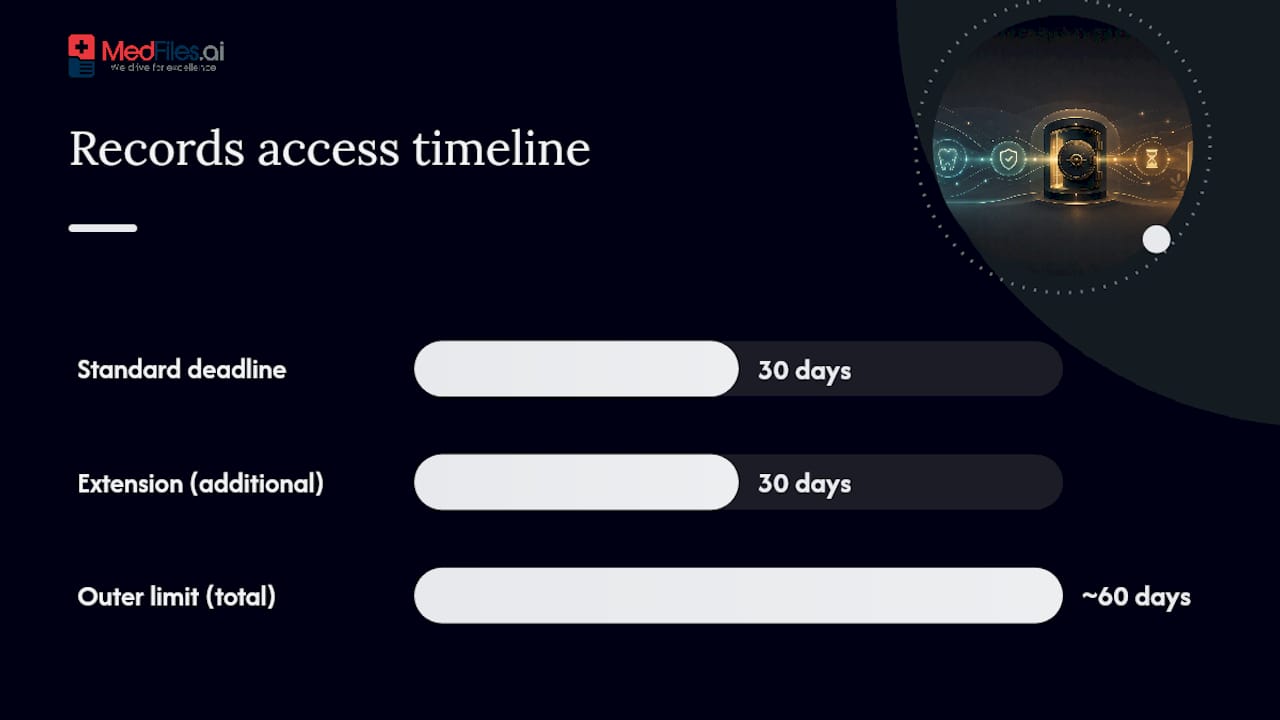
In rare cases when both timeframes apply, this sums to an outer limit of about 60 days. Most transfers move far faster, especially when a new office requests records directly.
Fees are legal, but limited. Offices can charge you a reasonable, cost-based amount covering the actual work of copying, scanning, and mailing your file. What they cannot do is withhold your records because you owe money on a past bill. That’s a separate financial matter from your right to your own health information.
A few practical safeguards:
- Ask for a written fee estimate before the office processes the request.
- Request an itemized breakdown if a flat fee seems high.
- Get proof of delivery, especially for mailed records, so you have a paper trail if anything goes missing.
- Check your state dental board’s rules. Some states cap fees lower than what federal law allows or require a free copy under certain circumstances.
If an office ignores the deadline or charges an unreasonable fee, you can file a complaint with the HHS Office for Civil Rights. Most disputes resolve before it gets that far, but knowing the option exists tends to speed things along.
How Do You Keep Electronic Records Secure During Transfer?
Standard email is not built for protected health information. Security research on electronic health information exchange consistently recommends encrypted channels over unsecured email, because a routine inbox is an easy target for interception.
Ask the releasing office whether they use a secure patient portal, an encrypted file-transfer service, or direct system-to-system exchange between electronic dental record platforms. Any of these beats a plain email attachment.
File format matters just as much as security. A CBCT scan needs to leave as a DICOM file, or your new dentist may not be able to open it at all. Standard digital X-rays typically export as common radiograph image formats, and written reports usually work fine as PDFs. Ask the receiving office what formats they can actually open before the transfer happens, not after.
- Confirm the transfer method before signing anything
- Ask specifically about DICOM support for CBCT or 3D imaging
- Request confirmation once the receiving office has opened and verified the files
If an office insists on unencrypted email as the only option, some will ask you to sign a written waiver acknowledging the risk. That’s a reasonable request. Reviewing MedFiles’s approach to encrypted storage and sharing shows what a more secure transfer method looks like in practice.
Pro Tip: Never send your own dental history over unencrypted personal email if you can avoid it. Ask for a secure link instead, even if it takes one extra phone call to set up.
What If Your Old Dentist Retired or the Office Closed?
Your dentist technically owns the physical records, but you always retain the right to copies. Retention periods vary by state, often landing around seven years or longer for adults, and longer for records involving minors, so older files aren’t necessarily gone just because time has passed.
When a practice closes or a dentist retires, the file doesn’t vanish. Closure notices typically list a records custodian, often another local dentist or a records-storage service that took over the file. If you can’t find that notice, your state dental board keeps a record of custodians for closed practices and can point you in the right direction.
Film X-rays present their own wrinkle. If your history predates digital imaging, ask whether the custodian can digitize the film for you.
- Contact the state dental board if no custodian notice turns up
- Ask specifically whether film X-rays can be scanned rather than mailed as originals
- Be prepared for some re-imaging if originals were lost or damaged over the years
What Should You Check Before You Sign Off on a Transfer?
A few quick questions upfront prevent most of the delays patients run into.
- What’s the estimated timeline for this specific office?
- Exactly which records are included, and which do I need to name separately?
- Will X-rays be digitized, or sent in their original format?
- What’s the total fee, and can I get that in writing?
- Will I get proof of delivery once the transfer is complete?
- Who’s my direct contact if something goes wrong?
The most common mistakes are small but costly: leaving off the recipient’s exact contact information, forgetting to specify a date range, failing to mention imaging format, and skipping the fee estimate entirely. Any one of these can add a week or more to a process that should take days.
Pro Tip: When possible, let the new dentist’s office handle the request directly. It’s often the fastest path, and many offices waive the copying fee for provider-to-provider transfers rather than charging you the patient rate.
Why Better Records Access Changes How You’re Treated
Continuity of care sounds like a buzzword until you’re the patient repeating your surgical history for the third time this year because nobody has your chart. Every dentist who treats you without your full history is working with less information than they need, and that gap shows up in slower diagnoses, redundant imaging, and treatment plans built on guesswork.
The system assumes you’ll chase paper trails across multiple offices for the rest of your life. It doesn’t have to work that way. There are digital platforms built around HIPAA-ready infrastructure, AI-powered document organization, and secure sharing tools that let you keep every dental and medical file in one place, accessible on your terms.
— Team
Keep a Secure Copy of Your Own Dental History
Requesting records is one thing. Actually holding onto them, in a format you can use for the rest of your life, is another problem entirely. Some digital services provide a permanent, secure home for files your dentist sends over, helping you avoid starting from zero again when you switch providers.

Once your old office transfers your chart notes, X-rays, or CBCT scans, upload them into a secure platform and they’re organized automatically, no manual sorting required. Need to share your history with a new dentist, a specialist, or a family member helping manage your care? Generate a secure link instead of emailing sensitive files, and keep a record of exactly what was shared and when. The platform’s secure document sharing tools preserve original file formats, so a DICOM scan stays usable instead of turning into a dead attachment nobody can open.
Multi-profile support also means you can manage records for your whole family, or even a pet, from a single account. If you’re tired of tracking down paperwork every time you change providers, start your free MedFiles account today and give your next dentist instant access to a complete, secure history.
Where to Verify Your Rights and Next Steps
For the legal specifics behind everything above, go straight to the source rather than relying on office staff alone.
- ADA guidance on copying and transferring dental records
- Your state dental board’s website, for retention rules and custodian information on closed practices
- MedicalRecords.com’s dental records guide for a plain-language walkthrough of the request process
- Klyr Media’s overview of secure messaging in healthcare for more on why encrypted channels beat standard email
This article is general information, not a substitute for advice from a qualified doctor. Consult a qualified healthcare professional about your own circumstances before acting on anything here.
Sources
- ADA — Ownership of dental records and radiographs
- PubMed — Security considerations for electronic health information exchange
FAQ
Can You Transfer Dental Records From One Dentist to Another?
Yes. Sign a release form with your current office, or authorize your new dentist to request the file directly, which is often the faster route and sometimes fee-free.
Who Legally Owns a Patient’s Dental Records?
The dentist or practice owns the physical or digital file, but you have a legal right to obtain copies at any time.
How Do You Get Dental Records From 20 Years Ago?
Contact the original office first; if it closed, check the closure notice for a listed custodian or contact your state dental board, since retention rules vary by state and older files may still exist.
What Is the 30-Day Rule for Dentists?
Under HIPAA, a dental office must provide requested records within 30 days of a valid request, with one allowed 30-day extension if they notify you in writing.
Can a Dental Office Refuse to Send Records Over an Unpaid Bill?
No. Providers cannot withhold your records because of an outstanding balance, though they can still bill you separately for that debt.