Best MedicalFile.io Alternatives for Families: HIPAA-Ready Vaults
Explore the best medicalfile.io alternatives for families. Discover HIPAA-ready vaults like Medfiles, ensuring secure and encrypted health records.

Best MedicalFile.io Alternatives for Families: HIPAA-Ready Vaults
If you’re searching for MedicalFile.io alternatives, the short answer is this: Medfiles, PicnicHealth, MyMedicalRecords (AMSEC), and OneRecord (The Sequoia Project) are the strongest HIPAA-ready personal medical record vaults available in the United States today. Of these, Medfiles is the recommended pick.
Here’s why Medfiles stands out:
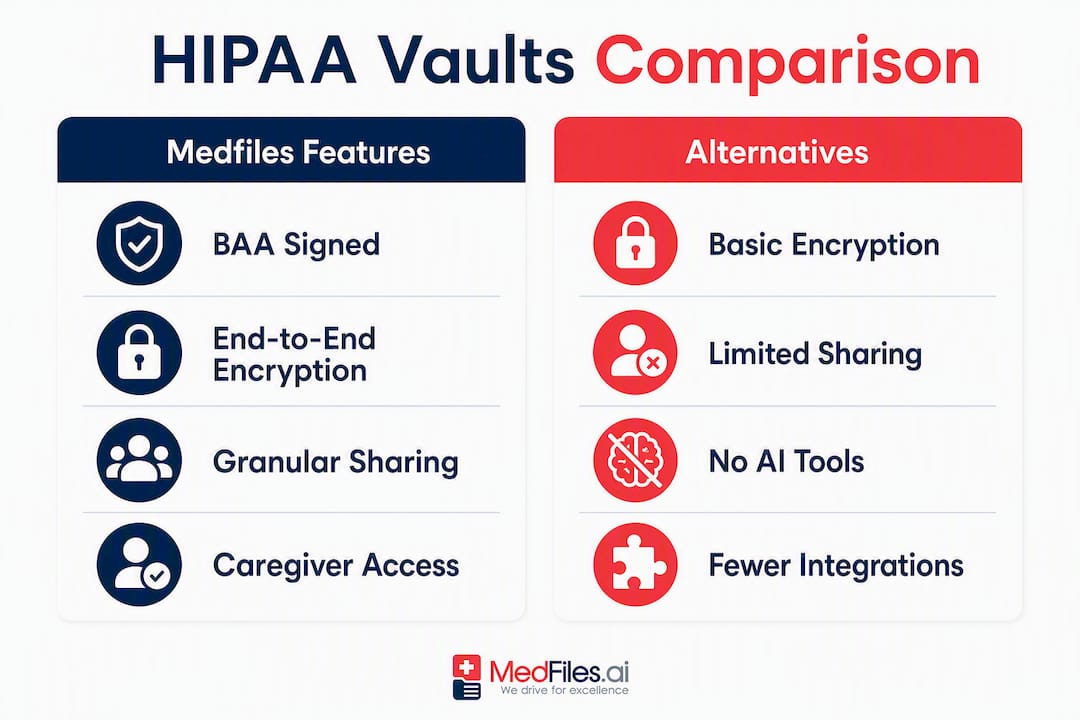
- BAA availability: Medfiles operates on HIPAA-ready infrastructure and provides a Business Associate Agreement, the legal contract that binds a vendor to protect your electronic protected health information (ePHI).
- End-to-end encryption: Your records are encrypted in transit and at rest, so no one accesses your data without your permission.
- Immutable audit logs: Every share event, login, and document access is logged with a timestamp, so you always know who saw what.
- Family and multi-profile management: One account covers your whole household, including dependents and pets, with separate profiles and caregiver access controls.
- Data export: You can download your records in portable formats at any time, so you’re never locked in.
Start with a free trial at Medfiles, no credit card required.
Table of Contents
- How do MedicalFile.io alternatives compare on HIPAA and key features?
- Security, sharing, portability, and AI features compared in practice
- How to choose the right HIPAA-ready personal medical record vault
- How to move your records: timeline, costs, and what to expect
- What HHS and NIST expect from HIPAA-ready platforms
- Why Medfiles meets the checklist and who it best serves
- How does Medfiles handle backup and disaster recovery?
- What other US regulations apply beyond HIPAA?
- Who owns your medical records, and what are your rights?
- Does Medfiles work across desktop, mobile, and web?
- Key Takeaways
- Why patient-controlled records are the whole point
- Your medical records deserve better than a filing cabinet
- Sources and further reading: HHS, NIST, and PHR research
How do MedicalFile.io alternatives compare on HIPAA and key features?
The table below maps each platform against the dimensions that matter most when choosing a personal medical record vault. “BAA available” means the vendor will sign a formal Business Associate Agreement with you, a requirement under HIPAA for any cloud service that handles your ePHI.

| Feature | Medfiles | PicnicHealth | MyMedicalRecords (AMSEC) | OneRecord (Sequoia Project) |
|---|---|---|---|---|
| HIPAA / BAA | HIPAA-ready; BAA available | HIPAA-compliant; BAA available | HIPAA-compliant; BAA available | HIPAA-aligned; BAA terms vary |
| Encryption | End-to-end; TLS in transit, AES at rest | TLS in transit; encrypted at rest | TLS in transit; encrypted at rest | TLS in transit; encrypted at rest |
| Audit logs | Immutable access and share logs | Access history available | Access logs available | Access history available |
| Sharing controls | Role-based; link expiration; download limits | Clinician sharing; limited role controls | Sharing via secure links | Provider-facing sharing; limited consumer controls |
| Data export | PDF, structured formats; full export on demand | PDF; structured export | PDF export | FHIR-based export |
| Family / multi-profile | Yes; dependents and pets | Limited; primarily individual | Yes; family plans available | Primarily individual |
| AI / clinical review | AI-powered document analysis; clinical review access | AI-assisted record summarization | No AI features listed | No AI features listed |
| Import method | Manual upload; inbox-style automated collection | Automated retrieval from providers | Manual upload | FHIR-enabled provider pull |
| Provider integrations | FHIR support; provider portal connectivity | — | Limited integrations | Sequoia network connections |
| Pricing | Tiered subscription; free trial | Subscription; free tier available | Subscription tiers | Free for individuals |
| Ease of use | Mobile app; web UI; designed for non-technical users | Web and mobile; clean UI | Web-based; functional UI | Web-based; provider-oriented UI |
Security, sharing, portability, and AI features compared in practice
Security: what BAAs and encryption actually protect
A signed BAA is not just paperwork. Under HIPAA, any cloud provider that stores or transmits your ePHI is a business associate and must sign one, even if the data is encrypted and the vendor never views it. Without a BAA, you have no contractual recourse if your records are exposed.
Encryption in transit (TLS) protects data moving between your device and the server. Encryption at rest protects data sitting on the server’s storage. Both are required. Role-based access controls limit who inside the platform can touch your records, and immutable audit logs create a tamper-proof record of every action. HIPAA-compliant file sharing requires all four: encryption in transit and at rest, audit logging, access controls, and a signed BAA.
Sharing and caregiver access
Granular sharing controls, including link expiration, download limits, and role-based permissions, reduce the risk of long-term unintended access. Permanent shared links are a real vulnerability: if you send a link to a specialist and never revoke it, that link stays active indefinitely. Medfiles’s secure sharing lets you set expiration dates and download caps on every share event.
Pro Tip: Before sharing records with any provider, set a link expiration of 30 days and a download limit of one. If the provider needs access again, generate a new link. This keeps your audit log clean and limits exposure.
Portability and provider integrations
PHR adoption has historically lagged because systems lacked portability and sharing capabilities. The practical fix is FHIR-enabled export and provider portal connectivity. FHIR (Fast Healthcare Interoperability Resources) is the federal standard for structured health data exchange. OneRecord leans heavily on FHIR pulls from provider networks. Medfiles supports FHIR connectivity alongside manual upload and its inbox-style automated collection. Understanding medical record interoperability helps you know which format to request from your provider’s records department.
Family profiles and caregiver workflows
Managing records for an elderly parent, a child, or a spouse requires separate profiles with proxy access. Medfiles supports multiple profiles under one account, including pets. PicnicHealth and MyMedicalRecords offer family plans, but with more limited caregiver delegation controls. OneRecord is built primarily for individual use.
AI and clinical review features
Next-generation PHRs are moving toward collaborative-care features that help clinicians filter and interpret patient-provided data, reducing the review burden on providers. Medfiles’s AI-powered document analysis flags key findings and organizes records by category automatically. PicnicHealth offers AI-assisted summarization. MyMedicalRecords and OneRecord do not currently list AI analysis features.
How to choose the right HIPAA-ready personal medical record vault
Must-have criteria
Before you sign up for anything, verify these four items:
- BAA availability: Ask the vendor directly. If they hesitate or say it’s not necessary, walk away.
- Encryption in transit and at rest: Both are required, not just one.
- Immutable audit logs: Logs should record timestamp, user ID, recipient, and action for every share event.
- Data export: You must be able to download your records in a portable format at any time, without paying an exit fee.
Nice-to-have criteria
- AI-powered document analysis
- FHIR/API provider integrations
- Mobile apps for iOS and Android
- WhatsApp or push alerts for new records
Questions to ask during sign-up
- “Will you sign a BAA with me as an individual?”
- “What is your data retention policy after account cancellation?”
- “How do you notify me in the event of a breach?”
- “Have you completed a third-party security audit or SOC 2 attestation?”
Red flags to avoid
- No explicit BAA offer for individual accounts
- Permanent shared links with no expiration option
- No downloadable export or a fee to export your own records
- Audit logs that don’t record recipient identity or download events
Decision flow by use case
- Individual adult: Start with a single-profile plan. Verify BAA and export before committing.
- Caregiver for an elderly parent: Choose a platform with multi-profile support and proxy access. Medfiles’s family plan covers this directly.
- Family with children: You need separate profiles, caregiver delegation, and enough storage for imaging files. Medfiles’s family tier handles all three.
How to move your records: timeline, costs, and what to expect
Realistic migration timeline
- Request records from providers (1–4 weeks): Submit requests to each provider’s medical records department. HIPAA gives providers a reasonable time to respond, sometimes up to 30 days, with a possible extension.
- Receive digital files (varies): Many providers now offer patient portal downloads in PDF or CCD format. FHIR-enabled portals can deliver structured data faster.
- Upload and organize (1–3 hours per provider): Use the platform’s inbox or bulk upload feature. Medfiles auto-organizes documents by type after upload.
- Verify completeness (1–2 hours): Cross-check your audit log against the documents you requested. Run a sample document check and confirm key records are readable.
Typical costs
- Records request fees: Providers may charge a per-page fee or a flat fee. Federal rules cap these fees for electronic records, but state laws vary.
- Subscription tiers: Free tiers exist on some platforms but typically limit storage or sharing. Paid tiers range from individual plans to family plans with expanded storage and AI features. Check Medfiles pricing for current tier details.
- Professional retrieval services: Third-party services can request and digitize records on your behalf, usually for a per-provider fee.
Pro Tip: Collect your date of birth, insurance ID, and provider NPI numbers before submitting requests. Incomplete identifiers are the most common reason records departments delay responses.
- Use FHIR-enabled patient portals where available; they deliver structured data you can import directly.
- Batch requests by provider system, not individual provider, to reduce paperwork.
- Never delete paper originals until you’ve confirmed the digital version is complete and readable in your vault.
What HHS and NIST expect from HIPAA-ready platforms
The HIPAA Security Rule requires three categories of safeguards for any organization handling ePHI:
- Administrative safeguards: Risk assessments, workforce training, and incident response procedures.
- Physical safeguards: Controls over physical access to servers and devices.
- Technical safeguards: Encryption, audit controls, automatic logoff, and authentication.
- Organizational requirements: Signed BAAs with all business associates.
NIST SP 800-66r2 maps these requirements to practical cybersecurity controls, including documented risk assessments, audit log retention, and contingency planning for data recovery.
Pro Tip: Ask any vendor for evidence of a completed Security Risk Assessment (SRA). A vendor that can produce a documented SRA or SRA-tool output mapped to implemented controls is taking HIPAA seriously. One that cannot is a risk.
Why Medfiles meets the checklist and who it best serves
Medfiles maps directly to every must-have criterion:
- BAA: Available for individual and family accounts.
- Encryption: End-to-end, TLS in transit, AES at rest.
- Audit logs: Immutable logs recording every share event, login, and document access.
- Family profiles: Separate profiles for dependents and pets, with caregiver proxy access.
- Export: Full download in portable formats, on demand, at any time.
- Clinical review access: Healthcare providers can receive and review shared records through a dedicated clinician workflow.
- AI analysis: Automatic document categorization and AI-powered analysis of uploaded records.
Three practical use cases:
Single adult managing chronic conditions: Upload lab results, prescriptions, and imaging reports. Use AI analysis to track trends. Share a time-limited link with a new specialist before an appointment.
Caregiver for an elderly parent: Create a separate profile for your parent. Upload their records, set up WhatsApp alerts for new documents, and share a read-only link with their primary care physician.
Family with children: Manage records for every family member, including pediatric immunization records and school health forms, under one subscription. The family tier covers multiple profiles with independent sharing controls.
Explore plan options on the Medfiles for patients page.
How does Medfiles handle backup and disaster recovery?
A personal medical record vault is only as reliable as its backup policy. Medfiles stores records on redundant cloud infrastructure with automated backups, so a single server failure does not put your data at risk. Data is replicated across geographically separate locations, which means a regional outage does not result in data loss.
For your own contingency planning: export a full copy of your records periodically and store it in a separate secure location. This mirrors the contingency planning requirement in NIST SP 800-66r2 and gives you a recovery path independent of any single vendor.
What other US regulations apply beyond HIPAA?
HITECH Act: The Health Information Technology for Economic and Clinical Health Act strengthened HIPAA’s breach notification requirements and increased penalties for non-compliance. Any platform handling your ePHI must comply with HITECH’s breach notification rules, which require notification to affected individuals within 60 days of discovering a breach.
CCPA: If a platform operates in California or serves California residents, the California Consumer Privacy Act gives you the right to know what personal data is collected, request deletion, and opt out of data sales. Even if you’re not in California, a platform’s CCPA compliance is a useful signal of its broader data governance posture.
State health privacy laws: Several states have enacted health privacy laws that go beyond HIPAA. Washington’s My Health MY Data Act, for example, covers health data held by non-HIPAA entities. Always check whether your state has additional protections.
Who owns your medical records, and what are your rights?
Under HIPAA, you have the right to access, copy, and request amendments to your own health records held by covered entities. You do not own the physical record, but you own the information in it. A personal medical record vault like Medfiles gives you a copy you control entirely.
Key rights to know:
- Right to access: Providers must give you electronic copies of your records within 30 days of request.
- Right to amend: You can request corrections to inaccurate information.
- Right to an accounting of disclosures: You can ask a covered entity for a list of who received your records.
- Data ownership in your vault: Records you upload to Medfiles are yours. The platform does not sell or share your data with third parties.
PHRs empower patients with portable, understandable data, but that empowerment depends on choosing a platform that explicitly states you own your data and can export or delete it at any time.
Does Medfiles work across desktop, mobile, and web?
Yes. Medfiles is accessible via web browser on desktop and laptop, and through mobile apps on iOS and Android. Records sync automatically across devices, so a document you upload from your phone is immediately available on your desktop. The interface is designed for patients of varying tech literacy, with clear navigation and no medical jargon in the UI.
For caregivers managing records on behalf of a family member, the mobile app is particularly useful: you can photograph a paper document, upload it directly, and have it auto-organized within seconds. WhatsApp alerts notify you when new records arrive or when a share link is accessed, keeping you informed without requiring you to log in constantly.
Key Takeaways
The strongest HIPAA-ready personal medical record vaults for US individuals, families, and caregivers are Medfiles, PicnicHealth, MyMedicalRecords, and OneRecord, with Medfiles offering the most complete combination of BAA availability, family profiles, AI analysis, and granular sharing controls.
| Point | Details |
|---|---|
| BAA is non-negotiable | Always verify a vendor will sign a BAA before uploading any health records. |
| Audit logs protect you | Immutable logs recording recipient, timestamp, and download count are a must-have, not a bonus. |
| Export before you commit | Test the export function during your trial; a vault you can’t leave is a liability. |
| Family profiles matter | Caregivers need multi-profile support with proxy access, not just a shared login. |
| Medfiles covers the checklist | Medfiles provides BAA, end-to-end encryption, audit logs, family profiles, AI analysis, and full data export in one subscription. |
Why patient-controlled records are the whole point
Most people don’t think about their medical records until they need them urgently: a new specialist, an ER visit in another city, a second opinion. At that moment, the difference between a well-organized digital vault and a stack of paper in a filing cabinet is enormous.
What gets overlooked in most comparisons is the audit log. Knowing who accessed your records, when, and what they downloaded is not just a compliance feature. It’s how you stay in control of your own health story. A caregiver managing records for an aging parent can see exactly which provider received which document, and when. That visibility changes the dynamic of care coordination.
The PHR category has struggled with adoption for years because platforms prioritized passive storage over active patient control. The platforms worth your attention are the ones that treat portability, sharing controls, and clinical usefulness as core features, not afterthoughts. Medfiles was built around that premise.
Your medical records deserve better than a filing cabinet
Medfiles gives you something the alternatives can’t match as a complete package: a HIPAA-ready vault with end-to-end encryption, immutable audit logs, AI-powered document analysis, and family profiles, all in one subscription with no credit card required to start.
During your free trial, do three things: request your BAA copy from the Medfiles security page, upload a sample record and test the export function, and set up a second profile for a family member. Those three steps will tell you everything you need to know about whether Medfiles fits your situation.
Start your free trial at Medfiles today.
Sources and further reading: HHS, NIST, and PHR research
- HIPAA Security Rule overview (HHS) — The legal baseline for administrative, physical, and technical safeguards required for ePHI.
- Guidance on HIPAA & Cloud Computing (HHS) — Clarifies when a cloud provider is a business associate and must sign a BAA.
- Implementing the HIPAA Security Rule: A Cybersecurity Resource Guide (NIST SP 800-66r2) — Maps Security Rule requirements to practical cybersecurity controls including risk assessments and audit logging.
- Personal Health Record (StatPearls / NCBI) — Clinical overview of PHR functions, collaborative-care features, and how PHRs support clinical review.
- What It Takes: Characteristics of the Ideal Personal Health Record (Health Affairs) — Identifies portability and sharing as the core gaps that limit PHR adoption.
- Functionalities and Issues in the Implementation of Personal Health Records (JMIR) — Systematic review of core PHR functions including interoperability standards (FHIR, HL7) and audit controls.
- Utility, Value, and Benefits of Contemporary Personal Health Records (PMC / NCBI) — Integrative review differentiating PHRs from EHRs and EMRs, with analysis of patient-centric design.