hopkinsmedicine.org Alternatives for Personal Health Records
Discover the best hopkinsmedicine.org alternatives for personal health records. Explore secure, HIPAA-ready options like Medfiles today!

hopkinsmedicine.org Alternatives for Personal Health Records
For most individuals and families, Medfiles is the strongest alternative to hopkinsmedicine.org for storing and sharing personal medical records. It combines HIPAA-ready storage, AI-powered document organization, family profiles, and secure sharing in one independent platform you actually own and control.
Quick shortlist:
- Medfiles — best overall: independent, HIPAA-ready, family profiles, AI analysis, free trial
- MyChart (Epic) — best for staying within a hospital network; limited cross-system portability
- Apple Health Records — best for solo iPhone users who want local, on-device storage
- FollowMyHealth — best for patients whose clinic networks already deploy it
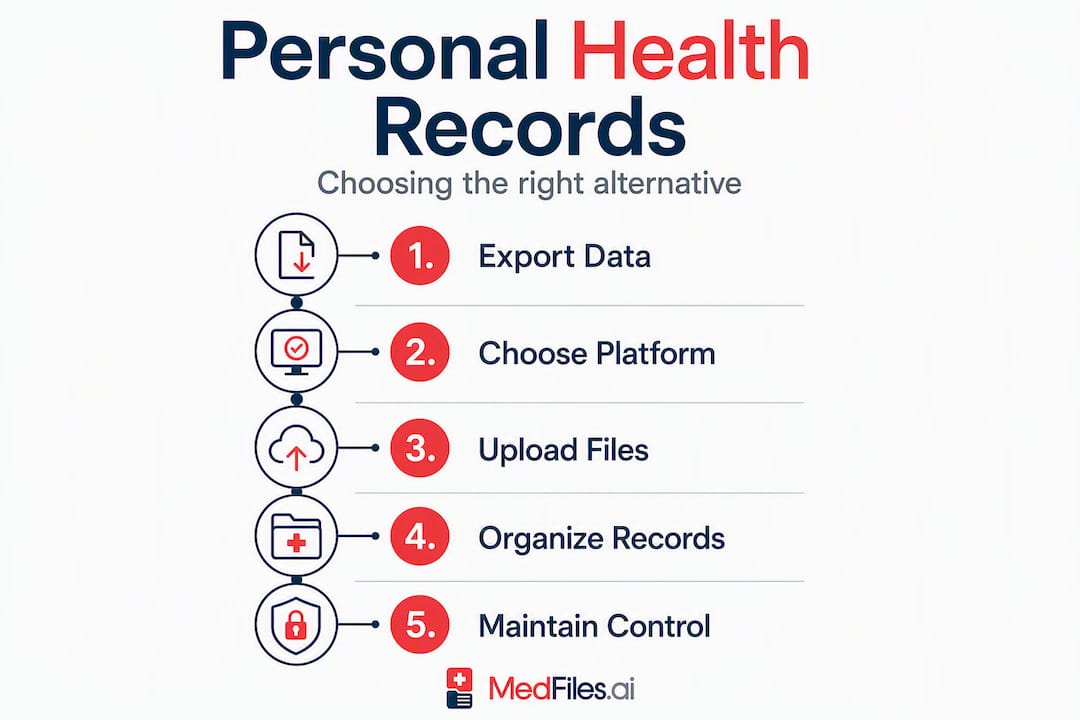
Your immediate next step: request a records export from Hopkins Medicine (PDF and CCD/FHIR format), then upload directly into your chosen platform.
Table of Contents
- What are the best hopkinsmedicine.org alternatives side by side?
- Why Medfiles is the recommended pick for most families
- MyChart (Epic): strong inside a network, limited outside it
- Apple Health Records: private and local, but platform-bound
- FollowMyHealth: a middle-ground portal worth checking
- How to request and export your records from Hopkins Medicine
- How do you choose the right alternative for your needs?
- What security and privacy basics actually affect your choice?
- What is the final verdict on the best alternative?
- Key Takeaways
- Why patient-owned records are the standard worth holding to
- Medfiles: your records, your control, starting today
- Authoritative sources and further reading
What are the best hopkinsmedicine.org alternatives side by side?
| Dimension | Medfiles | MyChart (Epic) | Apple Health Records | FollowMyHealth |
|---|---|---|---|---|
| HIPAA compliance | HIPAA-ready | HIPAA-covered entity | Apple privacy framework | HIPAA-covered entity |
| Data ownership | Patient-owned | Hospital-controlled | Device-local | Varies by clinic |
| Export / FHIR support | Yes | CCD/FHIR via portal | FHIR from providers | Varies |
| Family / multi-profile | Yes (family + pets) | One account per person | Limited | Limited |
| Secure sharing | Providers + family | Affiliated providers only | AirDrop / limited | Clinic network only |
| Security / audits | End-to-end encryption | Hospital-grade | On-device encryption | Varies by deployment |
| AI features | AI document analysis | None | None | None |
| Storage & pricing | Tiered; free trial, no credit card | Free via hospital | Free (device storage) | Free via clinic |
| Mobile app | iOS + Android | iOS + Android | iOS only | iOS + Android |
| Provider-facing access | Yes (clinician review) | Affiliated only | No | Clinic network only |
| Import from portals | Upload any PDF/CCD | Epic-to-Epic only | Participating providers | Clinic-linked only |
Key trade-offs to know:
- Hospital portals like MyChart excel at direct clinical messaging within their own network, but records stay siloed by system. If you switch providers or move cities, you start over.
- Apple Health Records stores data locally on your iPhone, which is great for privacy but creates a single point of failure if your device is lost.
- FollowMyHealth’s features vary significantly depending on which clinic deployed it, so export and family options are not guaranteed.
Why Medfiles is the recommended pick for most families

Medfiles is built for exactly the situation you are in: you have records scattered across one or more health systems, and you need a single, secure place that belongs to you, not your hospital.
Core capabilities:
- HIPAA-ready infrastructure with end-to-end encryption at rest and in transit
- Automatic document organization after upload (no manual filing)
- AI-powered analysis of uploaded documents to surface key findings
- Multi-profile management for your entire family, including pets
- Secure sharing with any provider or family member via controlled links
- Clinician review access so your doctor can see what you share
- Free trial with no credit card required
Use cases that show where it fits:
A single adult switching from Hopkins Medicine to a new provider in another state can upload their full record export and share it with the new clinic before the first appointment. A family managing records for two parents and three kids can keep every profile in one place, with separate storage per person. A caregiver handling an elderly parent’s care can upload specialist reports, imaging, and prescriptions, then share a read-only view with the primary care physician.
Pro Tip: Before uploading, rename your files clearly (e.g., “LabResults_March2025_Hopkins”) so Medfiles’s automatic organization has clean inputs to work with. It saves time on the AI analysis step.
Medfiles’s family records management is one of the few independent PHR features that genuinely covers multi-profile needs without requiring separate accounts or subscriptions per person.
MyChart (Epic): strong inside a network, limited outside it
MyChart is the patient portal most major U.S. health systems use, including many affiliated with academic medical centers. If your care stays within one Epic-connected network, it works well.
Strengths:
- Direct messaging with your care team
- Appointment scheduling and prescription refill requests
- Lab results and visit summaries from affiliated providers
- CCD/FHIR export available through the portal
Limits:
- Records from non-Epic providers do not appear automatically
- One account per person; no family profile consolidation
- If you leave the health system, access can become restricted
- No AI analysis or independent document storage
Practical note: MyChart is a useful source for your records, not a destination for long-term, portable storage. Export your CCD file from MyChart and import it into an independent platform like Medfiles to preserve continuity.
Apple Health Records: private and local, but platform-bound
Apple Health Records aggregates clinical data from participating providers directly onto your iPhone using FHIR. No cloud middleman, no subscription. For a single iPhone user with one or two providers, it is genuinely convenient.
Strengths:
- Records stored locally on device; Apple does not access them
- Automatic sync from participating health systems
- Strong privacy defaults
Limits:
- iOS only; no Android, no web access
- No family or multi-profile support
- If your provider does not participate, records do not sync
- Device loss or reset can mean data loss without a separate backup
Tip on combining tools: Export your Apple Health data as a PDF or structured file and upload it to a cloud-based PHR. That gives you local privacy plus off-device backup and portability.
FollowMyHealth: a middle-ground portal worth checking
FollowMyHealth is a vendor-agnostic patient portal deployed by many independent clinic networks and regional health systems. It sits between a full hospital portal and an independent PHR.
Strengths:
- Cross-system messaging for clinics that use it
- Aggregates records from multiple FollowMyHealth-connected providers
- Available on iOS and Android
Limits:
- Features depend entirely on how your clinic configured it
- Export and FHIR support are not consistent across deployments
- Family profile support is limited or absent in many configurations
- Not a standalone record store; records leave if you leave the clinic
Check your clinic’s specific FollowMyHealth setup before relying on it as your primary record home. If export is unavailable or family profiles are missing, an independent PHR fills that gap.
How to request and export your records from Hopkins Medicine
- Log in to MyChart at Hopkins Medicine. Go to hopkinsmedicine.org and sign in to your patient portal account.
- Navigate to “Health” then “Download My Data.” This section lets you export a CCD (Continuity of Care Document) file, which is the structured FHIR-compatible format.
- Request a full medical records release for documents not in the portal. Use the Hopkins Medical Records Release form (available online or at any registration desk). Bring a valid photo ID.
- Specify the formats you need. Request both the structured CCD/FHIR export and PDF copies of imaging reports, pathology, and any documents not captured in the digital export.
- Expect a response within 30 days. Under HIPAA, covered entities must provide access to your records within 30 days of a written request. Hopkins typically fulfills digital requests faster.
- Check for fees. HIPAA allows providers to charge a reasonable cost-based fee for copies. Electronic formats are generally lower cost than paper.
- Download and save everything. Store copies in at least two places before uploading to your chosen PHR.
Pro Tip: Always request the CCD/FHIR file in addition to PDFs. The structured file carries coded diagnoses, medications, and lab values that platforms like Medfiles can parse automatically. PDFs alone can miss that structured data, as digital health practitioners note.
How do you choose the right alternative for your needs?
Must-have checklist:
- HIPAA-ready or HIPAA-covered status confirmed on the vendor’s site
- Clear data ownership language (you own your data, not the platform)
- Export support (PDF at minimum; CCD/FHIR preferred)
- End-to-end encryption at rest and in transit
- Transparent pricing with a free trial or money-back option
- Multi-profile support if you manage records for family members
Questions to ask any vendor:
- Who owns my data if I cancel my subscription?
- Can I export everything in a portable format (CCD/FHIR)?
- Does a clinician need an account to view records I share?
- What happens to my data if the company shuts down?
- Is there emergency access, and how is consent managed?
Red flags that should disqualify a service:
- No clear privacy policy or vague language about “sharing with partners”
- Ad-supported model (your health data funds the product)
- No encryption disclosure
- No export option or data portability
- No trial period and no refund policy
Evidence-based evaluation applies to health platforms just as it does to health claims. If a vendor cannot clearly answer who owns your data, that is your answer.
What security and privacy basics actually affect your choice?
Key terms, plainly explained:
- HIPAA-ready means the platform is built to meet HIPAA technical and administrative safeguards. It does not automatically mean the platform is a HIPAA-covered entity (that applies to providers and insurers), but it does mean they take compliance seriously and will sign a Business Associate Agreement (BAA).
- End-to-end encryption means your data is encrypted before it leaves your device and decrypted only by the intended recipient. No one in between, including the platform, can read it.
- SOC 2 audit is a third-party security review confirming that a vendor’s controls meet defined standards for security, availability, and confidentiality.
- Business Associate Agreement (BAA) is a contract required under HIPAA when a vendor handles protected health information on your behalf.
Trust signals to look for on any vendor page:
- Explicit encryption disclosure (at rest and in transit)
- BAA availability
- Third-party audit reports or SOC 2 certification
- Clear data ownership and deletion policy
- Emergency access with documented consent controls
Mayo Clinic guidance reinforces the principle: favor sources and platforms that explain the evidence and controls behind their claims, not just the marketing.
This article provides general information, not legal or medical advice. Confirm current HIPAA rules and your specific rights with HHS.gov or a qualified health privacy professional.
What is the final verdict on the best alternative?
Recommended pick for most individuals and families: Medfiles. It is independent, HIPAA-ready, supports family profiles, and gives you full data portability. You own your records regardless of which providers you use.
Situation-specific alternatives:
- Staying within one Epic-connected health system? MyChart covers your day-to-day clinical needs.
- Single iPhone user, one or two providers, privacy-first? Apple Health Records is a solid complement.
- Your clinic already uses FollowMyHealth and you only need basic messaging? It works for that narrow use case.
Your next step: Export your records from Hopkins Medicine in CCD and PDF format, then upload and organize them in Medfiles with a free trial account. No credit card needed to start.
Key Takeaways
Medfiles is the strongest independent alternative to hopkinsmedicine.org for families who need HIPAA-ready storage, portability, and multi-profile management in one platform they control.
| Point | Details |
|---|---|
| Patient ownership matters | Choose a platform where you own and can export your data, regardless of which provider you use. |
| HIPAA-ready is the baseline | Confirm HIPAA-ready status and BAA availability before storing any protected health information. |
| Export both formats | Request CCD/FHIR and PDF copies from Hopkins Medicine to preserve structured data and attachments. |
| Hospital portals have limits | MyChart and similar portals are siloed by network; they work best as record sources, not long-term homes. |
| Medfiles covers the full picture | Family profiles, AI analysis, and secure sharing make Medfiles the recommended pick for most households. |
Why patient-owned records are the standard worth holding to
The conventional wisdom is that your hospital portal is “good enough.” For routine care within one system, it often is. But the moment you change providers, move to a new city, or need a specialist outside your network, a siloed portal becomes a barrier rather than a resource.
Patient-controlled portability is not a luxury feature. Clinicians and health IT specialists consistently note that records kept only in hospital portals complicate care transitions. An independent PHR preserves continuity when it matters most: a new diagnosis, an emergency away from home, or a family member who cannot speak for themselves.
Independent PHRs like Medfiles complement your clinical records. They do not replace your doctor’s notes or your hospital’s systems. What they do is give you a copy you can carry, share, and control. That distinction is worth protecting.
Medfiles: your records, your control, starting today
Most people searching for hopkinsmedicine.org alternatives are not looking for another hospital portal. They want a place that belongs to them. Medfiles gives you secure medical document storage with automatic organization, AI-powered analysis, and family profiles, all under HIPAA-ready infrastructure with end-to-end encryption.
No credit card. No lock-in. Start a free trial, upload your Hopkins Medicine export, and have your full medical history organized and shareable within minutes. If you manage records for a spouse, children, or aging parents, the family plan keeps every profile in one place. Visit medfiles.ai to start your free trial now.
Authoritative sources and further reading
For clinical evidence and health information, these are the sources worth bookmarking:
- MedlinePlus (U.S. National Library of Medicine) — patient-friendly summaries of conditions, treatments, and medications, curated from NIH sources
- NCCIH Health Information — evidence-based reviews of complementary and integrative health approaches
- PubMed / ClinicalTrials.gov — peer-reviewed research and active clinical trials; use these to verify any clinical claim you encounter online
- NCBI StatPearls — clinical reference entries written for practitioners but accessible to informed patients
- Mayo Clinic — plain-language clinical guidance with evidence citations
How to use these: Go to MedlinePlus or Mayo Clinic for general health education. Go to PubMed or ClinicalTrials.gov when you need to verify a specific clinical claim against peer-reviewed literature. NCCIH is particularly useful for evaluating integrative or complementary approaches your provider may recommend.