Medical Records Retention: A Family Storage Plan
Learn how to efficiently manage your medical records retention for better health management. Secure your documents and ensure easy access.

Medical Records Retention: A Family Storage Plan
Personal medical records retention means keeping your health documents, digitally and long-term, in a secure archive you control and can share on your terms. The first step takes less time than you think.
Build a one-page emergency summary today. List current medications, allergies, major diagnoses, and emergency contacts. Then start importing your most critical recent records, discharge papers, imaging reports, prescription lists, into a secure account or an encrypted folder.
Before you upload anything sensitive, check two things:
- HIPAA-ready infrastructure with a Business Associate Agreement (BAA), which signals the provider carries legal responsibility for your data’s security.
- End-to-end encryption, so your files stay unreadable to anyone but you and the people you approve.
Johns Hopkins Medicine notes that a personal health record with ready access can be lifesaving during an emergency. A platform like MedFiles.ai is built around exactly those two checks, HIPAA-ready storage and encryption, which makes it a reasonable starting point if you’d rather not stitch together folders and email attachments yourself.
TL;DR:
- Keep immunization records, surgical reports, imaging, and chronic condition histories permanently to ensure ongoing access and legal protection.
- Implement the 3-2-1 backup rule by maintaining three copies on two media types, with at least one stored offsite, and regularly test your restore process.
- Build daily habits like scanning new documents within 24 hours and updating your emergency summary after each appointment to ensure quick access in emergencies.
- Verify platforms for HIPAA readiness, signed Business Associate Agreements, and encryption features before trusting them with your sensitive health data.
- Use platforms like MedFiles.ai for family-wide, secure, and organized storage that supports multi-profile management, emergency sharing, and full data export.
Table of Contents
- What Medical Documents Should You Keep, and for How Long?
- What Security Features Actually Matter for Storing Health Data?
- How Do You Back Up Medical Records So They Survive a Disaster?
- How Should You Organize a Family Medical Records Archive?
- How Do You Set Up Emergency Access to Medical Records?
- How Do You Choose a Medical Record Storage Service?
- What Are the Legal Rules Around Keeping Medical Records?
- How Long Should You Keep Different Types of Medical Records?
- When and How Should You Dispose of Old Medical Records?
- What Rights Do You Have to Access and Correct Your Medical Records?
- What We Think Actually Matters in Medical Records Retention
- Get Your Family’s Records Organized With MedFiles.ai
- Key Takeaways
- Sources
What Medical Documents Should You Keep, and for How Long?
Not every record deserves the same shelf life. Some belong in your archive forever. Others can be cleared out once their job is done.
Keep these permanently:
- Immunization records
- Surgical reports
- Imaging reports (X-rays, MRIs, CT scans)
- Chronic condition histories (diabetes, autoimmune disorders, cardiac conditions)
- Major procedural records
- Family health history
Keep these for a defined window. Lab results should stick around for at least five years, longer if they relate to an ongoing condition, according to SingleCare’s guidance on personal health records. Bills and Explanation of Benefits (EOB) statements need only 1 to 7 years, depending on your tax situation and any insurance disputes still in play. Your prescription list is different: it’s not a “keep for X years” document, it’s a living list you update every time something changes.
Special cases deserve extra care. A child’s vaccination and growth records should be saved permanently. They matter for school enrollment, sports physicals, and future medical decisions decades from now. The same goes for hospital discharge packets. Request the full record before you leave the hospital, not weeks later when the request gets buried in a phone queue.
Patient portals hold pieces of this puzzle, but Merck Manuals points out that portals aren’t a complete family archive. They represent one provider’s system, and that system can change, restrict access, or disappear. Download what you need and consolidate it somewhere you control.
What Security Features Actually Matter for Storing Health Data?
A consumer cloud drive and a HIPAA-ready platform are not the same category of product, even if both let you upload a PDF. The difference is accountability. When a service signs a Business Associate Agreement, it accepts legal responsibility for protecting your health information under federal privacy rules. Most photo-storage apps and generic cloud drives never make that commitment, because they were never built for protected health information in the first place.
Before trusting any platform with your family’s records, verify these items:
- End-to-end encryption, so data is unreadable in transit between your device and the server.
- Encryption at rest, so stored files stay protected even if a server is compromised.
- Multi-factor authentication (MFA), adding a second lock beyond your password.
- Audit logs, showing who accessed what and when.
- Exportability, guaranteeing you can pull your data out in a usable format if you ever switch services.
- A clear data ownership and deletion policy, spelling out what happens to your files if you close the account.
Consumer messaging apps and unencrypted photo galleries fail almost all six checks. Research on family record organization found that many people assume the app on their phone is covered by HIPAA when it isn’t, which means their most sensitive documents sit exposed with none of the guarantees they’d assume come standard.
Pro Tip: Search any platform’s privacy page for the phrase “Business Associate Agreement” before you upload a single file. If it’s not there, the service isn’t built for protected health information, no matter how polished the app looks.
How Do You Back Up Medical Records So They Survive a Disaster?
The 3-2-1 backup rule is the standard for protecting anything you can’t afford to lose: three copies of your data, stored on two different types of media, with at least one copy kept offsite. Applied to medical records, that looks like this:
- Copy one: your primary HIPAA-ready cloud account.
- Copy two: an encrypted external hard drive at home.
- Copy three: a secondary offsite cloud account or a drive stored at a relative’s house.
Automate as much of this as you can. Many patient portals support bulk export in CCD or CCDA format, or at least batch PDF downloads. Schedule a recurring monthly or quarterly reminder to pull fresh exports and feed them into your archive instead of waiting until you need something urgently.
A few habits make this system actually reliable instead of theoretical. Encrypt your external drive with a passphrase, and store that passphrase only in a password manager, never in a sticky note or a text file on the same drive. Test your restore process every quarter: open the backup, confirm the files open, confirm the password still works. A backup you’ve never tested is a backup you’re only guessing works.

How Should You Organize a Family Medical Records Archive?
A folder system only works if you can find something in under thirty seconds during a crisis. The structure that holds up over years follows a simple pattern: family member, then category, then date.
- Create a top-level folder for each family member (including pets, if you’re tracking their records too).
- Inside each, build category folders: Lab Results, Imaging, Prescriptions, Immunizations, Visit Summaries.
- Name every file starting with the date in YYYY-MM-DD format, followed by a short description:
2026-03-14-bloodwork-annual-physical.pdf.
That date-first naming convention isn’t a formality. It means files sort chronologically without you touching a thing, and organization guides for family records point to this exact pattern as the difference between an archive you can search in seconds and one you dread opening.
Maintenance is where most systems quietly fail. The fix is a five-minute habit, not a weekend project. Scan or upload any new document within 24 hours of receiving it, before it lands in a junk drawer. Update your one-page emergency summary any time a diagnosis, medication, or allergy changes. Set a quarterly reminder to review the whole archive for anything missing.
Pro Tip: Attach the five-minute habit to something you already do, like scanning documents in the car before you leave the parking lot after an appointment. Habits that piggyback on existing routines stick far longer than ones you have to remember cold.
How Do You Set Up Emergency Access to Medical Records?
Your one-page emergency summary needs to answer the questions a paramedic or ER doctor asks in the first sixty seconds: current medications, known allergies, major diagnoses, any implants or devices, emergency contacts, and your primary clinician’s name and number.
Accessibility matters as much as content. A PDF pinned to your phone’s home screen, a quick-access feature inside a secure app, and a printed copy in a home safe cover the three most likely scenarios: you’re conscious and can pull it up, someone else has your phone, or your phone is dead or missing entirely.
Controlled sharing extends this further. Time-limited links let you share a specific record with a specialist without granting permanent access. Read-only clinician access means a doctor can view what they need without editing rights. And a trusted-person recovery protocol, someone named in advance who can access your account if you’re incapacitated, closes the gap that most people never think about until it’s too late. Explore secure sharing options for families if you’re setting this up for the first time. Pairing digital records with a medical ID gives first responders an immediate signal even before anyone opens your phone.
How Do You Choose a Medical Record Storage Service?
Run any platform through this checklist before you commit your family’s records to it:
- Offers a signed BAA and HIPAA-ready infrastructure
- Lets you export all your data, not just view it
- Supports multiple profiles for family members
- Maintains audit logs of who accessed what
- Uses encryption at rest and in transit
- Publishes a clear, readable privacy policy
- Provides account-recovery options for trusted contacts
A free tier is fine for a single healthy adult tracking a handful of documents. Once you’re managing a family, coordinating with caregivers, or need clinical sharing features, a paid plan usually pays for itself in time saved and features unlocked, particularly storage capacity and multi-profile support.
Before signing up, ask directly: Does the BAA cover this specific plan tier? What’s the data retention policy if I stop paying? What formats can I export to? Walk away from any service that’s vague about deletion rights or that monetizes your data for advertising. That’s not a gray area. It’s a dealbreaker.
What Are the Legal Rules Around Keeping Medical Records?
Retention rules for the records your providers keep vary by state and by document type, often ranging from several years to indefinitely for certain categories like minors’ records. That variation is exactly why relying on your provider’s retention schedule as your own backup plan is risky. States set different minimums for how long a hospital or clinic must retain your file, and those rules exist to protect the institution’s compliance obligations, not your personal access.
Here’s the practical distinction that matters for your own planning: HIPAA gives you the right to request and receive copies of your records, but no federal law obligates providers to keep them forever. A clinic that closes, merges, or switches record systems can lose or purge documents that fall outside their state’s mandated window. If you’re relying solely on “the doctor’s office has it,” you’re betting your health history on an entity that has no long-term obligation to preserve it for your benefit.
This is the core argument for keeping your own copy, independent of any provider’s system. Personal retention isn’t about replacing institutional recordkeeping. It’s about making sure you have a copy that outlives any single provider relationship, any practice merger, and any software migration a clinic decides to make. Your archive answers to you, not to a state’s minimum retention statute written for a hospital’s compliance department.
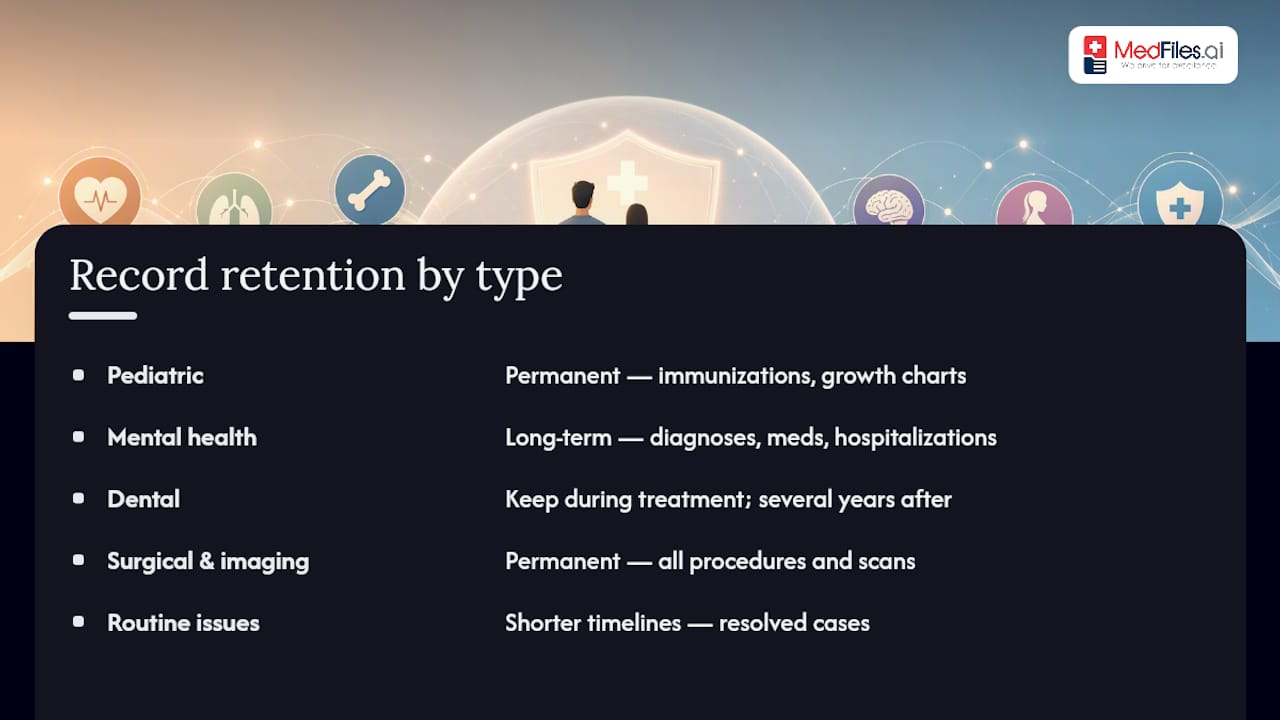
How Long Should You Keep Different Types of Medical Records?
Retention needs shift depending on what kind of record you’re holding, and treating every document the same way leads to either clutter or gaps.
Pediatric records deserve permanent retention. Immunization histories follow a child into adulthood for school, employment, and travel requirements, and growth charts help identify patterns years later that wouldn’t be obvious from a single visit.
Mental health records carry more nuance. Therapy notes and psychiatric evaluations should generally be kept long-term, especially anything documenting a diagnosis, medication history, or hospitalization. These records matter for continuity of care if you switch providers, and they matter legally if a diagnosis history ever becomes relevant to disability claims or workplace accommodations.
Dental records, including X-rays and treatment plans, are worth keeping for the life of any ongoing dental work and for at least several years afterward. They matter more than people expect when switching dentists or insurance carriers, since new providers often want history rather than starting from scratch.
Surgical and imaging records belong in the permanent category regardless of the body part or specialty involved. A knee MRI from a decade ago can matter enormously if the same joint causes problems again.
The common thread: anything tied to an ongoing condition, a developing child, or a procedure with lasting physical effects belongs in permanent storage. Routine, resolved issues, a one-time flu treatment, a minor sprain, can follow shorter timelines.
When and How Should You Dispose of Old Medical Records?
Not every document needs to live in your archive forever, and holding onto everything indefinitely just makes the important files harder to find. Once a record passes its useful retention window, typically routine bills and EOBs after your state’s tax and insurance windows close, it’s safe to remove.
Disposal method matters as much as timing. Never toss paper medical records directly into the trash or recycling. These documents contain enough personal information, Social Security numbers, dates of birth, insurance IDs, to enable identity theft. Shred paper documents completely before disposal, using a cross-cut shredder rather than a strip-cut model, which is far easier to reconstruct.
For digital files, “deleting” isn’t always permanent. Moving a file to the trash bin on your device or cloud account often leaves it recoverable for days or weeks. Confirm your storage provider’s deletion policy specifies permanent erasure, not just removal from your visible file list. This is exactly the kind of detail worth checking in a provider’s terms before you ever need to invoke it.
A simple rule of thumb: if a document falls into the permanent-keep category outlined earlier (immunizations, surgical reports, chronic condition histories), don’t destroy it, digitize it and archive it instead. Reserve destruction for genuinely time-limited documents, old EOBs, resolved billing disputes, and superseded prescription lists, once they’ve served their purpose and cleared any relevant tax or legal window.
What Rights Do You Have to Access and Correct Your Medical Records?
Federal law gives you meaningful control over your own health information, and most people never exercise the full extent of it. You have the right to request copies of your medical records from any provider, in either paper or electronic format, typically within 30 days of your request.
You also have the right to request corrections. If a record contains inaccurate information, a wrong diagnosis code, an outdated medication list, an error in your family history, you can formally request an amendment. The provider must respond, and if they decline, they’re required to document your disagreement in the file.
Transfer rights matter just as much when you switch doctors or move. You can request that records be sent directly from one provider to another, and providers generally cannot charge you an unreasonable fee for this transfer or use cost as a barrier to your own information.
These rights only help you if you actually use them. Waiting until you’re already sitting in a new doctor’s office, hoping records transferred in time, puts you at the mercy of two administrative systems that may or may not communicate well. Requesting your own copies proactively, and keeping them in an archive you control, sidesteps that entire dependency. It’s the difference between hoping a system works and knowing your information is already in hand.
What We Think Actually Matters in Medical Records Retention
Most advice on this topic treats retention like a filing project: sort your papers, label your folders, done. That misses the point. The real test of a retention system is whether it works at 2 a.m. in an emergency room when you can’t remember your child’s penicillin allergy status.
The conventional advice, “keep everything, forever, somewhere”, fails because it optimizes for completeness over speed. A thousand well-organized files are useless if nobody can pull up the one page a doctor needs in the next ninety seconds. That’s why the emergency summary deserves more attention than most guides give it, and why the five-minute-per-appointment habit matters more than any elaborate filing system you set up once and abandon.
Prioritize in this order: build the emergency summary first, establish the 3-2-1 backup second, and only then worry about deeper organization. A platform built around HIPAA-ready storage and family profiles, which is exactly what MedFiles.ai offers, removes most of the manual labor from that stack. The habit is what makes it last.
— Team
Get Your Family’s Records Organized With MedFiles.ai
MedFiles.ai gives you a done-for-you version of everything covered above, instead of stitching together folders, drives, and password managers yourself. The platform runs on HIPAA-ready infrastructure with a Business Associate Agreement, end-to-end encryption, and security controls built specifically for protected health information, not repurposed from a generic file-sharing app.

Multi-profile management lets you organize records for every family member, including pets, under one account, with AI-powered organization sorting incoming documents automatically instead of leaving that to you at midnight. Secure sharing gives caregivers and clinicians read-only access without handing over your whole archive, and full export rights mean your data stays yours if you ever decide to leave. WhatsApp alerts and quick-access emergency features handle the “2 a.m. in the ER” scenario the checklist above is built around.
Subscription tiers scale from individual use to full family plans, and you can start a free trial without a credit card to see whether the setup fits how your household actually manages health information.
Key Takeaways
Personal medical records retention works best as a digital-first system combining permanent storage for critical documents, a 3-2-1 backup plan, and a one-page emergency summary kept current after every appointment.
| Point | Details |
|---|---|
| Keep critical records permanently | Immunizations, surgical reports, imaging, and chronic condition histories should never be deleted. |
| Apply the 3-2-1 backup rule | Maintain three copies across two media types, with one copy stored offsite. |
| Build a five-minute habit | Scan documents within 24 hours and update your emergency summary after each visit. |
| Verify security before uploading | Confirm HIPAA-ready status, a signed BAA, and end-to-end encryption before trusting any platform. |
| Consider MedFiles.ai as your archive | It combines HIPAA-ready storage, family profiles, and emergency access in one platform built for this exact checklist. |
Sources
- Medical Records: Getting organized | Johns Hopkins Medicine
- 3-2-1 backup rule explanation
- Handling medical records | Merck Manuals