Patients & Caregivers: Share Records Across Systems via Expiring Links
Gather and send medical records securely. Use a patient managed PHR, assert your HIPAA rights, and share via expiring encrypted links to keep control of...

Patients & Caregivers: Share Records Across Systems via Expiring Links
Use a patient-managed personal health record (PHR) to gather your files from every provider portal, then send them with secure, expiring links instead of email attachments. This lets you share records across systems without losing control of who sees them or how long they stay accessible. Document every request and every disclosure. That combination, aggregating, verifying, sharing securely, logging it, is the fastest path to getting your history in front of the right doctor, family member, or specialist.
TL;DR:
- Sharing records via secure, expiring links provides better control and minimizes the risk of data exposure compared to unencrypted email transfers.
- Most providers respond within 30 days to records requests, but it’s essential to verify completeness and request specific documents to avoid missing older or non-digital files.
- Direct transfers using FHIR-enabled apps or portal-to-portal uploads are the safest options, with encrypted links as a strong alternative, while unencrypted email should be avoided.
- Sending only the necessary information, such as specific date ranges or document types, aligns with HIPAA’s minimum necessary principle and reduces privacy risks.
- Managing family access requires documented authority and structured profiles, with shared emergency summaries to facilitate quick caregiver responses during crises.
Table of Contents
- What Is a Personal Health Record, and How Is It Different From a Portal?
- How Do You Get Your Records From Each Provider?
- What’s the Safest Way to Share Records Across Systems?
- How Much Should You Actually Share?
- How Do You Set Up Family and Emergency Access?
- What Do You Do If a Provider Delays or Refuses?
- What Do Most People Get Wrong About Sharing Records?
- Let MedFiles.ai Handle the Steps Above
- Where This Guidance Comes From
- Sources
- FAQ
What Is a Personal Health Record, and How Is It Different From a Portal?
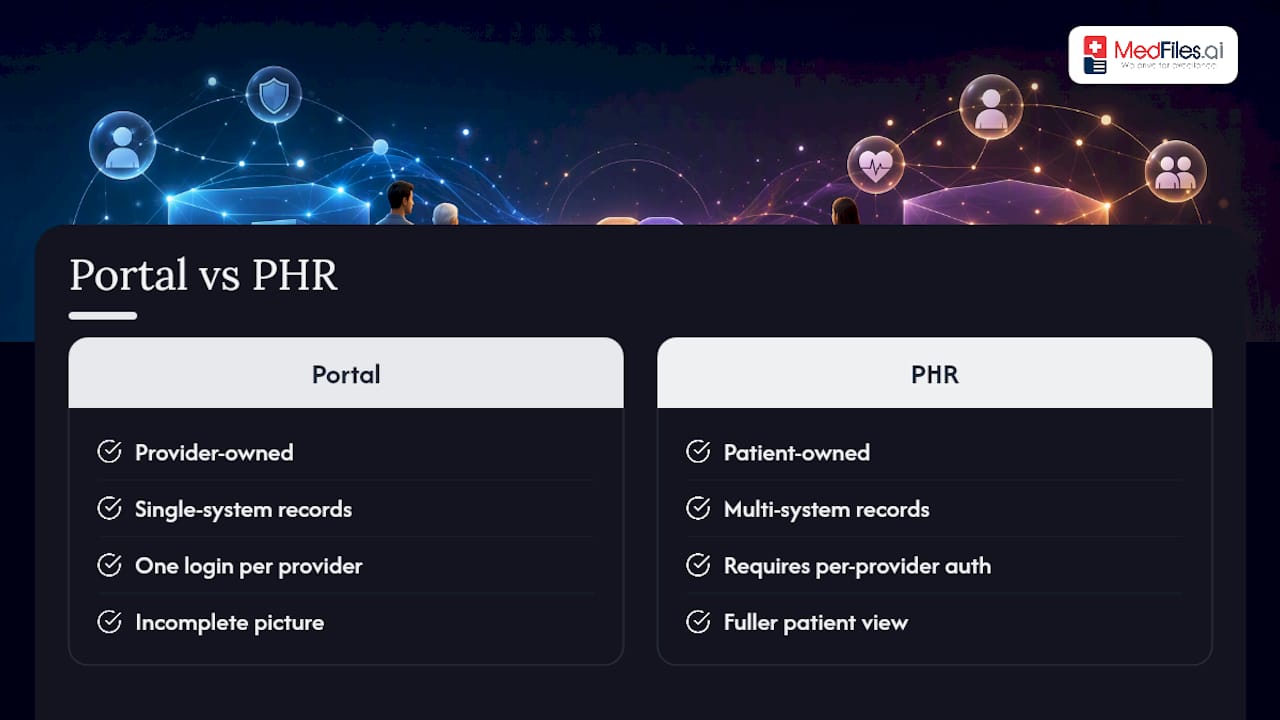
A patient portal belongs to one provider. It shows you your labs, notes, and visit summaries from that clinic or hospital system, but it stops there. A personal health record (PHR) is different: you own it, and it pulls in documents from every provider you’ve ever seen, not just one.
That distinction matters more than it sounds. If you’ve had care at three different systems, three portals is three logins, three formats, and three incomplete pictures. A PHR that imports data from multiple sources gives you and any new doctor a fuller view, which research on contemporary PHRs links to better continuity of care, especially when you’re switching providers or seeing a specialist for the first time.
There are limits worth knowing upfront. Authentication with each provider still takes some manual work, and imported data isn’t automatically clean. Lab values, medication lists, and diagnosis codes sometimes carry formatting quirks or outdated entries. Peer-reviewed research on digital health records has found that adoption and accuracy both improve when patients actively check what came through, rather than assuming every import is correct. Treat your PHR as a well-organized starting point, not a replacement for asking your doctor to confirm anything critical.
How Do You Get Your Records From Each Provider?
Every provider you’ve seen holds a piece of your history, and HIPAA gives you the legal right to all of it. Here’s the order that gets results fastest:
- Check the patient portal first. Most systems let you download visit summaries, lab results, and immunization records as PDFs directly from the portal. ONC recommends starting here before contacting anyone, since a large share of what you need is often already available for download.
- Identify the gaps. Portals frequently miss older records, imaging reports, or notes from before the system went digital. Make a short list of exactly what’s missing.
- Submit a signed release form for anything the portal doesn’t have. Include your full name, date of birth, the date range you need, the specific documents (imaging, pathology, referral letters), and where to send them.
- Call the medical records department if the form sits without a response. Ask for a reference number and a callback date. If you’re picking records up in person, bring photo ID and the same details you’d put on a release form.
The HIPAA Privacy Rule requires providers to respond without unreasonable delay, and most must comply within 30 days. Some charge a reasonable, cost-based fee for copies, but they can’t use fees or paperwork to stall you indefinitely.
What’s the Safest Way to Share Records Across Systems?
Not every sharing method carries the same risk, and picking the right one depends on who’s receiving the file and how fast you need it there.
Best option: direct transfers. If the receiving practice supports it, a direct portal-to-portal upload or an EHR-to-EHR transfer using FHIR, the API standard behind most modern patient apps, skips manual handling entirely. Ask the front desk if they accept a SMART on FHIR link; more clinics do every year.
Strong option: expiring encrypted links. A PHR-generated link that self-destructs after a set window, say seven days, keeps a stray forward or an old email thread from exposing your history months later.
Acceptable with safeguards: encrypted email or SFTP. TLS or S/MIME-encrypted email, secure file transfer, or encrypted physical media all work when a direct transfer isn’t available. Standard, unencrypted email is not acceptable for anything containing your health information.
Security settings worth defaulting to:
- Link expiration of 7 days or less
- AES-256 encryption for anything stored or in transit
- Password protection on shared links
- Two-factor authentication on your PHR account, wherever it’s offered
Pro Tip: Set every shared link to expire automatically, even for a doctor you trust completely. The risk isn’t the recipient. It’s the link sitting in an inbox indefinitely after the appointment is long over.
Human error, not hacking, is the most common way health data ends up somewhere it shouldn’t. Research on health data disclosures points to recipient verification and disclosure logs as the two controls that actually prevent it.
How Much Should You Actually Share?
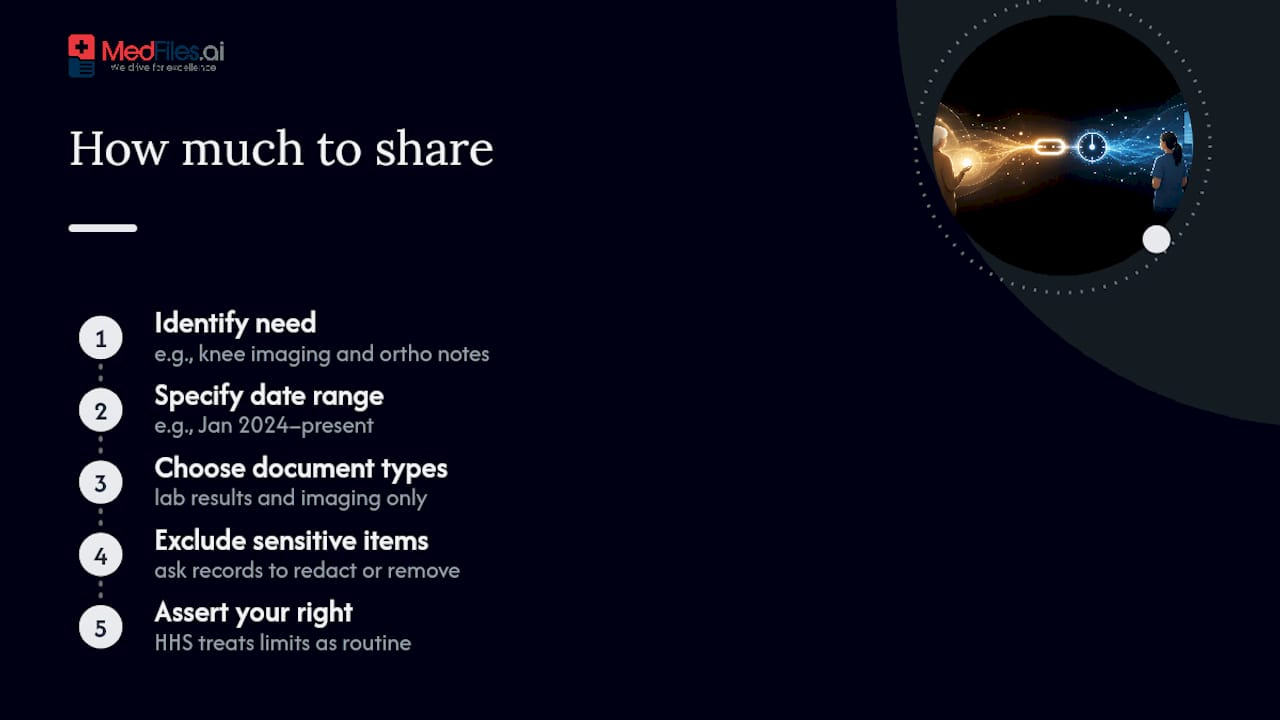
HIPAA’s “minimum necessary” principle means sending exactly what the recipient needs, not your entire chart. A specialist evaluating a new knee injury needs imaging and orthopedic notes, not your full psychiatric history from a decade ago.
In practice, that means specifying a date range (“records from January 2024 to present”) or a document type (“lab results and imaging only”) on every release form you sign. If a request pulled in something unrelated and sensitive, ask the records office to exclude or redact it. HHS’s own guidance on minimum necessary treats this as a routine right, not a special favor, so don’t hesitate to be specific.
How Do You Set Up Family and Emergency Access?
Caregivers need documented authority before a provider will hand over someone else’s records, not just a verbal okay from a relative.
- Keep a copy of the power of attorney, guardianship paperwork, or HIPAA authorization on file with each provider and in your own PHR.
- Set up separate profiles for children, elderly parents, and even pets so records don’t get mixed together in one folder.
- Build a one-page emergency summary: allergies, current medications, chronic conditions, and emergency contacts.
- Share that summary through a link caregivers can access instantly, without waiting on a portal login during a crisis.
A PHR that supports multiple profiles under one account makes this far less chaotic than juggling separate logins for every family member.
What Do You Do If a Provider Delays or Refuses?
Start with a paper trail. Every request, every phone call, every confirmation email gets logged with a date. If 30 days pass with no response, that’s your cue to escalate, not wait longer.
Call the medical records office first and ask for the privacy officer if the front desk can’t help. If that stalls too, you can file a complaint directly with HHS, which oversees HIPAA compliance and takes access complaints seriously.
Keep signed release forms, mailing receipts, and any confirmation of delivery. Once you receive the records, confirm the file opens correctly and matches what you requested before you consider the request closed.
What Do Most People Get Wrong About Sharing Records?
The most common mistake is sending an entire chart when a doctor needs two pages. The second is skipping recipient verification, firing off a link without confirming who’s actually on the other end. The fix is simple: build one clean share packet per situation, use expiring links every time, and keep an emergency summary ready before you need it, not during a crisis.
— Team
Let MedFiles.ai Handle the Steps Above
Medfiles is the alternative to juggling five provider portals and a folder of scanned PDFs. Every step in this guide, aggregating records, verifying recipients, sending expiring encrypted links, lives inside one HIPAA-ready platform instead of a patchwork of logins and email attachments.
Upload one document and try sending it through a secure expiring link to see how fast a clinician can receive it without you touching an email attachment. Multi-profile management covers your kids, your parents, and even your pets under one account, and the Doctor Center lets your provider review shared files directly. Start with the free plan to test it, or choose paid plans that offer additional features such as AI-powered document analysis and family record management. Current prices are available on the pricing page. Compare the details on the pricing page and set up your account today.
Where This Guidance Comes From
The steps above draw on HHS guidance on HIPAA patient access rights, ONC’s practical instructions for obtaining records, and peer-reviewed research on PHR utility and continuity of care. For deeper reading on reducing disclosure risk, see this HIPAA security risk analysis checklist.
This article is general information, not a substitute for advice from a qualified doctor. Consult a qualified healthcare professional about your own circumstances before acting on anything here.
Sources
- Hhs
- Get It - ONC - Office of the National Coordinator for Health Information Technology
- Utility, Value, and Benefits of Contemporary Personal Health Records: Integrative Review and Conceptual Synthesis
- Patient introduction to FHIR | HL7
FAQ
Can I Legally Get Copies of All My Medical Records?
Yes. The HIPAA Privacy Rule gives you a legal right to access and obtain copies of your own medical records from any covered provider, and they cannot create unreasonable barriers to that access.
How Long Can a Provider Take to Send My Records?
Most providers must comply with a records request without unreasonable delay, typically within 30 days. If that window passes, contact the privacy officer or file a complaint with HHS.
Is Email Safe for Sending Medical Records?
Standard email is not safe for sharing medical records because it isn’t encrypted by default. Use encrypted email (TLS or S/MIME), a secure portal upload, or an expiring encrypted link instead.
What Is FHIR, and Do I Need to Understand It?
FHIR is the technical standard many patient apps and portals use behind the scenes to export and connect your records across systems. You don’t need to understand the mechanics, just know that a “SMART on FHIR” link from your provider is a safe, direct way to share.
Does MedFiles.ai Cost Anything to Try?
You can start with MedFiles.ai’s free plan with no credit card required. Paid tiers begin at $2.99 per month for the Understand Your Health plan, with full pricing details listed on the site.