Automatic Medical Document Organization for Families
Experience hassle-free health management with automatic medical document organization. Upload, tag, and share records effortlessly and securely.

Automatic Medical Document Organization for Families
Automatic medical document organization means software scans, sorts, tags, and indexes your medical records the moment you upload them. No manual folders. No guessing which visit summary matches which lab result. If you’re managing records for yourself or a family member, the fastest path forward is a HIPAA-ready digital vault built for exactly this.
- Upload lab results, prescriptions, and reports.
- Let AI tag and timeline them automatically.
- Share instantly with family or your doctor.
Key Takeaways
Automatic medical document organization works because it removes manual sorting and puts a searchable, shareable family record where every caregiver can reach it.
| Point | Details |
|---|---|
| Automation beats folders | OCR and AI tagging sort documents by type and date without manual filing. |
| Caregiver burden is real | 26% of family caregivers report major coordination difficulty, often at hospital discharge. |
| Security checklist first | Confirm HIPAA-readiness, encryption, access logs, and revocable sharing before uploading records. |
| Setup takes a weekend | Plan a few focused hours to import records, then five minutes per new appointment. |
| Medfiles matches the checklist | MedFiles.ai offers HIPAA-ready encryption, AI tagging, multi-profile support, and a free trial. |
Table of Contents
- What Does Automatic Medical Document Organization Actually Mean?
- Why Does an Organized Vault Matter for Caregivers?
- What Features Separate a Real Organizer From a Digital Folder?
- How Do You Set Up an Automatic Medical Vault?
- What Privacy and Security Details Actually Matter?
- How Much Does This Cost and How Long Does It Take?
- When Does an Organized Vault Make the Biggest Difference?
- How Does MedFiles.ai Handle Automatic Organization?
- Try Automatic Organization Before You Commit to It
- Frequently Asked Questions
- Sources
What Does Automatic Medical Document Organization Actually Mean?
Automatic medical document organization is the process of scanning, extracting, tagging, and indexing your personal health documents so you can find and share them without digging through folders. It relies on optical character recognition (OCR) to read scanned pages and AI models to sort them by document type, date, and provider — a process detailed in this guide on digital advocacy that explains how technology can empower patients.
This is different from an electronic health record (EHR), which your doctor’s office owns and controls. It’s also different from a tethered patient portal, which only shows records from one health system. A personal health record that you control can pull from many sources at once.
Three practical differences matter:
- Control: You own the account, not the hospital.
- Portability: Your records move with you between providers.
- Sharing: You decide who sees what, and for how long.
Why Does an Organized Vault Matter for Caregivers?
An organized record vault solves the exact problem that overwhelms most family caregivers: keeping track of scattered paperwork across multiple doctors. It pays off most at hospital discharge, in the emergency room, and during ongoing chronic care.
A significant share of family caregivers report difficulty coordinating care for aging parents, and that friction often peaks right after a hospital discharge, according to AARP and the National Alliance for Caregiving. A missed medication change or an overlooked follow-up appointment at that moment can send someone right back to the hospital.
An automatically organized vault helps with:
- Pulling up a current medication list during an ER visit.
- Tracking discharge instructions so nothing slips through.
- Giving every sibling or caregiver the same access, at the same time.
- Spotting trends in lab values across specialists for chronic conditions.
This isn’t paperwork for its own sake. It’s the difference between calling three offices in a panic and opening an app.
What Features Separate a Real Organizer From a Digital Folder?
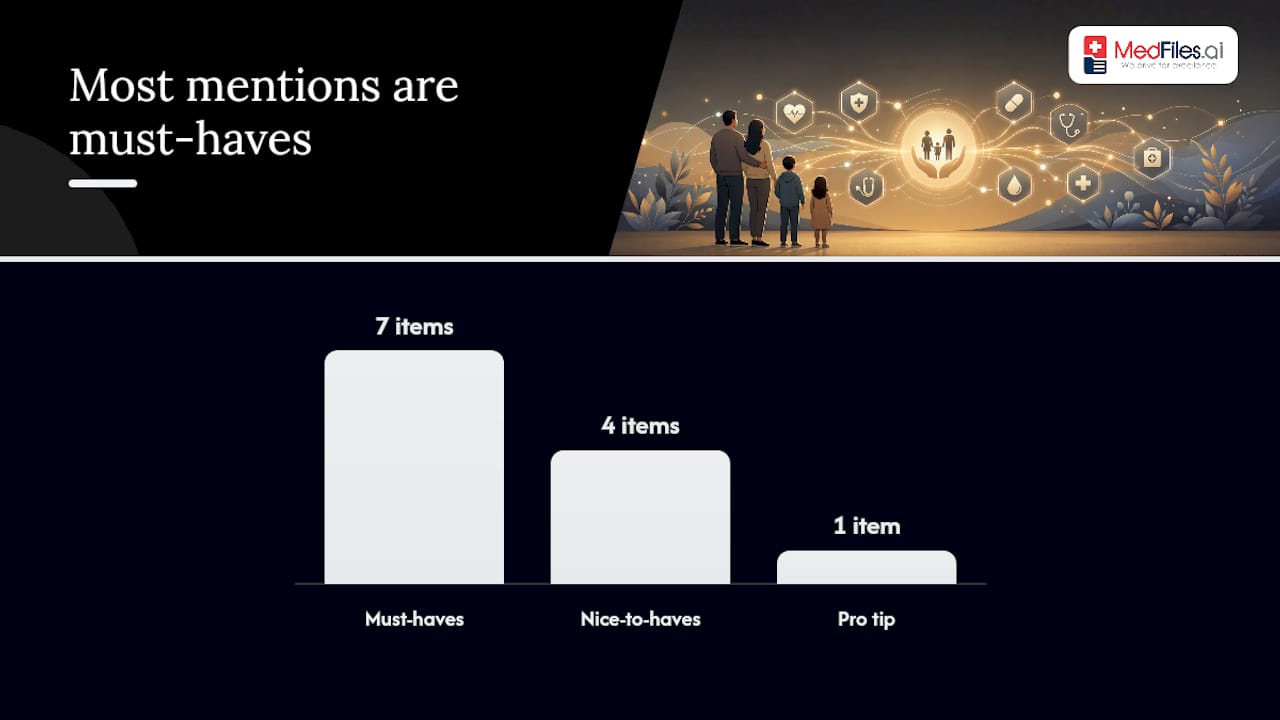
A folder full of PDFs isn’t organization. Real automatic organization requires specific technical pieces working together, and some matter far more than others.
Must-haves:
- HIPAA-ready infrastructure and end-to-end encryption, in transit and at rest.
- Accurate OCR and auto-tagging that correctly labels lab results, prescriptions, and imaging.
- A timeline or index view that sorts documents chronologically by provider and visit.
- Multi-profile support so you can manage records for a spouse, kids, or aging parents from one account.
- Secure sharing controls with revocable links, not just an email attachment.
- Access logs showing who viewed or downloaded a document, and when.
- Bulk import from patient portals and scanned paper, not just one file at a time.
Nice-to-haves:
- Biomarker trend charts for things like blood pressure or A1C.
- Clinician-sharing workflows built for a doctor’s review, not just a patient’s.
- Mobile scanning with automatic cropping and glare correction.
- Two-factor authentication and offline export options.
Pro Tip: Before trusting any platform with real records, upload three sample documents during the free trial, a lab report, a prescription, and a visit summary, then check whether the auto-tagging correctly labels the document type, date, and provider. If it mislabels basic documents, it will mislabel the ones that matter in an emergency.
How Do You Set Up an Automatic Medical Vault?
Getting a family’s records organized takes a focused afternoon, not weeks. Here’s the order that actually works:
- Gather your document sources. List every provider, pharmacy, and lab your family has used in the past two to three years.
- Choose a secure organizer. Confirm HIPAA-readiness and encryption before you upload anything.
- Bulk-download portal records. Most patient portals let you export visit summaries and lab results as PDFs in a few clicks.
- Scan remaining paper. Old discharge papers or handwritten prescriptions can go in with your phone camera.
- Import and let the system tag everything. This is where the automation happens.
- Invite trusted caregivers. Set permissions so a sibling or spouse sees what they need, no more.
- Verify and reconcile. Cross-check one sample encounter note, confirm medication dates line up, and make sure lab values mapped to the right test.
The Mayo Clinic notes that a well-maintained personal health record works best when it consolidates information from every provider you see, not just one.
Pro Tip: Treat the first setup as a weekend project. After that, spend five minutes after every appointment uploading the new visit summary. That habit keeps the vault current without ever feeling like a chore.
What Privacy and Security Details Actually Matter?
Not every security claim on a landing page holds up, so check for these specific things before uploading anything sensitive:
- HIPAA-readiness, meaning the company operates under a business associate agreement.
- End-to-end encryption, both while data moves and while it sits in storage.
- Two-factor authentication on your account login.
- Clear data ownership, meaning you can export or delete your records anytime.
- Access logs that show exactly who viewed or downloaded a file.
- Revocable sharing links instead of permanent access grants.
Portability protects you if you ever switch services. Access logs matter because they let you catch unauthorized sharing before it becomes a real problem. Individuals also have a legal right to request copies of their own medical records under HIPAA rules, so don’t hesitate to pull records directly from a provider if a portal export fails.
Statistic to note: online access to personal health records has expanded rapidly and is linked to greater patient empowerment, a shift that accelerated once telemedicine went mainstream.
Use unique passwords, lock your phone with a passcode, and keep one printed emergency summary in a safe place at home. Digital backups fail sometimes. Paper doesn’t.
How Much Does This Cost and How Long Does It Take?
Most families can finish the initial setup in a single weekend, or a few focused hours per person if you’re only organizing your own records. After that, plan on roughly five minutes per appointment to keep things current.
Pricing usually follows one of a few shapes:
- A free tier with limited storage, good for testing the platform.
- A flat monthly subscription for individuals.
- A family plan covering multiple profiles, often with an annual discount.
- A free trial with no credit card required, so you can test auto-tagging before paying anything.
Watch for hidden costs like paid clinician review add-ons, extra fees for large imaging files, or charges to export your data if you ever leave. Ask about all three before you commit to a plan.
When Does an Organized Vault Make the Biggest Difference?
Some situations turn a scattered folder of paperwork into a genuine liability. These are the moments where automatic organization earns its place.
- Hospital discharge: An aging parent leaves the hospital with new prescriptions and follow-up instructions. A shared, organized vault means every sibling sees the same discharge plan instantly.
- Emergency room visits: A current medication and allergy list, pulled up on a phone in seconds, can change how fast a patient gets treated safely.
- Chronic disease management: Someone seeing a cardiologist, endocrinologist, and primary care doctor benefits from one place where every lab trend lives together.
- Care handoffs: Traveling, or handing caregiving duties to another family member for a week, gets simpler when access transfers with a permission change, not a box of papers.
Caregivers managing aging parents, families with kids who have complex medical needs, and anyone juggling several specialists benefit the most. Multi-profile support extends that value further, letting one account cover a spouse, children, and even pets, all with separate timelines.
Pro Tip: If you’re the one coordinating care for both a parent and a pet, use separate profiles inside the same account rather than mixing records. It keeps the timeline accurate and prevents mismatched document tagging.
How Does MedFiles.ai Handle Automatic Organization?
MedFiles.ai builds directly against the checklist above rather than around it. The platform runs on HIPAA-ready infrastructure with end-to-end encryption, and its AI reads uploaded documents, tags them by type and date, and places them on a timeline automatically.
Families get multi-profile management for parents, kids, and pets under one account. Sharing works through revocable links with access logs, covered in detail on the security and privacy page. Clinicians can receive shared records through a dedicated for-doctors workflow, which matters if your specialist wants a full history before an appointment rather than a stack of loose PDFs.
Feature-to-checklist matches include:
- OCR and AI-powered document tagging.
- A chronological timeline view across providers.
- Sharing controls with expiring links.
- A free trial with no credit card required.
Why We Built This Guide
We built MedFiles.ai after watching how many families lose critical time hunting for paperwork during a crisis, not because they’re careless, but because no one ever showed them a better system. This guide reflects what our product team has learned building tools for exactly that moment.
Try Automatic Organization Before You Commit to It
You don’t need to take our word for any of this. Medfiles offers a free trial with no credit card required, so you can upload a handful of real documents and watch the auto-tagging work before deciding anything.

Start by uploading a lab report, a prescription, and one discharge summary. Check whether each one lands in the right category and the right timeline slot. Then invite one family member and confirm the sharing link actually works the way you expect, with the ability to revoke it later. Review the security details if you want the technical specifics before uploading anything sensitive.
When you’re ready to move past testing, the signup page walks you through creating your first family profile in a few minutes. Check the pricing page if you want to see plan details before you commit to anything beyond the trial.
Frequently Asked Questions
Is automatic medical document organization the same as an EHR? No. An EHR belongs to your provider. A consumer PHR like MedFiles.ai belongs to you, and you control what gets shared and with whom.
How do I check auto-tagging accuracy before paying? Upload three sample documents, a lab result, a prescription, and a visit summary, during a free trial, then verify the tags and dates match reality.
Can I manage records for my whole family in one account? Yes, most consumer platforms support multi-profile management, letting you track a spouse, children, and aging parents separately within one login.
What happens to my records if I cancel a subscription? Look for export and deletion capabilities before signing up. A trustworthy platform lets you take your data with you if you leave.
Is uploading my medical records to a digital vault legal and safe? Yes, when the platform is HIPAA-ready and uses end-to-end encryption. You also have a legal right to request copies of your own medical records from any provider.
This article is general information, not a substitute for advice from a qualified doctor. Consult a qualified healthcare professional about your own circumstances before acting on anything here.
Sources
- Caregiving in the United States (AARP / National Alliance for Caregiving)
- Patient empowerment through online access to health records - PMC
- Personal health records and patient portals - Mayo Clinic