Your Personal Medical Records: How to Access and Organize Them
Learn how to access and organize your personal medical records effectively. Follow three simple steps to take control of your health data.

Your Personal Medical Records: How to Access and Organize Them
Under HIPAA’s Privacy Rule, you have the legal right to inspect, review, and receive copies of most of your medical and billing records held by covered providers and health plans. That right is real, it is enforceable, and exercising it takes three steps.
Your immediate checklist:
- Step 1 — Check your patient portal. Log in to your provider’s portal (such as MyChart) and download available visit notes, lab results, and medication lists.
- Step 2 — Submit a written Release of Information (ROI) request. If records are missing or you need older documents, contact the provider’s medical records office with a signed authorization form.
- Step 3 — Escalate to HHS OCR if denied. If a provider refuses without a valid legal basis, file a complaint with the HHS Office for Civil Rights at HHS.gov.
Know this before you start: Psychotherapy notes and certain substance-use records sit outside the standard HIPAA access right. Providers may lawfully withhold them under specific federal and state rules. If you hit a denial, always ask the provider to cite the exact legal basis in writing.
If you need records urgently — before travel or an ER visit — call the medical records office directly and request expedited processing. Most providers will accommodate a documented urgent need.
Key Takeaways
Your HIPAA right to access most medical and billing records is enforceable within 30 days, and building a secure, portable PHR starts with your patient portal and a signed ROI request.
| Point | Details |
|---|---|
| HIPAA access right | You can request copies of most records within 30 days; providers may charge only reasonable copying costs. |
| Psychotherapy note exception | Separate session notes are lawfully withheld under HIPAA; request a treatment summary from the main record instead. |
| PHR vs. EHR | Your EHR is clinician-generated; your PHR is patient-controlled and can aggregate records across multiple providers. |
| Denied or delayed access | Ask for the denial in writing, citing the legal basis, then file with HHS OCR if the refusal is unjustified. |
| Medfiles for centralization | Medfiles provides HIPAA-ready, encrypted storage with automatic organization, multi-profile management, and secure sharing. |
Table of Contents
- How can you access your personal medical records?
- What’s actually in your medical record vs. a personal health record?
- Special categories: psychotherapy notes, substance-use, HIV, and minors
- How to request corrections or amendments to your medical record
- How to build a PHR your family and caregivers can actually use
- How to share or transfer records between providers and caregivers
- How to get old records and records from federal systems
- What fees and timelines should you expect?
- Why a PHR helps and what to look for in a secure solution
- What the team at Medfiles thinks you should prioritize first
- Medfiles makes these steps faster and more secure
- Sources
How can you access your personal medical records?
Your fastest route is your patient portal. Systems like MyChart give you on-demand access to visit summaries, lab results, imaging reports, and prescription histories from providers within that health network. Download what you need and save copies locally or to a secure storage platform.
When portal data is incomplete — older records, records from a different health system, or imaging files — you need a formal ROI request.
Portal vs. ROI: which to use
- Patient portal: Best for recent records within one health system; instant or near-instant access; limited to what that system has loaded.
- Written ROI request: Required for older records, records from closed practices, full imaging files (DICOM), or when you need a legally certified copy; takes longer but covers more.
What to include in a written ROI request
A complete request reduces back-and-forth and speeds fulfillment. Include:
- Full legal name and date of birth
- Dates of service (narrow the range to speed the search)
- Specific record types needed (visit notes, labs, imaging, billing)
- Preferred format (PDF, CD, electronic/FHIR export)
- Delivery destination (your address, secure email, or another provider’s fax)
- Your signature and a copy of a government-issued ID
Many clinics post their own ROI form online. Your insurance carrier’s patient-resource page, such as the one at Precision Digestive Care, often lists the exact documents to prepare before making a request.
Timelines and data formats
Providers must respond within the federally mandated deadline. An extension may be allowed if the provider notifies you in writing before the original deadline. For digital portability, ask specifically for a C-CDA or FHIR-formatted export alongside your PDF copies. These machine-readable formats let you import records directly into a PHR platform or share them with a new provider’s EHR system.
Pro Tip: Request both a PDF copy and a Blue Button or FHIR export in the same ROI. The PDF is readable anywhere; the structured export is importable into any modern health platform.
What’s actually in your medical record vs. a personal health record?
Your medical record (held in your provider’s EHR or EMR) is clinician-generated. It contains what your care team documented: visit notes, diagnoses, medication orders, lab and imaging results, immunizations, surgical reports, and billing codes. You did not write it; your providers did.
A personal health record (PHR) is something different. The NCI defines a PHR as a collection of information about your health that you maintain and control yourself — sometimes called a personal medical history. It may include everything from your EHR plus self-reported data: wearable device readings, over-the-counter medications, family history, and advance directives.
The key distinction: Your EHR is a legal document owned by your provider. Your PHR is a personal resource you build and control. Neither replaces the other — together, they give you the most complete picture of your health.
| Record item | Found in EHR/EMR | Add to your PHR |
|---|---|---|
| Visit notes and diagnoses | Yes — via portal or ROI | Import or copy |
| Prescription history | Yes — via portal | Import; add OTC meds manually |
| Lab results | Yes — via portal or ROI | Import |
| Imaging reports and files | Yes — via ROI (CD or DICOM) | Import or upload |
| Immunization records | Yes — via portal or state registry | Import |
| Allergies | Yes | Verify and update |
| Surgical and procedure history | Yes — via ROI | Import |
| Advance directives | Paper or scanned — via ROI | Upload original |
| Wearable/device data | Rarely in EHR | Patient-entered |
| Family medical history | Sometimes noted | Patient-entered |
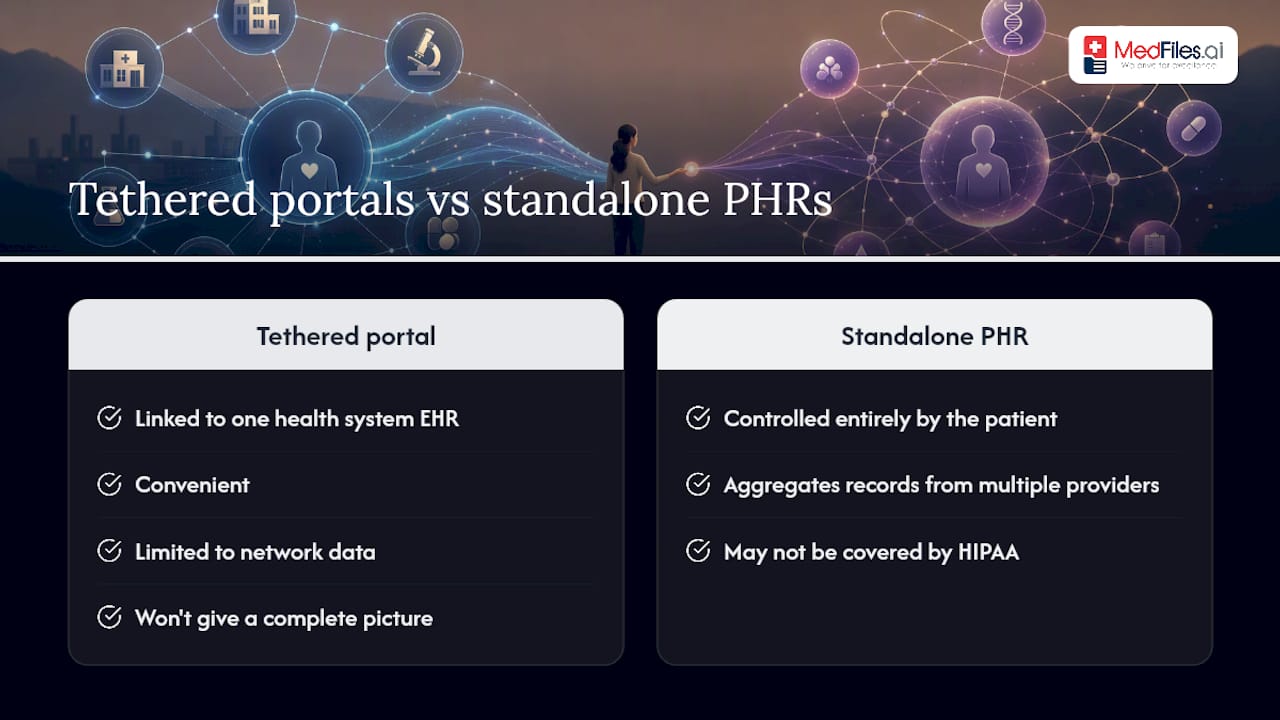
Tethered portals vs. standalone PHRs
A tethered PHR is your patient portal — linked to one health system’s EHR. It is convenient but limited to that network’s data. According to TechTarget, standalone PHRs are controlled entirely by the patient and can aggregate records from multiple providers, but they may not be covered by HIPAA when offered by non-covered entities. If you see multiple providers across different systems, a portal alone will not give you a complete picture.
Special categories: psychotherapy notes, substance-use, HIV, and minors
Some records require extra steps to access or are lawfully withheld. Knowing the rules before you request saves time and frustration.
Psychotherapy notes are the clearest exception. HHS confirms that psychotherapy notes — the therapist’s private session notes kept separately from the main record — are excluded from the standard HIPAA access right. You can still request a summary of your mental-health treatment from the main record; only the separate session notes are protected.
Substance-use records may carry additional federal protections under 42 CFR Part 2, which governs records from federally assisted substance-use disorder treatment programs. These rules are stricter than standard HIPAA. SAMHSA’s guidance explains what protections apply and how to seek support if you need help navigating them.
HIV-related records and certain genetic information may have extra state-level protections that vary by state. Check your state attorney general’s office for specific rules.
If a provider denies your request: Ask them to provide the denial in writing, citing the specific legal authority. You can then request a partial copy that excludes only the protected material, submit an amendment if the denial is based on an error, or file a complaint with HHS OCR.
Minors and the transition to adulthood
Parents generally have access to a minor child’s medical records, but this varies by state and by the type of care. In many states, minors can consent to and control records related to reproductive health, mental health, and substance-use treatment without parental access. At age 18, a child’s records become fully private. Providers typically restrict parental portal access at that point. If you are a caregiver for a young adult, ask the provider about a formal proxy authorization so access continues with the patient’s consent.
How to request corrections or amendments to your medical record
You have the right to request an amendment to your medical record if you believe it contains an error or is incomplete. The provider must respond — either by making the change or by providing a written denial with the specific reason.
Your amendment right is real but not absolute. A provider can deny an amendment if the record was not created by them, if they believe the information is accurate, or if the record is not part of what you have a right to access. A denial is not the end of the road.
What to include in your amendment request
Send your request in writing to the medical records office. Include:
- The specific entry you want changed (date of service, document type, the exact text)
- Why you believe it is incorrect or incomplete
- Supporting documentation (a second opinion, a corrected lab report, a letter from another provider)
Pro Tip: Keep a copy of every amendment request you send, along with the date sent and the provider’s response. If the case escalates to OCR, this paper trail is your evidence.
If the provider denies your amendment, you can add a “statement of disagreement” to your record. The provider must attach your statement to any future disclosures of that record. You can also file a complaint with HHS OCR or contact your state attorney general’s office if you believe the denial violates your rights. Expect a response to your initial amendment request within 60 days, with a possible 30-day extension.
How to build a PHR your family and caregivers can actually use
Start with two documents: an emergency summary and a doctor directory. The emergency summary fits on one page and lists your current medications (with doses), allergies, primary diagnoses, emergency contacts, and your primary care provider’s number. The doctor directory lists every provider you see, their specialty, address, phone, and fax. These two documents alone can save critical time during a care transition or ER visit.
What to scan vs. what to keep as originals
- Scan and store digitally: Lab results, visit notes, imaging reports, explanation-of-benefits statements, prescription records.
- Keep originals (and scan as backup): Vaccination cards, signed advance directives, insurance cards, birth certificates used for medical purposes.
File naming and update cadence
Name files consistently: YYYY-MM-DD_ProviderName_DocumentType (for example, 2025-11-03_DrSmith_LabResults). This format sorts chronologically and makes searching fast. Update your PHR after every visit, every medication change, and at least every six months if you manage a chronic condition.

Pro Tip: For families managing multiple people’s records, create a separate folder or profile for each person. Label each file with the person’s initials at the start so searches never pull the wrong record.
Storage method comparison
A dedicated PHR platform — one with end-to-end encryption and a Business Associate Agreement — gives you the strongest combination of searchability and secure sharing. For long-term record retention, a platform built for health data is more reliable than a general-purpose cloud folder.
How to share or transfer records between providers and caregivers
The safest transfer method depends on what you are sending and who is receiving it.
Default rule: Share the minimum necessary. Never send a full record dump when only a specific date range or document type is needed. Limit exposure every time.
Your options, ranked by security and convenience:
- Portal-to-portal share: The most secure option when both providers use compatible systems. Request this directly through your portal’s “share” or “send to provider” feature.
- HIE (Health Information Exchange): Your state or regional HIE can route records electronically between participating providers. Ask your provider if they participate.
- Blue Button / FHIR API download: Download a structured export from your portal and upload it to a PHR platform or send it to a new provider’s intake system. This is the most portable format.
- Mailed CD or paper: Still common for imaging files. Confirm the receiving provider’s preferred format before you request.
Avoid sending protected health information (PHI) over standard email. Use the portal’s secure messaging system or a HIPAA-compliant file-sharing method instead. For families sharing health information securely, permissioned access through a dedicated platform is safer than forwarding documents by email.
Pro Tip: After any transfer, follow up with the receiving provider’s office and ask them to confirm the date the records were imported and which documents they received. A quick confirmation call prevents gaps in your care.
How to get old records and records from federal systems
Older records and federal-system records take more planning, but the process is straightforward once you know who to contact.
For records from VA (Veterans Affairs): Request through the VA’s MyHealtheVet portal or submit a Standard Form 180 (SF-180) to the National Personnel Records Center. Include your full name, Social Security number, branch of service, and dates of service.
For DoD (Department of Defense) records: Active-duty and separated service members can access records through milConnect or submit requests to the appropriate service branch records center.
For Indian Health Service (IHS) records: Contact the specific IHS facility where care was received. IHS facilities follow federal records rules; bring your tribal enrollment number and government-issued ID.
For federally qualified health centers: Use the HRSA health center finder to locate the facility and contact their medical records office directly.
Practical tips for older record retrieval:
- Narrow your date range to the specific episode of care — broad requests take longer to fulfill.
- Request scanned copies rather than paper originals when possible.
- If you are requesting on behalf of a deceased family member or as a legal representative, include your authorization documentation (power of attorney, executor paperwork) with the request.
- Be prepared for retrieval times of 60–90 days for archived federal records; follow up in writing at the 30-day mark.
What fees and timelines should you expect?
Providers must respond to your records request within 30 days. A single 30-day extension is allowed, but the provider must notify you in writing before the original deadline passes. They cannot simply go silent.
On fees: Federal guidance permits providers to charge only reasonable, cost-based fees — typically the cost of copying and postage. They cannot charge for the time spent searching or retrieving your records. If a provider quotes you an unusually high fee, ask for an itemized breakdown and compare it against your state’s fee schedule.
| Rule | Detail |
|---|---|
| Standard response window | 30 days from receipt of request |
| Allowable extension | One additional 30 days, with written notice to you |
| Permitted fees | Reasonable copying costs and postage only |
| Prohibited fees | Search time, retrieval labor, or processing overhead |
| Electronic copy fees | Must be lower than paper copy fees when data is already electronic |
Common pitfalls that delay requests:
- Vague requests (“send me everything”) without a date range or document type
- Missing signature or ID copy on the authorization form
- Wrong office contacted (billing vs. medical records vs. radiology)
- No delivery address or format specified
Fix these before you submit and your request moves faster. For billing record disputes, CMS guidance covers the No Surprises Act and related consumer protections that may apply to your situation.
Why a PHR helps and what to look for in a secure solution
A well-maintained PHR can improve shared decision-making and help you track chronic conditions over time. StatPearls notes that widespread adoption of digital PHRs supports better monitoring of therapeutic goals, though poorly designed systems can produce information overload. The Journal of AHIMA frames the PHR as a lifelong resource that complements legal medical records and improves readiness for urgent decisions — not a replacement for them.
The practical benefits are clearest during care transitions: moving to a new city, switching primary care providers, or managing a parent’s care from another state. Having organized, portable records cuts the time spent re-explaining your history and reduces the risk of medication errors.
What a strong PHR platform should offer
- HIPAA-ready infrastructure with end-to-end encryption and a Business Associate Agreement
- Automatic document organization so uploads are categorized without manual sorting
- Multi-profile management for families, dependents, and pets
- Structured data exports (C-CDA or FHIR) for provider-to-provider transfers
- Secure, permissioned sharing with specific providers or family members
- Free trial with no credit card required, so you can evaluate before committing
Vendor evaluation checklist
Before choosing any PHR platform, confirm:
- Does it hold a BAA and operate on HIPAA-ready infrastructure?
- Can it export in C-CDA or FHIR format?
- Does it support multiple family profiles?
- Is pricing transparent, with a free trial available?
- Does it offer access controls so you decide exactly who sees what?
Pro Tip: Ask any PHR vendor directly: “Do you sign a Business Associate Agreement?” A vendor that hesitates or says it is not necessary is not HIPAA-ready, regardless of how the marketing reads.
What the team at Medfiles thinks you should prioritize first
Most people spend time researching PHR options before they have done the two things that matter most: getting their current records and creating an emergency summary. Get those done first.
Your three priorities, in order:
- Access: Log in to your patient portal today and download your most recent visit notes, active medication list, and lab results from the past 12 months. If you do not have portal access, call the medical records office and request it.
- Verify: Check what you downloaded for accuracy. Wrong medication doses, outdated allergies, and incorrect diagnoses appear more often than most people expect. If you find an error, submit an amendment request immediately.
- Centralize: Bring everything into one secure, searchable place. A paper binder works in a pinch, but it will not help you in an ER at 2 AM in another state. A secure digital platform with emergency access does.
The scenario that makes this concrete: a caregiver managing an aging parent’s care across two states, three specialists, and a recent hospitalization. Without centralized records, every new provider starts from scratch. With them, care transitions take minutes instead of hours.
Medfiles makes these steps faster and more secure
Pulling records from multiple providers, keeping them organized, and sharing them safely with your care team is exactly what Medfiles is built for. Upload lab results, prescriptions, imaging reports, and clinical notes in one place. Medfiles automatically organizes every document, so you are not manually sorting files at midnight before a morning appointment.

Key use cases where Medfiles delivers immediate value:
- Travel and ER access: Your complete record is available on your phone, anywhere, instantly.
- Caregiver management: Manage a parent’s or child’s records in a separate profile, with secure sharing to their providers.
- Complex medication lists: Track every medication across multiple prescribers with a clear, current view.
- Cross-state provider transfers: Export structured records in a format new providers can actually import.
Medfiles operates on HIPAA-ready, encrypted infrastructure with end-to-end data protection. Pricing is transparent, and a free trial is available with no credit card required. See the full pricing and plans to find the tier that fits your situation.
Sources
The sources below are the primary legal, clinical, and definitional references used throughout this guide.
This article is general information, not a substitute for advice from a qualified doctor. Consult a qualified healthcare professional about your own circumstances before acting on anything here.