health.mil Alternatives for Veterans & Families: 2026 Guide
Explore the best health.mil alternatives for veterans and families in 2026. Manage your health records securely with top-rated options!

health.mil Alternatives for Veterans & Families: 2026 Guide
The best approach to replacing or supplementing health.mil is to combine a patient-controlled personal health record (PHR) with the official government portals you already have access to. Your top options are:
- Medfiles — HIPAA-ready PHR with AI analysis, family profiles, and end-to-end encryption; the recommended choice for everyday record management
- MHS GENESIS — the DoD’s unified electronic health record, fully deployed across military treatment facilities as of 2026
- My HealtheVet — the VA’s secure portal for veteran health records, prescriptions, and appointments
- Blue Button / Blue Button 2.0 — the VA and Medicare data-portability standard for downloading your records in standardized formats
- Apple Health / Health Records on iPhone — device-native record aggregation for patients whose providers support FHIR connections
Your immediate next step: locate your DS Logon or My HealtheVet credentials, download your critical records using Blue Button, and start a Medfiles free trial to store and organize everything in one place.
Table of Contents
- Which health.mil alternatives fit your situation?
- How do government portals differ from personal PHRs?
- How do you pick the right alternative for your family?
- How to export your DoD/VA records and import them into a PHR
- Why Medfiles is the recommended personal alternative
- Key Takeaways
- Why patient-controlled records are worth the effort
- Your records, secured and ready when you need them
- Authoritative sources and official links
Which health.mil alternatives fit your situation?
| Dimension | MHS GENESIS | My HealtheVet | Blue Button | Apple Health | Medfiles |
|---|---|---|---|---|---|
| Security & compliance | DoD-managed, CAC/PIV | VA-managed, DS Logon | VA/CMS standard | Apple privacy policy | HIPAA-ready, end-to-end encryption |
| Portability / export | CCD, FHIR via jHIE | Blue Button download | FHIR, C-CDA, PDF | FHIR pull from providers | FHIR import, bulk upload, PDF |
| Sharing & access controls | Provider-to-provider | Limited patient sharing | Download only | Provider FHIR share | Granular provider + family sharing |
| Family / multi-profile | Single beneficiary | Single veteran | Single account | Per device/Apple ID | Multi-profile, pets included |
| Document types | Clinical records | Clinical + Rx | Structured data | Clinical data | PDFs, images, DICOM, scanned docs |
| AI features | None | None | None | None | Summaries, gap detection |
| Cost | Free (DoD benefit) | Free (VA benefit) | Free | Free | Subscription tiers; free trial |
| Mobile access | Patient portal app | VA: Health and Benefits app | Download to device | Native iOS | iOS and Android apps |
| Provider / clinical access | Full clinical workflow | VA providers only | Read-only data | Limited | Clinician review sharing |
MHS GENESIS is your go-to for authoritative DoD clinical records. If you’re active duty or recently separated, this is where your lab results, clinical notes, and prescriptions live.
- ✅ Fully deployed across military treatment facilities
- ⚠️ Requires CAC/PIV or DS Logon; credential friction can slow access after separation
My HealtheVet gives veterans direct access to VA records and tools like prescription refills and appointment management. It’s the primary portal for anyone receiving VA care.
- ✅ Free, secure, and tied to VA benefits
- ⚠️ Limited to VA-generated records; civilian records don’t sync automatically
Blue Button is a data-portability standard, not a storage platform. It lets you download structured health data from the VA and Medicare in formats like C-CDA and FHIR.
- ✅ Standardized, machine-readable exports you can import into a PHR
- ⚠️ No storage, no organization, no sharing controls on its own
Apple Health / Health Records aggregates data from participating providers via FHIR connections directly to your iPhone. Convenient for ongoing tracking if your providers support it.
- ✅ Zero setup friction for iPhone users
- ⚠️ Coverage depends entirely on which providers have enabled FHIR connections
Medfiles is the recommended PHR for individuals and families who need more than a government portal offers: organized storage, AI-powered analysis, family profiles, and secure sharing with any provider.
- ✅ HIPAA-ready, encrypted, supports DICOM and scanned documents
- ✅ Multi-profile management covers your whole family, including pets
How do government portals differ from personal PHRs?

Government EHR portals like MHS GENESIS and My HealtheVet are authoritative clinical systems. They capture what your providers document. You can view and download that data, but you don’t control the structure, and fragmentation across agencies means your DoD records and VA records often don’t talk to each other automatically.
Access and ownership
With MHS GENESIS or My HealtheVet, the institution owns the record. You get a view. With a PHR like Medfiles, you own the file. That distinction matters most when you transition out of service, move to a new state, or need records at 2 AM during a family emergency.
Interoperability gaps
MHS GENESIS shares data with the VA through the Joint Health Information Exchange, and connects with civilian providers in networks like the eHealth Exchange. But participation is not universal. Many civilian specialists, urgent care clinics, and pediatricians are outside those networks entirely, which means manual consolidation is still the reality for most families.
What clinical portals miss
Official EHR portals are built for provider workflows, not personal file management. They don’t have a place for your therapy logs, nutrition plans, school immunization forms, or scanned records from a base clinic that closed years ago. A PHR fills that gap.
Who needs what
- Active-duty transitioning to civilian care: Download everything from MHS GENESIS before your CAC expires, then import into a PHR.
- Veteran relying on VA benefits: Keep My HealtheVet as your official source; use a PHR for non-VA records and family documents.
- Family caregiver managing pediatric and elderly records: Government portals cover only the individual beneficiary. A multi-profile PHR handles everyone.
How do you pick the right alternative for your family?
Start with these four questions before committing to any platform.
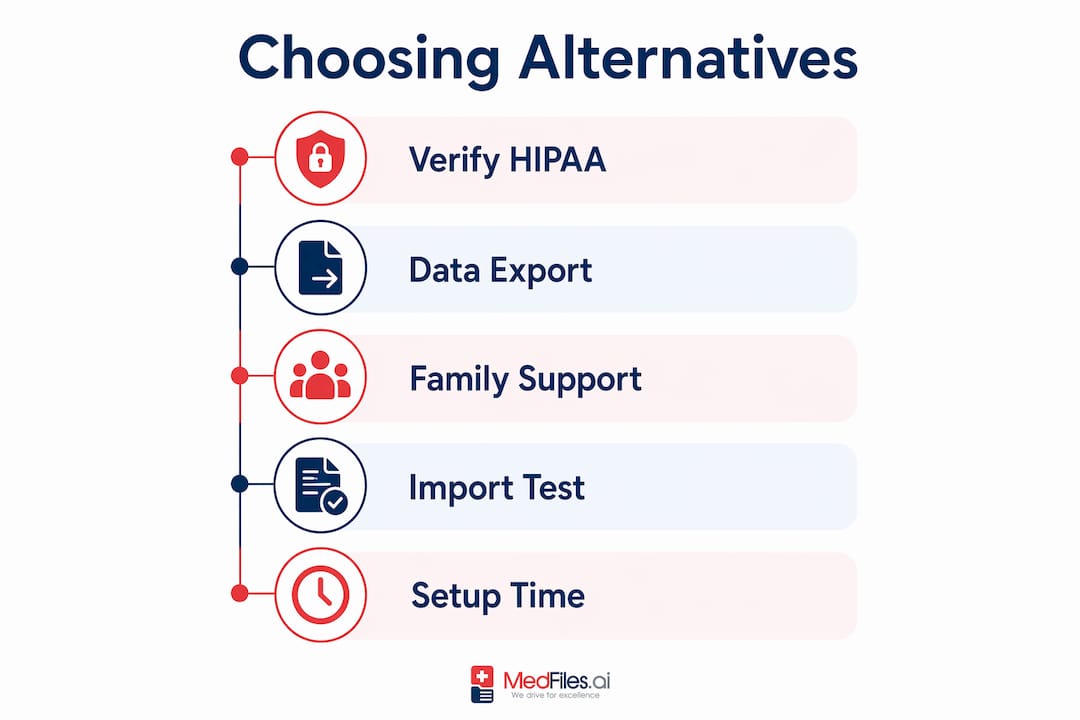
1. Is it actually HIPAA-ready? Look for end-to-end encryption, audit logs, and a published Business Associate Agreement. Vague language like “we take security seriously” is a red flag.
2. Can you get your data out? Any platform that doesn’t offer a full export in a standard format (PDF, FHIR, C-CDA) is a risk. No-export policies are a hard disqualifier.
3. Does it support your whole family? Single-profile platforms force you to manage separate accounts for each family member. Look for multi-profile management under one login.
4. What file types does it accept? You need PDF, JPEG, and DICOM support at minimum. Scanned paper records and imaging files are common in military health histories.
Red flags to watch for:
- No mention of audit logs or access history
- Encryption described only as “in transit” (not at rest)
- No family or dependent account options
- Credentialing requirements with no recovery path
Pro Tip: Before you sign up for any PHR, export one record from your VA or DoD portal and try importing it. If the import fails or loses formatting, that tells you everything about the platform’s real-world usability.
Setup typically takes under an hour for a single profile. Migrating a full family record set, including requesting copies from civilian providers, can take several weeks depending on provider response times.
How to export your DoD/VA records and import them into a PHR
Follow these steps in order to avoid gaps.
- Secure your credentials. Log in to MHS GENESIS via the TRICARE patient portal and confirm your DS Logon or CAC/PIV access is active. Do this before separation or retirement, not after.
- Download from MHS GENESIS. Request a Continuity of Care Document (CCD) or use the Blue Button download option for structured data. Prioritize: immunization records, surgical history, allergy lists, and active prescriptions.
- Download from My HealtheVet. Use the Blue Button feature to export VA health summaries, lab results, and medication history. The VA recommends keeping copies of essential documents to prevent gaps during system transitions.
- Request civilian records. Contact any non-DoD, non-VA providers in writing. HIPAA gives you the right to your records within 30 days.
- Import into your PHR. Upload files to Medfiles using bulk upload or the MedFiles Inbox auto-ingest feature. Tag each document by type, date, and provider for fast retrieval.
- Verify completeness. Cross-check your PHR record count against your download files. Keep offline backups of your original exports — failure to maintain offline copies is one of the most common causes of lost records.
Why Medfiles is the recommended personal alternative
Medfiles is built specifically for the use case government portals don’t cover: patient-controlled, organized, shareable records for individuals and families.
| Feature area | What Medfiles offers |
|---|---|
| Security & compliance | HIPAA-ready infrastructure, end-to-end encryption, audit logs |
| Import / portability | FHIR import, Blue Button support, bulk PDF/image upload |
| Sharing controls | Granular provider sharing, family access, emergency access |
| Family management | Multi-profile accounts for dependents and pets |
| Document types | PDFs, images, DICOM, scanned paper records |
| AI features | Document summaries, preventive care gap detection |
| Clinical access | Clinician review sharing for provider-facing workflows |
| Mobile | iOS and Android apps with instant access |
The security posture covers encryption at rest and in transit, with audit logs that show exactly who accessed what and when. That’s the standard you should hold any PHR to.
Recommended scenarios:
- New veteran consolidating records: Import MHS GENESIS and VA exports, add civilian records, and share a summary with your new primary care provider in minutes.
- Family caregiver: Set up separate profiles for each dependent, upload pediatric immunization records, and grant emergency access to a trusted family member.
- Frequent traveler or relocating family: Your complete medical document storage is accessible from any device, anywhere, without needing a government portal login.
Key Takeaways
The most effective approach to managing military and veteran health records is to use government portals for authoritative clinical data and a HIPAA-ready PHR like Medfiles for everything else.
| Point | Details |
|---|---|
| Export before credentials expire | Download MHS GENESIS and VA records while your CAC or DS Logon is still active. |
| Blue Button is a tool, not a destination | Use it to export structured data, then import into a PHR for long-term storage and organization. |
| Government portals have real gaps | Clinical EHRs miss non-clinical documents; a PHR like Medfiles fills that gap for families. |
| Verify every transfer | Cross-check record counts and keep offline backups to prevent data loss during migrations. |
| Medfiles covers the full family | Multi-profile management, AI summaries, and secure sharing make it the recommended PHR for military families. |
Why patient-controlled records are worth the effort
The gap between what government portals promise and what families actually experience is real. Records get siloed. Credentials expire. A service member separates, and suddenly years of clinical history are locked behind a CAC that no longer works. The VA and DoD have made genuine progress with interoperability, but the fragmentation across agencies still puts the burden on the patient to connect the dots.
Owning your records, in a format you control, changes that dynamic. It means you walk into any new provider’s office with your full history. It means your family has access in an emergency, even if you can’t speak for yourself. And for veterans, it means the readiness to seek care isn’t blocked by a login problem or a missing fax.
Pro Tip: After any major record transfer, open your PHR and search for your most recent immunization date and your allergy list. If either is missing or outdated, that’s your gap. Fix it before you need it.
Your records, secured and ready when you need them
Medfiles gives you something no government portal does: a single, encrypted home for your entire family’s medical history, with AI-powered organization and one-tap sharing for any provider or emergency contact. There’s no paperwork to track down, no credential to expire, and no gap when you move between military, VA, and civilian care.
Start a free trial today, no credit card required. Import one key record in your first session, then invite a family member to share access. Your secure medical document sharing setup takes minutes, and your records stay protected with end-to-end encryption from day one.
Authoritative sources and official links
Use these official portals to request records, verify eligibility, and learn more about the standards covered in this guide.
- VA Health Care | Veterans Affairs — Start here to access My HealtheVet, use Blue Button, and manage VA health benefits online.
- About VA Health Benefits | Veterans Affairs — Full overview of what VA health benefits cover, including inpatient, outpatient, and specialty care.
- Eligibility for VA Health Care | Veterans Affairs — Confirms eligibility criteria, priority groups, and how TRICARE and VA benefits interact.
- MHS GENESIS: TRICARE — Official page for the DoD’s unified EHR; includes patient portal login, deployment status, and interoperability details.
- MHS GENESIS Patient Portal | DHA.mil — Defense Health Agency’s beneficiary-facing guide to using the MHS GENESIS patient portal.
- Military Health & Wellness Support | Military OneSource — Wellness resources and health program information for service members and families.
A note on backups: Always keep at least one offline copy of your exported records, whether on an encrypted USB drive or a local hard drive. Verify completeness by checking record counts against your original downloads before deleting any source files.