What are electronic health records? A patient's essential guide
Discover what electronic health records are and how they enhance your healthcare. Learn to navigate and maximize your patient experience today!
What are electronic health records? A patient’s essential guide
Nearly every hospital in America now runs on digital records rather than paper charts. 96% of hospitals now electronically send and receive patient health information, yet most patients still don’t fully understand what that means for their care. Electronic health records, or EHRs, shape almost every clinical decision made about you, from the medication your doctor prescribes to the lab results your specialist reviews. This guide breaks down what EHRs actually are, how they work, and how you can use them to stay in control of your own health story.
Table of Contents
- What is an electronic health record (EHR)?
- How do EHRs differ from EMRs and PHRs?
- How electronic health records actually work
- How patients and caregivers access and use EHRs
- Interoperability, data quality, and real-world challenges
- A fresh perspective: What most guides miss about EHRs
- Take charge of your health data with MedFiles.ai
- Frequently asked questions
Key Takeaways
| Point | Details |
|---|---|
| EHRs centralize health data | Electronic health records collect and securely store all your key medical information in one digital file. |
| Sharing improves care | EHRs enable secure, real-time data-sharing between authorized providers, reducing errors and delays. |
| Portals empower patients | Patient portals let you view, manage, and actively participate in your own care using EHR access. |
| Challenges remain | EHR data can have gaps or errors; patients should review and advocate for correct records. |
| Action leads to confidence | Knowing your rights and using digital solutions puts you in control of your health information. |
What is an electronic health record (EHR)?
Once you grasp how prevalent EHRs are, it’s important to understand exactly what they are and why they’re a game changer for patient care.
An EHR is a secure, digital version of your medical history. Think of it as your paper chart, but faster, smarter, and accessible from anywhere your care team needs it. According to HealthIT.gov, EHRs are real-time, patient-centered digital versions of a patient’s paper chart, and they’re built to move with you across providers and care settings.
“Electronic health records go beyond standard clinical data collected in a provider’s office and can be inclusive of a broader view of a patient’s care.” — HealthIT.gov
EHRs typically include:
- Medical history including past diagnoses, hospitalizations, and surgeries
- Medications and allergies, updated in real time by your providers
- Lab results and imaging reports, such as blood panels or X-rays
- Provider notes from office visits, telehealth appointments, and specialist consultations
- Immunization records and preventive care tracking
- Vital signs tracked over time to identify trends
One of the biggest advantages is care coordination. If you visit your primary care doctor on Monday and a specialist on Friday, both providers can see the same record. This reduces duplicate tests, prevents dangerous drug interactions, and cuts down on miscommunication. Patients and families who understand the types of medical records that exist are better equipped to track what’s in their EHR and spot what might be missing.
The practical benefits for families are equally significant. Parents managing a child’s asthma, adults caring for aging parents, or anyone with a chronic condition can use EHRs to stay informed across multiple providers and care teams.
How do EHRs differ from EMRs and PHRs?
Understanding EHRs’ basics sets the stage, but many people get confused by similar-sounding terms. Here’s how they really compare.
The three terms you’ll hear most are EHR, EMR, and PHR. They sound alike, but they serve different purposes and have different owners.
| Term | Full name | Who manages it | Designed for sharing? | Includes patient-added data? |
|---|---|---|---|---|
| EHR | Electronic health record | Healthcare system | Yes, across providers | No |
| EMR | Electronic medical record | Single provider or practice | No | No |
| PHR | Personal health record | Patient | Optional | Yes |
As HealthIT.gov confirms, EHRs differ from EMRs, which are provider-specific and not designed for sharing outside the organization. Your local clinic might use an EMR to track your visits there, but that data won’t automatically flow to your cardiologist across town unless it’s part of a connected EHR system.

A personal health record, or PHR, is different again. You own it. You fill it in. You can include fitness data, diet logs, and over-the-counter medications that never appear in a clinical system. PHRs are useful for personal tracking, but they are not official medical documents and cannot substitute for clinical records.
Understanding the medical records workflow at each provider’s office helps you know which type of record they’re using and whether your data is actually being shared.
Pro Tip: When you switch providers or visit a new specialist, always ask: “Is your system connected to my other providers’ EHRs?” Don’t assume your records follow you automatically.
How electronic health records actually work
With those key differences in mind, it helps to see what actually happens behind the screens when your care team uses EHRs.
EHRs don’t just appear. They are built, updated, and maintained through a chain of steps every time you receive care. Here’s how the process typically flows:
- Data entry: A nurse, physician, or technician enters your vitals, diagnoses, and notes during or after your visit. Some connected devices, like blood pressure monitors or glucose meters, can upload data automatically.
- Data standardization: Your information is formatted using common standards so it can be read by other systems. This is where frameworks like FHIR (Fast Healthcare Interoperability Resources) and HL7 come in.
- Secure storage: Data is saved in encrypted databases or cloud systems compliant with HIPAA, the federal law governing health data privacy.
- Extraction and analysis: Using ETL (Extract, Transform, Load) processes, your data can be pulled for analysis, care planning, or population health research.
- Sharing: Your records are shared between providers through APIs (application programming interfaces), Health Information Exchanges (HIEs), or direct connections.
- Patient access: You receive access through a secure online portal, where you can view, download, and in some cases share your records.
As Oracle Health explains, EHR mechanics involve data collection via manual entry or connected devices, extraction using processes and standards like OMOP CDM or FHIR, and sharing via APIs, HL7, or HIEs.
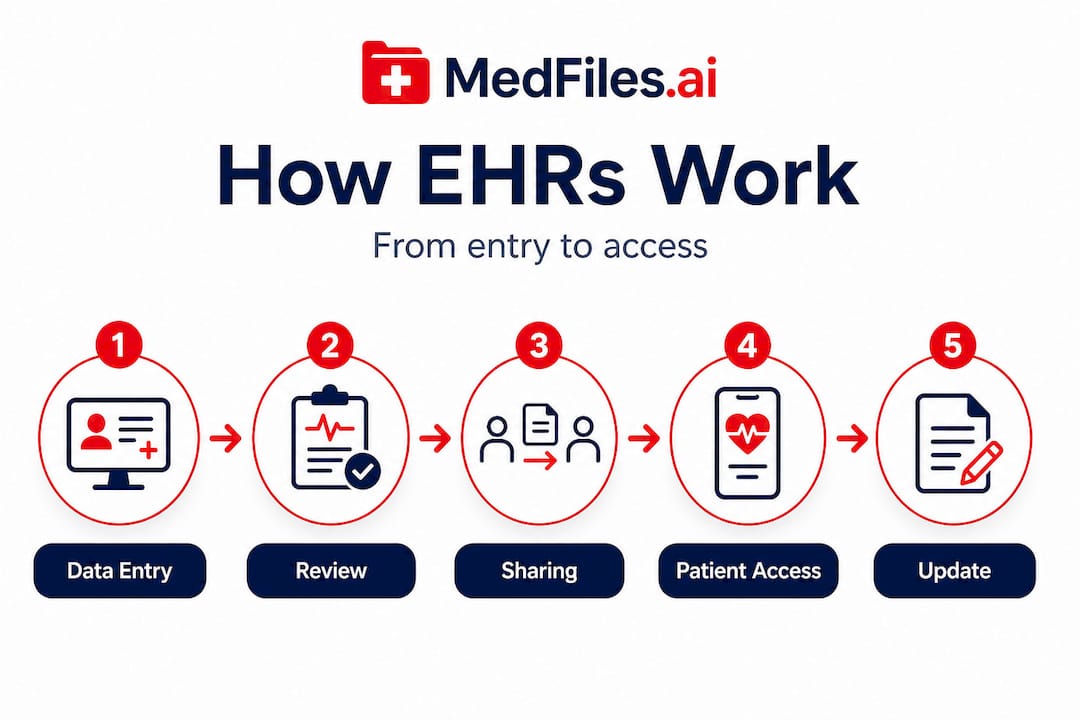
| Stage | Who is involved | Technology used |
|---|---|---|
| Data entry | Providers, nurses, devices | EHR software |
| Storage | Hospital IT teams | Encrypted databases |
| Sharing | Providers, HIEs | FHIR, HL7, APIs |
| Patient access | You | Secure web portals |
Understanding this flow has a real benefit: you know exactly where to look when something seems off. If your new doctor doesn’t have your recent MRI results, you can ask which stage broke down and request the records yourself. Families who learn how to organize secure family access to health records are far better prepared to fill those gaps.
Pro Tip: After any hospital stay or major procedure, give your EHR a few days to update, and then log in and review it. Errors caught early are much easier to correct.
How patients and caregivers access and use EHRs
Now that you know how EHRs work, here’s how you can access and use them to simplify and improve your healthcare experience.
Most healthcare systems now give patients and caregivers direct access to EHR data through patient portals. These are secure, password-protected websites or apps that connect to your provider’s EHR system. The most widely used one in the U.S. is MyChart, operated by Epic Systems, which powers records for hundreds of hospitals.
According to HealthIT.gov, patients and caregivers can access EHR data through patient portals, enabling viewing records, scheduling appointments, secure messaging with providers, prescription refills, and bill payments.
Here’s what you can typically do inside a patient portal:
- View lab results as soon as they’re released, sometimes before your doctor calls you
- Read provider notes from your visits, including the doctor’s clinical impressions and plans
- Request prescription refills without calling the office
- Message your care team securely for non-urgent questions
- Book or reschedule appointments at any time, day or night
- Download and share your records if you’re seeing a new specialist or getting a second opinion
- Manage bills and insurance claims in one place
Setting up your portal access is straightforward. Call your clinic and ask for an invitation link, or look for a sign-up prompt on their website. You’ll verify your identity and create secure login credentials. Caregivers looking after elderly parents or minor children can often be granted proxy access, meaning they manage the portal on someone else’s behalf.
Knowing your access options for digital record management goes hand in hand with using your portal effectively. Both together give you the most complete picture of your health data.
The biggest shift portal access creates is speed. You no longer have to wait days for a phone call to find out your cholesterol results. You can see the numbers, review reference ranges, and come to your next appointment with specific questions ready.
Our patient portal guide walks through how to get the most from this access, including what to look for and how to flag discrepancies.
Interoperability, data quality, and real-world challenges
With regular use, patients and caregivers should also know about the hurdles that can affect the completeness and usefulness of EHRs.
The progress is real. 76% of hospitals now engage in all four key interoperability domains: sending, receiving, finding, and integrating patient data. That’s a significant leap from even five years ago.
But gaps remain. Behavioral health facilities, for example, show only 68% exclusive EHR adoption. If your care includes a psychiatrist, addiction specialist, or therapist at a separate facility, their records may not connect to your hospital’s EHR automatically.
Data quality is another real issue. Research on ICU data reveals that some variables have missing data rates above 80%, and copy-paste errors appear in 82% of clinical notes. That’s not a reason to distrust your EHR, but it is a reason to read it carefully.
“Data quality issues including copy-paste errors and missing values are widespread across EHR systems and can affect clinical decision-making.” — Critical Care Research Analysis, 2025
Here’s what you should watch for and do:
- Check your medication list after every new prescription or hospital discharge. Duplicates and outdated entries are common.
- Review your allergy records. If a reaction you’ve reported isn’t listed, flag it immediately.
- Confirm your diagnoses are accurate. Old or resolved conditions sometimes remain active in the system.
- Read provider notes. Clinical notes can contain inaccuracies. You have the right under HIPAA to request corrections.
- Verify specialist records are included. If you saw a cardiologist at a different hospital, confirm that data reached your primary care EHR.
New standards like FHIR and USCDI (United States Core Data for Interoperability) are improving the situation steadily, but the system is not seamless yet. Learning more about digital records security helps you protect what’s already there while you wait for the technology to catch up. You can also explore EHR data examples to understand exactly what categories of information should appear in a complete record.
A fresh perspective: What most guides miss about EHRs
Most articles about EHRs focus on the benefits. They list the features, explain the technology, and celebrate the shift from paper to pixels. That’s valuable. But it leaves patients unprepared for the reality.
Here’s the harder truth: your EHR is only as accurate as the people and processes that build it. And right now, 90% of hospitals use APIs to enable patient data sharing, which sounds impressive. But gaps between payers and providers, non-standard data methods, and post-discharge instability still create real problems for patients and caregivers. Providers recommend verifying data stability about four to seven days after hospital discharge before relying on the record as complete.
Your rights as a patient are more powerful than most people realize. Under HIPAA, you can request your complete medical record, ask for corrections to inaccurate entries, and restrict certain disclosures. Most people never exercise these rights because they don’t know they exist.
Caregivers face an additional challenge. When a loved one transitions from a hospital to a rehab facility or home care, data often falls through the cracks. The most dangerous moment for a patient’s EHR is that transition period. Medication lists get outdated. Discharge summaries don’t transfer in time. Diagnoses get dropped or mislabeled.
As HealthIT.gov confirms, EHRs enable better health data management via portals but require awareness of data quality issues and access rights under HIPAA. The technology is a tool, not a guarantee.
The patients and caregivers who get the best outcomes are not the ones who trust their EHR blindly. They’re the ones who check it regularly, ask questions when something looks wrong, and keep their own backup records. A little vigilance brings much greater peace of mind.
Take charge of your health data with MedFiles.ai
Understanding your EHR is a powerful first step. The next step is doing something with that knowledge.

MedFiles.ai gives you a secure, centralized place to store all your health records, test results, prescriptions, and imaging reports, organized automatically and accessible from any device. Whether you’re managing your own records or caring for your whole family, you can upload documents from any provider’s portal and keep everything in one place.
You can also share records securely with new doctors, specialists, or family members in seconds. No faxes. No delays. No lost paperwork. Check out the available plans to find the right option for your needs, or explore how MedFiles.ai supports healthcare providers in streamlining clinical data exchange. Your health story deserves to be complete, accurate, and always within reach.
Frequently asked questions
Can I access my own EHR, and how?
Most patients can access their EHR through secure online portals provided by their healthcare system or clinic. As HealthIT.gov confirms, patients can access EHR data to view records, schedule appointments, and message providers directly.
Is my information in EHRs secure from unauthorized access?
Yes, EHRs use strong security standards including encryption and access controls, but you should use strong, unique passwords and only share portal access with trusted individuals. HealthIT.gov notes that EHRs are accessible securely only to authorized providers across different care settings.
What’s the biggest risk of errors in EHRs?
Copy-paste errors and missing data are the most common issues. Research shows copy-paste problems appear in 82% of clinical notes, so always review your records after a hospital stay and ask for corrections if anything looks wrong.
Are EHRs the same across different hospitals and clinics?
EHRs are designed for sharing, but system gaps still exist. HealthIT.gov confirms EHRs differ from EMRs, which are provider-specific and not designed for external sharing, so always confirm your complete records transfer when switching providers.
Can I add my own data or notes to my EHR?
You can contribute personal health information through a personal health record, or PHR, but only providers can add to official clinical EHRs. As HealthIT.gov explains, PHRs are patient-managed and may include lifestyle data but are not official clinical records maintained by providers.