How to maintain long-term medical records safely
Learn how to maintain long-term medical records effectively. This guide ensures your family’s health data is organized and accessible when you need it most.

How to maintain long-term medical records safely
Picture this: your child is rushed to the emergency room while you’re traveling. The ER team asks about allergies, current medications, and past surgeries. Your mind goes blank. The records are back home, scattered across three different provider portals, and one of those portals just changed systems last month. This scenario plays out every day for families who never planned for it. A well-organized, accessible medical record archive changes everything. This guide walks you through exactly how to build and maintain one, so you’re never caught unprepared.
Table of Contents
- What you need to start: Tools and requirements
- Step-by-step: Building your personal health record archive
- Keeping your health data safe and private
- Maintaining, updating, and accessing records over the years
- Perspective: Rethinking medical records as lifelong family assets
- Solutions for smarter medical record management
- Frequently asked questions
Key Takeaways
| Point | Details |
|---|---|
| Set up your own archive | Don’t rely only on provider systems; keep a personal, exportable archive for your health records. |
| Update regularly | Add new information after appointments or tests to keep your archive accurate and complete. |
| Use secure storage | Protect your records with strong passwords, encryption, and an offline backup whenever possible. |
| Prepare for emergencies | Maintain an accessible emergency summary so vital details are ready whenever they’re needed. |
| Plan for provider changes | Always export and save your records before switching providers or when policies or portals might change. |
What you need to start: Tools and requirements
Now that the need is clear, let’s get organized with the tools and requirements you’ll need before starting your archive.
First, understand what belongs in your archive. The goal is to capture every meaningful piece of health data for each person in your household. Here’s what to collect:
- Lab results (blood panels, urine tests, pathology reports)
- Imaging reports (X-rays, MRIs, CT scans, ultrasounds)
- Doctor and specialist notes from every visit
- Immunization and vaccination records
- Prescription histories and current medication lists
- Surgical reports and discharge summaries
- Mental health records (when applicable and consented)
- Dental and vision records
- Insurance explanation of benefits documents
- Emergency contact and insurance card scans
Knowing which types of medical records to include helps you avoid gaps that could matter during a crisis.
Choosing the right digital tools and formats
PDF is the gold standard for medical documents. It preserves formatting, is universally readable, and is easy to store. For images like X-rays, DICOM files are the clinical format, but JPEG exports work fine for personal archives.
Your storage options fall into three main categories:
| Storage type | Best for | Key consideration |
|---|---|---|
| Cloud-based app (e.g., MedFiles.ai) | All users, especially families | HIPAA-ready, accessible anywhere |
| Local hard drive or USB | Offline backup | Risk of physical loss or damage |
| Personal cloud (Google Drive, iCloud) | General use | Not HIPAA-specific, less secure |
For the strongest setup, use a dedicated secure storage solution as your primary system and keep a local encrypted backup as a safety net.
Understanding your privacy rights before you start
HIPAA provides patients a right to access and receive copies of their protected health information held by covered entities. That means your doctor’s office, hospital, lab, or health plan must give you your records when you request them. They can charge a reasonable fee, but they cannot refuse.
This right is powerful. Use it. Request records from every provider you’ve seen in the last five to ten years before building your archive.
Pro Tip: Always keep one offline backup alongside your digital archive. A USB drive stored in a fireproof safe at home gives you access even during internet outages or platform disruptions.
Step-by-step: Building your personal health record archive
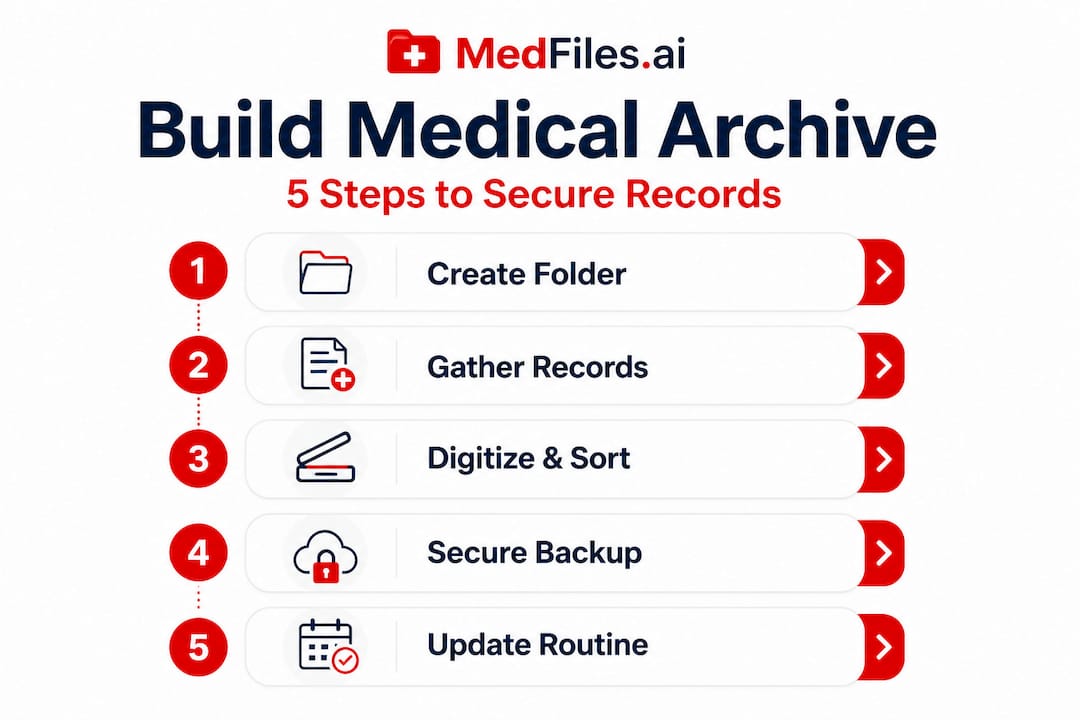
With your tools in hand, you’re ready to start building your archive step by step.
Step 1: Create one master folder or profile per person
Mixing family members’ records together creates confusion fast. Set up a separate profile or folder for each person, including children, elderly parents you care for, and even pets if your platform supports it. Label each clearly with the person’s full name and date of birth.
Step 2: Gather existing records from all sources
Start with what you already have. Log into every provider portal (MyChart, Athena, your insurer’s portal) and download everything available. Request paper records from any provider who doesn’t have an online portal. Scan paper documents using your phone’s camera or a dedicated scanner app. Name every file with a clear format like: LastName_FirstName_RecordType_Date.
Step 3: Digitize and organize by category
Once everything is collected, sort it into clear categories: lab results, imaging, visit notes, medications, immunizations, and so on. Within each category, organize by date with the most recent on top. Consistent naming and organization means you can find any record in seconds, not minutes.
As ASTP guidance from HHS notes, patients should take steps to keep electronic copies of their records secure and consider how they’ll manage and share them before doing so.
Step 4: Build a lightweight emergency summary
Every archive needs a one-page emergency summary. This document should live at the top of each person’s folder and contain the essentials a new doctor or ER team needs immediately. Include:
- Full name, date of birth, blood type
- Active diagnoses and chronic conditions
- Current medications with dosages
- Known allergies and reactions
- Names and contact information of primary care providers
- Emergency contacts
Step 5: Set up a routine for adding new records
A benchmark for a robust personal archive includes frequent ingestion of new records, one master archive per family member, a lightweight emergency summary, and the ability to export securely when you switch providers. Don’t wait months. After every appointment or test result, add the new documents within a day or two.
Step 6: Test your archive
Can you find a specific lab result from two years ago in under 60 seconds? Can you share your child’s immunization record with a school instantly? Run these tests. Fix any gaps in organization before an emergency forces you to.

Pro Tip: Set a monthly calendar reminder to check for new records to add. It takes less than 10 minutes and keeps your archive reliable year-round.
Comparing digital organization methods
| Method | Pros | Cons |
|---|---|---|
| Dedicated health app (MedFiles.ai) | Auto-organized, shareable, HIPAA-ready | Subscription cost |
| Personal cloud folder | Free, flexible | Not medical-specific, less secure |
| Local hard drive only | No internet needed | Single point of failure, no sharing |
| Hybrid (app + local backup) | Most resilient | Requires discipline to maintain both |
To organize records for family access, the hybrid approach with a health-specific platform as the primary system is the most reliable long-term choice.
Keeping your health data safe and private
After your archive is set up, protecting this sensitive information becomes your next priority.
Medical records are among the most sensitive personal data you have. A breach can expose your diagnoses, medications, and insurance details. Here’s how to protect what you’ve built:
- Use strong, unique passwords for every platform that holds health data. Use a password manager to keep track.
- Enable two-factor authentication wherever it’s available.
- Choose platforms with end-to-end encryption so data is protected both in storage and in transit.
- Limit sharing to only what each recipient actually needs. Don’t send full record dumps when a single test result will do.
- Review access permissions regularly. If you shared records with a provider you no longer see, revoke that access.
“Before sharing any part of your record, consider safeguards such as encryption and secure sharing, because long-term archives increase the impact of any later data exposure.”
This is especially important when using general-purpose cloud storage like a personal email or a shared family folder. These tools were not designed for health records.
Emergency access: A careful balance
You want trusted people to access your records in a crisis, but you don’t want those records exposed unnecessarily. The solution is a tiered approach.
Keep your full archive under strong security. Give your emergency summary (the one-page document from Step 4) to one or two trusted family members, either as a printed copy or through a shared secure link. This way, help is available without exposing your entire health history.
HIPAA allows certain disclosures for emergency preparedness and response planning, but proper privacy safeguards still apply. Building your own archive gives you control over who sees what and when.
What to do if your data is exposed or lost
If you suspect a breach on a platform holding your records, take these steps immediately:
- Change your passwords and revoke any active sharing links.
- Contact the platform’s support team to report the issue.
- Check if the platform is required to notify you under HIPAA breach rules.
- Review your secure record storage strategy and consider switching to a more secure option.
- Monitor your insurance accounts for unusual activity.
Your family security best practices should include a written plan for this scenario. Having a plan reduces panic and speeds up your response.
Maintaining, updating, and accessing records over the years
Consistent maintenance ensures your effort today pays off year after year. Here’s how to keep your archive future-proof and readily accessible.
Setting a sustainable update schedule
The biggest risk to a long-term archive isn’t a data breach. It’s neglect. Most people set up a system, then stop updating it. Within a year, the archive is already months out of date.
Use a simple approach:
- After every appointment: Download visit notes or request them within 48 hours.
- After every test: Save results to the correct folder before you even leave the lab or clinic.
- Every 3 months: Do a quick audit. Are medications current? Has an insurance card changed? Are there any new diagnoses to add?
- Annually: Back up your full archive to an offline location and verify the backup opens correctly.
Before switching providers, act fast
This is one of the most overlooked moments in health record management. When you change doctors, move to a new city, or your practice closes, your access to that provider’s portal often disappears.
Medical record retention requirements vary by state, not federal law, and providers can destroy records after their required retention period ends. HIPAA sets no minimum retention period on its own. If your old provider shuts down and deletes their system, records you never downloaded are gone.
Before any transition, download everything. Every visit note, every lab result, every image. Don’t assume the new provider will get everything in a transfer.
Wearables and digital health data
Modern health tracking doesn’t stop at doctor’s offices. Smartwatches, continuous glucose monitors, and fitness apps generate meaningful examples of digital records that can inform your care. Export summaries from these devices periodically and add them to the relevant section of your archive.
The three most common mistakes to avoid
- Waiting too long to update: Records become stale quickly. A medication list from eight months ago could cause a dangerous interaction if shared as current.
- Relying only on provider portals: Portals change, get retired, or get locked when you’re no longer an active patient. They are not a substitute for your own archive.
- Skipping backups: One corrupted file or expired subscription should not erase years of records. Always maintain at least one redundant copy.
Relying solely on a provider portal or single vendor app is risky for long-term access. Your own exportable archive is the only record you can fully control.
Perspective: Rethinking medical records as lifelong family assets
There’s a mindset shift that changes how you approach all of this.
Most people think of medical records as paperwork. Forms you fill out, files someone else keeps, documents you dig up when you absolutely have to. But your family’s health history is actually one of your most valuable assets. It informs every future medical decision. It protects you from repeated testing and medication errors. It carries knowledge across decades and across providers.
Provider systems were not designed to preserve your history forever. They were designed to support care delivery at a specific organization. When that organization changes systems, merges with another, or closes, your records become their problem, not their priority.
The families who handle medical crises best are the ones who treated their health data like they treat financial records. They kept their own copy. They updated it regularly. They made sure it was accessible to the right people at the right moments.
A family-first record workflow is not about distrust of your providers. It’s about acknowledging that you are the one constant across every doctor, every hospital, and every decade of care. You are the best keeper of your own history.
The real payoff is confidence. When you travel, when you change jobs and lose insurance, when an elderly parent needs emergency care, when your child starts college across the country, you know exactly where the records are and how to share them. That confidence is worth every minute you put into building this system.
Solutions for smarter medical record management
Ready for even greater peace of mind? Here’s how MedFiles.ai can help.
Everything described in this guide, gathering records, organizing by person and category, securing with encryption, building emergency summaries, and sharing with providers, is exactly what MedFiles.ai was built to do. You get HIPAA-ready infrastructure, automatic document organization, AI-powered analysis, and multi-profile management for your entire family, all in one place.

You don’t have to build and manage a complicated folder system manually. MedFiles.ai handles the structure so you can focus on what matters: knowing your family’s health information is safe, current, and always within reach. Whether you’re managing records for one person or an entire household, there’s a plan that fits. Explore plans and pricing and get started today. Your health history deserves a permanent, secure home.
Frequently asked questions
Can I access my medical records from all providers?
Yes, HIPAA gives you the right to request and receive copies of your medical records from any HIPAA-covered provider, including doctors, hospitals, labs, and insurers.
How often should I update my long-term medical archive?
Update your archive after every significant appointment, procedure, or test result. A robust personal system prioritizes frequent ingestion of new records to stay current and accurate.
What if my provider deletes old records or retires?
Build and maintain your own archive now, because providers can destroy records after their required state retention periods, and HIPAA sets no federal minimum. Your personal copy is your only guarantee.
Is it safe to store medical records in the cloud?
Yes, cloud storage is safe when you use a platform with end-to-end encryption and strong access controls. Always apply security safeguards before sharing any portion of a long-term archive.
What should an emergency medical summary include?
Include current medications with dosages, known allergies and reactions, active diagnoses, blood type, and the names and contact information of your primary care providers for fast reference in any emergency.