Medical document management for secure health records
Discover what is medical document management and how digital tools can secure your health records, ensuring you stay in control when it matters most.

Medical document management for secure health records
Most people assume their medical records are neatly organized somewhere, ready to hand over when needed. The reality is far messier. Records sit scattered across a dozen providers, locked in outdated formats, or buried in filing cabinets at home. When a health emergency hits or you switch doctors, that disorganization becomes a real problem. This guide breaks down what medical document management actually means, why fragmentation is more common than you think, and how digital tools and smart habits can put you back in control of your health story.
Table of Contents
- What is medical document management?
- Types of medical documents and common management challenges
- Digital solutions for medical document management
- Privacy, compliance, and retention: what you must know
- Why your medical history deserves proactive digital management
- Secure your health records with MedFiles.ai
- Frequently asked questions
Key Takeaways
| Point | Details |
|---|---|
| Organize for accessibility | Digital medical document management makes it easier for families to find and share health records quickly. |
| Leverage digital tools | Cloud platforms and AI-driven apps help streamline and secure the document management workflow. |
| Understand compliance rules | Retention and privacy requirements differ for HIPAA, CMS, and state laws, so always check minimum standards. |
| Take proactive control | Don’t wait for providers to solve record fragmentation; regularly audit your family’s digital medical archive. |
What is medical document management?
Medical document management means organizing, storing, retrieving, and sharing health records in a secure and structured way. Simple enough as a definition, but the practice looks very different depending on who you are.
For hospitals and clinics, document management focuses heavily on regulatory compliance, audit trails, and integrating with electronic health record (EHR) systems. For you as an individual or family, the focus shifts to accessibility, portability, and having the right document ready at the right moment.
Here is why that distinction matters. Provider document systems emphasize HIPAA compliance and audit controls over managing unstructured content, while consumer apps prioritize user control and portability across providers but may lack full clinical integration. Hybrid models face their own challenge: connecting modern platforms to legacy systems that were never designed to talk to each other.
“The biggest gap in healthcare document management is not technology. It is the assumption that accessibility for providers equals accessibility for patients. Those are two very different things.”
Understanding this gap is the first step. For families, the goal is not to replicate a hospital’s system. It is to build something practical, portable, and secure for your own needs. You can start by exploring this secure storage guide to understand what a consumer-focused approach looks like in practice.
The essential functions of any solid medical document management system include:
- Storage: Safely keeping digital copies of all health records, from lab results to imaging reports
- Retrieval: Finding the right document fast, even years after it was created
- Sharing: Sending records securely to new providers, specialists, or family members
- Version control: Knowing which version of a document is current and why
- Audit trails: Tracking who accessed or changed a record and when
If you want to build a stronger foundation, learning about the types of medical records you need to manage is a smart starting point.
Types of medical documents and common management challenges
Medical documents are not one thing. They cover a wide range of formats, sources, and uses. Knowing what you are working with makes the management task much less overwhelming.
The most common types your family will encounter include:
- Lab results: Blood panels, urine tests, cultures, genetic reports
- Prescriptions: Current medications, dosage histories, pharmacy records
- Imaging reports: X-rays, MRIs, CT scans, ultrasounds
- Visit summaries: Physician notes, discharge papers, after-visit instructions
- Insurance documents: Explanation of benefits, prior authorization forms, coverage letters
- Vaccination records: Immunization histories for adults and children
- Specialist referrals and consult notes: Often stored separately from your primary care record
The problem is that each of these often comes from a different source. Your cardiologist has one set of files. Your primary care doctor has another. The urgent care clinic you visited on vacation has a third. None of them automatically share with each other, and none of them are thinking about your complete health picture the way you are.
Fragmentation is the biggest practical challenge families face. But it is not the only one. Incomplete records happen when a provider changes systems, a clinic closes, or a patient moves. Privacy concerns arise when records are shared via unsecured email or fax, which is still more common than it should be. Legacy formats like paper files, non-searchable PDFs, or outdated imaging discs add another layer of friction.

Modern AI-powered tools can handle unstructured PDFs using OCR and machine learning, reaching F1 scores of 0.95 for document segmentation, 0.96 for classification, and 0.90 for date extraction. These tools reduce manual review time by 40%, which is significant when you are dealing with a thick stack of medical history from multiple providers.
You can learn more about the full range of records you should be tracking in this guide to essential medical documents.
Pro Tip: If you need to correct an error in your medical record, never ask a provider to change the original document. Always request an addendum, which is a note added to the record explaining what needs to be corrected. Altering originals creates legal and compliance problems. An addendum keeps the original intact and adds the accurate information.
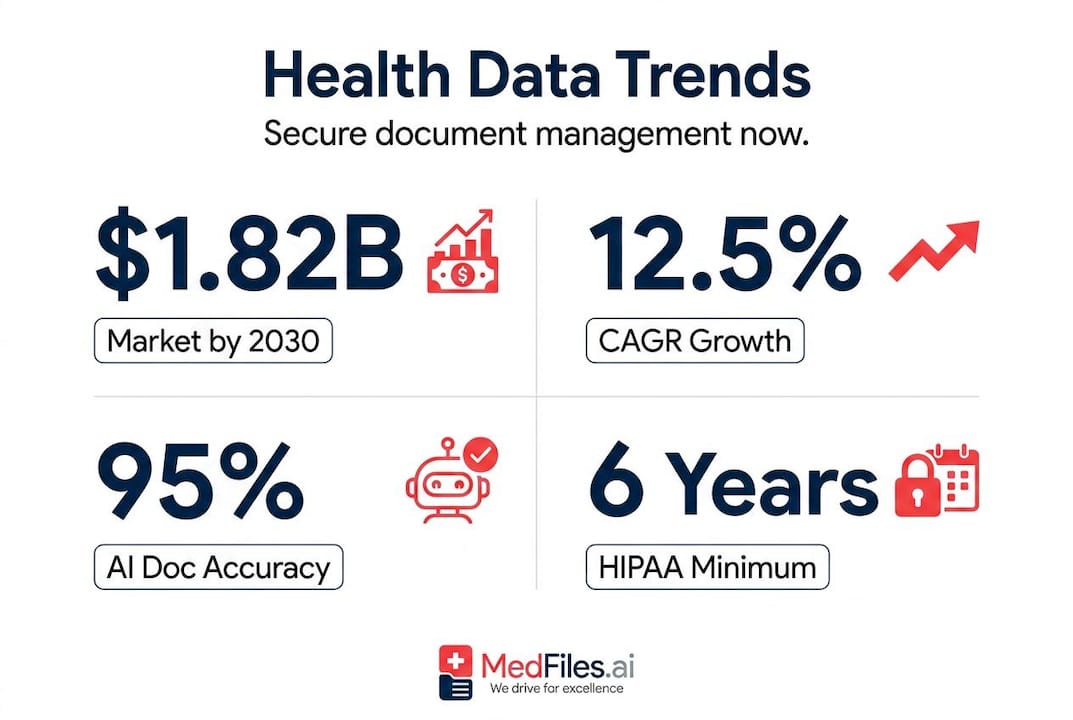
It is also worth knowing that retention rules vary based on who holds the records and for whom. HIPAA requires providers to keep records for at least 6 years. CMS programs extend that to 7 to 10 years. Many states go even longer, especially for records involving minors. That means your child’s pediatric records may need to be kept far longer than you expect. For a practical look at how families handle these complexities, see these healthcare data examples.
Digital solutions for medical document management
The good news: technology has caught up with the problem. Digital solutions now exist that make it genuinely practical for families to manage their records without needing an IT background or a full-time administrator.
The healthcare document management market is growing to $1.82 billion by 2030, at a 12.5% CAGR, driven by cloud adoption, AI integration, and a growing demand for consumer-focused tools. Platforms like OnBase and Laserfiche score 9.7 out of 10 in enterprise reviews. On the consumer side, Apple Health leads in record aggregation for individuals.
Here is a quick comparison of the three main models available today:
| Feature | Consumer apps | Provider systems | Hybrid models |
|---|---|---|---|
| Accessibility | High, mobile-first | Moderate, desktop-focused | Variable |
| HIPAA compliance | Partial | Full | Full |
| Clinical integration | Limited | Deep | Partial |
| User control | High | Low | Moderate |
| Cost | Low to moderate | High | Moderate to high |
| Best for | Families, individuals | Hospitals, clinics | Multi-site practices |
For most families, a consumer-focused platform with strong privacy features and easy sharing is the right fit. You do not need the complexity of a hospital system. You need something that works on your phone, keeps your data safe, and lets you share a document with a new doctor in seconds.
Here is a practical process to get started:
- Gather all existing records. Request copies from every provider your family has seen in the last 5 to 10 years. Many providers now offer digital downloads through patient portals.
- Choose a secure digital platform. Look for one with end-to-end encryption, HIPAA-ready infrastructure, and multi-profile support for your whole family.
- Organize by category and date. Sort records into clear categories like lab results, imaging, medications, and visit notes. Use consistent naming.
- Set up sharing permissions. Decide who can see what. A new specialist may only need recent labs and imaging, not your full history.
- Schedule regular updates. After every provider visit, upload new documents within a week. Do not let the backlog build.
- Back up your data. Even if your platform has cloud backups, keep a personal encrypted copy on a secure drive.
To build out your system step by step, this guide on how to organize family records covers the full process. For an even deeper look at workflows that fit busy families, the family records workflow guide is worth bookmarking.
Privacy, compliance, and retention: what you must know
Digital tools are powerful, but they do not replace your responsibility to understand the rules around privacy and retention. Getting this wrong has real consequences.
Here is what the key frameworks require:
| Standard | Retention period | Who it applies to |
|---|---|---|
| HIPAA | Minimum 6 years | Covered entities and business associates |
| CMS programs | 7 to 10 years | Medicare/Medicaid providers |
| State laws | Varies, often longer | All healthcare providers in that state |
| Minors’ records | Often until age 21 or longer | Providers treating children |
These retention benchmarks are not just administrative details. If records are deleted too early, it can create serious legal exposure, a concept known as spoliation, which means the loss or destruction of evidence that was legally required to be preserved. That risk applies even to individuals managing their own copies.
AI and OCR tools have transformed how records are processed, but human review remains essential for accuracy, especially when records come from external systems or non-standard formats. Never rely solely on automated classification for legal or clinical purposes.
Practical privacy steps every family should take:
- Use platforms with end-to-end encryption. Your records should be unreadable to anyone without your specific authorization.
- Enable two-factor authentication. This simple step blocks most unauthorized access attempts.
- Review access logs regularly. Know who has viewed or downloaded your records and when.
- Avoid emailing documents unencrypted. Use secure sharing features built into your platform instead.
- Understand your correction rights. You have the right to request an addendum if a record contains errors. Keep a log of any corrections you have requested.
- Store records beyond the minimum. Especially for children’s health records, err on the side of keeping more, not less.
For a detailed breakdown of what secure, compliant storage looks like for families, the storage compliance guide is a thorough resource.
Why your medical history deserves proactive digital management
Here is an opinion worth sitting with: your healthcare providers are not going to solve the fragmentation problem for you. They are optimized for their own workflows and compliance requirements, not for giving you a clean, portable, complete view of your own health.
The best personal health record tools are built for accessibility and personal control, while provider systems are built for scale and compliance. These are fundamentally different goals. Waiting for your hospital to hand you a perfectly organized health history is like waiting for your employer to manage your personal finances. It is not going to happen.
The families who manage their health records well share a few key habits. They audit their records at least once a year, checking for missing documents, outdated information, and errors. They do not assume that because a provider has a record, they can access it quickly in an emergency. They maintain their own copy, organized and ready.
They also treat record management as a regular household task, not a crisis response. Using a digital workflow for families that runs on a monthly schedule prevents the overwhelm of trying to reconstruct years of health history all at once.
One more thing worth saying clearly: demand your correction rights. If a record contains incorrect information, your provider is required to add an addendum. Many families do not know this, and some providers are not quick to volunteer it. Track any corrections you request and confirm they were added. Legacy errors in medical records can follow a patient for years and affect future diagnoses and treatment decisions.
Your health history is yours. Manage it like it matters, because it does.
Secure your health records with MedFiles.ai
You now have a clear picture of what medical document management involves, why fragmentation is so common, and what it takes to build a secure, accessible system for your family. The next step is putting it into practice.

MedFiles.ai gives you everything you need in one secure place. Upload lab results, prescriptions, imaging reports, and visit notes. The platform organizes them automatically, keeps them encrypted, and makes sharing with providers fast and simple. It is built for families, with multi-profile support for every member of your household including pets. Whether you are managing records for a new baby, an aging parent, or your own chronic condition, MedFiles.ai is designed to keep everything accessible and secure. Explore pricing and plans to find the right fit, or check out the tools built for doctors if you want to streamline clinical sharing too. Your entire medical history, in your pocket, forever.
Frequently asked questions
How do I update or correct my medical records digitally?
You must request an addendum to your existing record rather than changing the original file, which keeps everything legally compliant and preserves the original documentation.
How long do I need to keep my medical documents for compliance?
At minimum, keep records for 6 years under HIPAA, but CMS and state laws often extend that to 7 to 10 years, with longer requirements for minors that can last until well after a child reaches adulthood.
Are consumer apps like Apple Health reliable for organizing family medical records?
Consumer PHR platforms like Apple Health are excellent for aggregating records from multiple sources, but they may not offer full clinical integration, so use them for day-to-day accessibility rather than as your sole source of complete medical history.
What is the role of AI and OCR in medical document management?
AI and OCR tools speed up document processing and classification significantly, but human review remains necessary to catch errors, especially in records sourced from external or non-standard systems.