Best mymedai.app Alternatives for Secure Family Records
Discover the best mymedai.app alternatives for secure family records. Explore top options like Medfiles for HIPAA-ready health management.

Best mymedai.app Alternatives for Secure Family Records
For patients, families, and caregivers who need a HIPAA-ready personal health record vault, Medfiles is the top pick among mymedai.app alternatives. It combines a signed Business Associate Agreement (BAA), end-to-end encryption, immutable audit logging, multi-profile family management, and clean FHIR/PDF export in one platform built specifically for your situation.
Quick shortlist:
- Medfiles — Best overall for families and caregivers: HIPAA-ready controls, AI document capture, multi-profile support, and full portability
- OneRecord — Consumer health-record vault; good for single adults who want a lightweight archive
- Epic MyChart — Provider-linked EHR portal; strong if your care team runs Epic, limited outside that network
- FollowMyHealth — Multi-provider portal aggregator; useful when records span several health systems
- CareZone — Medication and caregiver coordination app; fits simple medication tracking, not deep record archiving
- Apple Health Records — iPhone-native health data aggregator; convenient for Apple users, no BAA for personal use
The CareNestHQ Family Medical Information Readiness Report found that care recipients’ information is often spread across an average of 5.2 separate information systems and that only 38% of families have an ER-ready emergency medical summary. That fragmentation is exactly what a dedicated family vault solves.
If your primary need is deep EHR integration managed by your provider, a portal like Epic MyChart may serve you better. For institutional or enterprise records management, a document-management platform is the right category. For everyone else, a patient-controlled HIPAA-ready vault is the practical answer.

Table of Contents
- How do these mymedai.app alternatives compare on security and family features?
- How do you choose the right HIPAA-ready platform?
- What does a HIPAA-ready personal health record platform actually do?
- What does migration actually cost and how long does it take?
- Who should pick Medfiles, and when does another category fit better?
- Key Takeaways
- The Medfiles team’s perspective on what actually matters here
- Medfiles gives you a HIPAA-ready family vault, not just storage
- Authoritative sources and references
How do these mymedai.app alternatives compare on security and family features?
| Feature | Family vault (e.g., Medfiles) | Provider EHR portal | Consumer health aggregator | Basic file storage |
|---|---|---|---|---|
| Signed BAA | Yes | Provider-managed | Varies | Rarely |
| Encryption at rest + transit | Yes, end-to-end | Yes | Partial | Basic TLS only |
| Immutable audit logs | Granular (views, exports, permission changes) | Limited to provider access | Minimal | None |
| Multi-profile / family support | Yes, including pets | Single patient | Single account | Manual folders |
| FHIR / CCD / PDF export | Yes | FHIR (limited) | FHIR (read-only) | PDF only |
| AI document capture | Yes | No | No | No |
| Emergency access | Dedicated workflow | Provider-only | None | None |
| Pricing model | Free trial + subscription tiers | Free (provider-funded) | Free or freemium | Free or low-cost |
| Mobile apps | iOS + Android | iOS + Android | iOS only or both | Varies |
| Clinical review access | Yes | Provider-side only | No | No |
Family vaults (Medfiles and similar) are the only category that gives you patient-controlled governance: you own the BAA relationship, you set sharing permissions, and you can export everything. The tradeoff is that you manage the setup yourself.
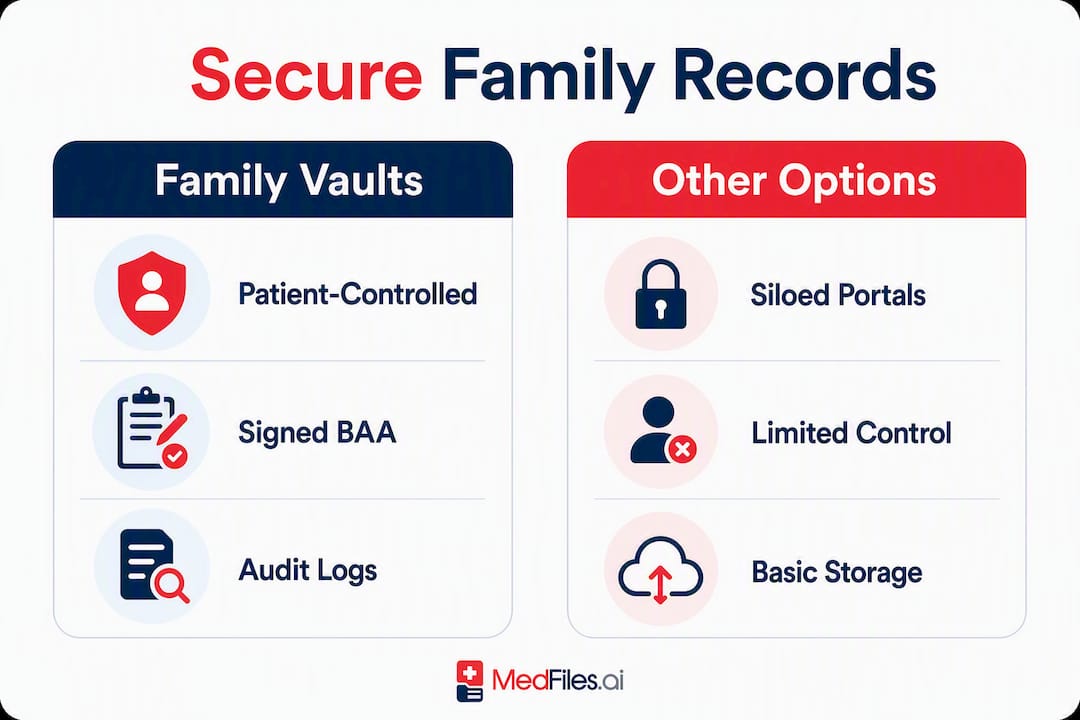
Provider EHR portals (Epic MyChart, FollowMyHealth) are free and pre-populated by your care team, but they are siloed. Records from a specialist outside the network don’t appear automatically, and you cannot add your own documents or manage family members under one roof.
Consumer health aggregators (Apple Health Records) pull structured data from connected providers via FHIR, which is genuinely useful. However, Apple does not sign a BAA for personal iCloud use, so this category is not a HIPAA-covered solution for caregivers managing someone else’s PHI.
Basic file storage (cloud drives, shared folders) is how most families currently operate, and it’s why portal sprawl is so common. No retention automation, no audit logs, no clinical integrations.
How do you choose the right HIPAA-ready platform?
Pick the product category that satisfies your top three needs: security proof, family access, and portability. Then verify before you subscribe.
- Request a signed BAA. Any cloud service that stores or processes protected health information (PHI) on your behalf must sign a BAA under the HIPAA Security Rule. If a vendor hesitates or offers only a checkbox acknowledgment, stop there.
- Confirm encryption at rest and in transit. Ask specifically whether data is encrypted at the field level or only at the disk level. Transport-layer security (TLS 1.2+) is the minimum; end-to-end encryption is the standard to require.
- Request an audit-log sample. Logs must capture views, downloads, permission changes, and exports, not just logins. Ask how long logs are retained and whether they are exportable.
- Check data residency and subprocessors. Know where your data lives and which third parties can access it. A vendor’s privacy policy should name subprocessors explicitly.
- Confirm export formats. You need FHIR, CCD, or at minimum structured PDF. Test an actual export during the free trial before committing.
- Ask for a SOC 2 Type II report or ISO 27001 certificate. Marketing claims of “HIPAA compliance” are not audited. A third-party attestation is the only independent verification.
Red flags: a vague or unsigned BAA; audit logs that only record logins; vendor-only key management with no rotation details; no documented data-deletion process; and no emergency-access workflow for caregivers.
Pro Tip: During any free trial, upload one test document, share it with a second account, then download the audit log. If the log doesn’t show the share event and the download, the logging is insufficient.
What does a HIPAA-ready personal health record platform actually do?
The HIPAA Security Rule requires three categories of safeguards: administrative (policies, BAA, workforce training), technical (unique user IDs, audit controls, encryption), and physical (data-center security). A genuine HIPAA-ready platform implements all three, not just encryption.
In practice, that means:
- Secure ingestion: upload PDFs, photos, and imaging files; connect to provider portals via FHIR; or use AI capture to classify documents on ingest. AI-powered capture dramatically reduces manual filing time and prevents backlog during migration.
- Structured profiles: each family member (or pet) gets a separate profile with their own record set, sharing permissions, and access history.
- Sharing controls: generate time-limited links for clinicians, grant emergency-access to a trusted contact, or share a full record set with a new specialist.
- Audit logs: every view, edit, export, and permission change is recorded with a timestamp and user ID. Logs should be immutable and searchable.
- Export and portability: FHIR R4, CCD, and PDF exports let you move your records to any future platform without starting over.
Generic cloud storage apps fail on retention automation, compliance-ready governance, and pre-built clinical integrations. A records-specific platform handles all three by design.
For higher-risk households, look for customer-managed key (CMK) support. CMK means you control the encryption key lifecycle, reducing blind trust in vendor key practices.
What does migration actually cost and how long does it take?
Setup time and cost vary by household size and how many legacy records you’re consolidating.
| Migration scenario | Realistic time window | Notes |
|---|---|---|
| Single adult, recent records only | 1–3 hours | Upload PDFs, connect one portal, create ER summary |
| Small family (2–4 members), 2–3 years of records | 1–3 days | Batch scan, AI capture, verify medications |
| Multi-generational household or chronic condition | 1–3 weeks | Prioritize meds and allergies first; add historical records in batches |
| Full legacy archive (paper-heavy) | 3–6 weeks | Use a batch scanning service; AI classification speeds tagging |
Pricing by category:
- Free/basic vaults: limited document count, no AI features, no BAA
- Consumer vault subscriptions: typically monthly or annual per-person or family tier; mid-range plans include AI analysis and sharing
- Enterprise/document management: custom pricing, institutional contracts
Practical tips to speed your migration:
- Use the vendor’s import tool or FHIR connection to pull records from existing portals first
- Prioritize your emergency summary and medication list before anything else; Johns Hopkins Medicine recommends keeping a printed one-page summary with meds, allergies, and emergency contacts
- Schedule a 15-minute weekly caregiver check-in to add new documents and verify accuracy; CareNestHQ recommends this routine as essential to maintaining a single source of truth for family health information.
- Let AI capture handle classification so you’re not manually tagging every file
Who should pick Medfiles, and when does another category fit better?
Medfiles is the recommended pick for most patients, families, and caregivers. It covers the full checklist: HIPAA-ready infrastructure, signed BAA, end-to-end encryption, granular audit logs, multi-profile family management, AI document capture, and clean export in FHIR and PDF formats.
Three scenarios where a different category may fit better:
- Deep EHR integration is your only need. If your entire care team is on Epic and you never need to add your own documents or manage family members, Epic MyChart’s free portal may be sufficient.
- Institutional or enterprise use. A hospital department or large care organization needs document-management platforms with enterprise governance, not a consumer vault.
- Minimal archival with no sharing. If you only need to store a handful of PDFs for yourself and never share them, a basic free vault may cover it, though you lose the BAA and audit-log protections.
Your practical next step: start a free trial of Medfiles, request the BAA on day one, run a test export, and build your one-page ER summary before you add anything else. That single document is your most important record.
Key Takeaways
The most reliable approach to replacing mymedai.app is choosing a HIPAA-ready family vault with a signed BAA, immutable audit logs, and verified export formats before you commit.
| Point | Details |
|---|---|
| BAA is non-negotiable | Any platform storing your PHI must sign a BAA; verify it before uploading a single file. |
| Audit logs must be granular | Logs should capture views, exports, and permission changes, not just logins, and must be exportable. |
| Export formats protect you | Confirm FHIR, CCD, or structured PDF export during your free trial so you are never locked in. |
| Weekly check-in beats features | A 15-minute weekly caregiver review keeps records accurate; no platform replaces this habit. |
| Medfiles covers the full checklist | Medfiles combines HIPAA-ready controls, family multi-profile support, AI capture, and full portability in one platform. |
The Medfiles team’s perspective on what actually matters here
Most of the conversation around personal health record apps focuses on features. The harder problem is trust infrastructure: who signed the BAA, what exactly the audit logs capture, and whether you can actually get your data out in a format another system can read.
The CareNestHQ data makes the real failure mode visible: 5.2 separate systems per care recipient, with one family member carrying the entire coordination burden in their head. No app fixes that if it can’t consolidate records across providers, support multiple family profiles, and export cleanly when you need to switch.
The weekly 15-minute check-in recommendation from CareNestHQ is underappreciated. Families that build that rhythm maintain a more accurate single source of truth than families with better software but no routine. CareNestHQ documents that only 44% of caregivers have a shared medication list and only 38% of families have an ER-ready emergency medical summary. The platform matters. The habit matters more.
What we’d tell any caregiver evaluating options: run the BAA and export tests on day one of every trial. If a vendor can’t produce a signed BAA and a working FHIR export in the first session, move on. Those two checks filter out most of the risk before you’ve uploaded a single document.
Medfiles gives you a HIPAA-ready family vault, not just storage
You’ve seen what separates a real HIPAA-ready platform from a file folder with a password. Medfiles delivers every element on that checklist: a signed BAA, end-to-end encryption, granular audit logs, AI document capture, multi-profile family management, and secure sharing with clinicians and emergency contacts.
Start your free trial, no credit card required. On day one: request your BAA, upload a test document, run an export, and build your one-page ER summary using the medical document storage tools. Your family’s complete health picture, organized and accessible whenever you need it.
Authoritative sources and references
Use these to verify vendor claims, BAA requirements, and family-readiness benchmarks before committing to any subscription.
- Guidance on HIPAA & Cloud Computing | HHS.gov — HHS guidance on when a cloud provider must sign a BAA and what safeguards apply
- HIPAA Security Rule overview | HHS.gov — Primary source for administrative, technical, and physical safeguard requirements
- 45 CFR § 164.312 Technical safeguards | Cornell LII — The exact regulatory text covering access controls, audit controls, and encryption requirements
- Medical records: getting organized | Johns Hopkins Medicine — Clinical guidance on the printed one-page emergency summary
- How to organize medical records at home | Granite — Explains portal sprawl and why families need a centralized archive
- Security & Privacy | Medfiles — Medfiles’s documented security architecture and HIPAA-ready controls
This article is general information, not legal or medical advice. Verify current HIPAA requirements and vendor compliance claims with HHS.gov or a qualified healthcare compliance professional before making decisions about your protected health information.