Why store medical records digitally: benefits, security, and solutions
Learn why storing medical records digitally improves emergency access, cuts repeated tests by 40%, and keeps your family's health history secure and organized.
Why store medical records digitally: benefits, security, and solutions
Relying on memory or a folder of paper files to manage your family’s health history is a real risk. Records get lost. Files get damaged. And when a doctor asks about a medication you took three years ago, you’re left guessing. Most families don’t realize how fragile their medical information actually is until they need it urgently and can’t find it. Digital medical records change that. They put you in control, keep your information secure, and make sure the right details are available at exactly the right moment. This guide covers what digital records are, why they matter, how to protect them, and how to get started today.
Table of Contents
- What does it mean to store medical records digitally?
- The main reasons to store medical records digitally
- How security, privacy, and control work with digital records
- Potential challenges and limitations to consider
- How to get started with digital medical records
- Our perspective: What most families miss when going digital
- Ready for peace of mind? Start with MedFiles.ai
- Frequently asked questions
Key Takeaways
| Point | Details |
|---|---|
| Reliable access | Digital record storage makes your family’s health information accessible anytime, anywhere. |
| Improved safety | Storing records digitally reduces medical errors and enhances care coordination especially in emergencies. |
| Privacy controls | You can control who views and updates your digital records using secure, HIPAA-compliant platforms. |
| Be aware of risks | Digital solutions have some limitations, including privacy risks and system errors, that require vigilance. |
| Simple start steps | Organizing and digitizing your records is straightforward with clear steps and the right tools. |
What does it mean to store medical records digitally?
With the need for reliable access clear, let’s define what storing medical records digitally actually involves.
Digital medical records are electronic versions of your health information. This includes everything from test results and prescriptions to allergy lists, scan images, visit notes, and vaccination history. When stored digitally, this data lives in secure cloud systems rather than paper folders or filing cabinets.
Two common formats exist. Electronic Health Records (EHRs) are managed by your healthcare provider and contain your clinical history. Patient portals are online platforms your provider gives you access to, so you can view your own records. Beyond these, personal health platforms let you store and organize records yourself, across multiple providers and family members.
Here’s what digital storage typically includes:
- Lab results and diagnostic reports
- Prescription history and current medications
- Allergy and adverse reaction records
- Imaging files (X-rays, MRIs, ultrasounds)
- Immunization records
- Visit summaries and specialist notes
- Insurance and billing documents
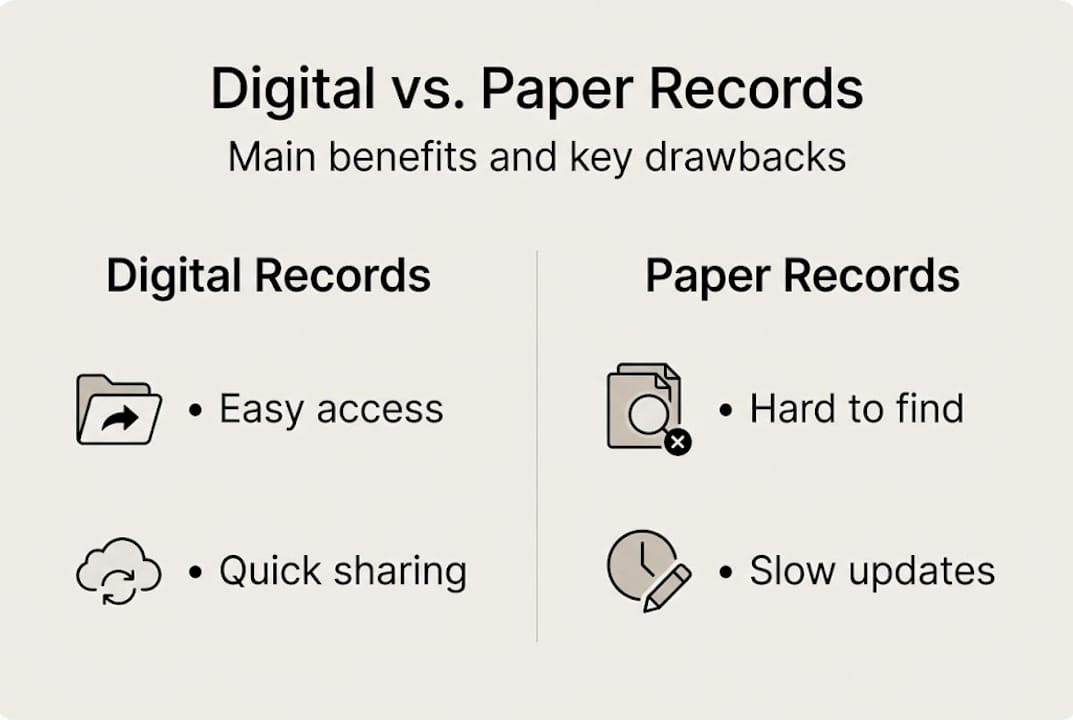
The difference from paper is significant. Digital records are searchable, shareable, and accessible from anywhere. Patient portals allow individuals and families secure access to records, results, and appointments, improving engagement, adherence, and satisfaction.
Here’s a quick comparison of paper vs. digital storage:
| Feature | Paper records | Digital records |
|---|---|---|
| Access during emergencies | Difficult | Instant |
| Sharing with providers | Manual, slow | Secure, fast |
| Searchability | None | Full text search |
| Risk of loss or damage | High | Low (with backups) |
| Storage space needed | Physical space | Cloud-based |
For families managing multiple members’ health histories, the benefits for families are especially clear. You can follow a structured record workflow guide to set everything up efficiently.
The main reasons to store medical records digitally
Now that you know what digital medical records are, let’s see why they’re becoming the preferred method for families.
The most urgent reason is emergency access. If you or a family member is rushed to an urgent care clinic while traveling, the staff needs to know about allergies, current medications, and past surgeries immediately. A digital record on your phone delivers that in seconds. A paper file at home does not.

Beyond emergencies, digital records improve everyday care. When you switch doctors, move cities, or see a specialist, your complete history travels with you. No more repeating yourself. No more gaps in your care.
Key benefits at a glance:
- Faster specialist care: EHR integration cuts specialist wait times by 16.5 days and reduces repeated tests and procedures by 4 to 40%, lowering costs without compromising outcomes.
- Better chronic disease management: EHRs improve patient satisfaction through better communication and efficiency, and are linked to stronger guideline adherence and chronic condition management.
- Family coordination: One platform can hold records for every family member, including children and elderly parents.
- Reduced paperwork burden: Fewer forms to fill out at every new appointment.
- Caregiver support: Share specific records with a caregiver or family member without handing over everything.
Pro Tip: Keep an updated digital copy for each family member before any trip or school enrollment. Vaccination records and allergy lists are the most commonly requested documents in those situations.
Here’s how digital and paper records compare on key health outcomes:
| Outcome | Paper-based care | Digital record-supported care |
|---|---|---|
| Specialist wait time | Standard | Up to 16.5 days shorter |
| Repeated tests | Common | Reduced by up to 40% |
| Chronic disease adherence | Variable | Consistently improved |
| Emergency readiness | Low | High |
For family health management, this shift is practical and powerful. It also plays a direct role in empowering your health over the long term.
How security, privacy, and control work with digital records
Security and privacy are major reasons some hesitate with digital records. Here’s what you need to know and how to stay safe.
HIPAA (Health Insurance Portability and Accountability Act) sets the legal standard for protecting health data in the United States. Any platform handling your medical records must follow these rules. That means encryption, strict access controls, and audit logs that track who viewed your data and when.
HIPAA-compliant platforms use encryption and access controls to secure data, and patients control who they share their records with, including family members and doctors.
But risks do exist. Over 700 privacy incidents occurred in 2023, affecting 130 million records, with an average breach cost of $10 million. That’s a real concern.
The takeaway: No system is 100% risk-free. But a well-secured digital platform is significantly safer than a paper file that can be lost, stolen, or destroyed in a flood or fire.
Here’s how to maximize your privacy:
- Use strong, unique passwords and enable two-factor authentication
- Review who has access to your records regularly
- Only share specific records, not your full history, when possible
- Ask your platform what encryption standards they use
- Check audit logs if your platform provides them
For parents, HIPAA includes specific rules about minors. In most cases, parents can access a child’s records until the child reaches adulthood. Caregiver access for elderly family members follows similar consent-based rules.
Our secure storage guide walks through best practices in detail. You can also learn about doctor access and security to understand how providers interact with shared records.
Potential challenges and limitations to consider
No solution is perfect. It’s just as important to understand the limitations before you fully adopt digital storage.
The biggest concern is data quality. Missing data exceeds 80% in some EHR systems, copy-paste errors affect 82% of records reviewed, and EHR-related errors account for 34% of medication mistakes, with one-third of those being life-threatening. That’s not a reason to avoid digital records. It’s a reason to stay engaged with your own data.
Usability is another real challenge. Physicians spend 2 hours on EHR tasks for every 1 hour of direct patient care. Alert fatigue and poor interface design increase errors and contribute to burnout. As a patient, you may also find some platforms clunky or hard to navigate.
Here’s how to work around these limitations:
- Review your records regularly. After every appointment, check that the visit notes, medications, and diagnoses are accurate.
- Flag errors immediately. Contact your provider’s office to correct mistakes. You have the right to request amendments.
- Choose user-friendly platforms. Not all digital tools are equal. Prioritize platforms designed for patients, not just clinicians.
- Keep offline backups. Download key documents periodically so you have access even without internet.
- Educate your family. Make sure at least one other person knows where your records are stored and how to access them.
Pro Tip: Set a reminder every three months to review each family member’s records for completeness and accuracy. Catching a medication error early can prevent a serious problem later.
For families dealing with complex care, following clear workflow strategies can reduce the burden significantly.
How to get started with digital medical records
Ready to take control? Here’s how you and your family can move your records into the digital age, step by step.
The process doesn’t have to be overwhelming. Start with what you have and build from there. Patient portals give individuals and families secure access to records, results, and appointments, which improves engagement, adherence, and satisfaction.
Follow these steps:
- Gather all existing records. Collect paper files, discharge summaries, lab results, vaccination cards, and insurance documents for every family member.
- Scan or photograph documents. Use your phone or a scanner to create digital copies. Most modern phones produce clear, readable images.
- Choose a HIPAA-compliant platform. Look for end-to-end encryption, multi-profile support, and easy sharing features. Read the privacy policy before signing up.
- Organize by family member. Create a separate profile for each person. Label documents clearly by date and type.
- Set access permissions. Decide who can view which records. A spouse may need full access. A school nurse may only need vaccination records.
- Share with your providers. Send relevant records to new doctors or specialists before your first appointment. This saves time and improves care quality.
- Update after every medical event. New diagnosis, new prescription, new test result? Upload it right away. Keeping records current is what makes them useful.
- Back up your data. Use a platform that automatically backs up your files. Download copies to a secure external drive as an extra layer of protection.
Explore digital record tools designed specifically for patients and families. A structured families workflow guide can also help you stay organized as your records grow.
Our perspective: What most families miss when going digital
You now know the facts, pros, and cons. Here’s what our experience suggests about succeeding with digital medical records.
Most families focus on the setup and then stop there. They upload a few documents, feel good about it, and move on. But digital records only work if you treat them as a living system, not a one-time project.
The families who benefit most are the ones who stay engaged. They review records after appointments. They teach their kids to understand their own health history. They make sure every family member knows how to access the records in an emergency, not just the person who set up the account.
Don’t let the pursuit of a perfect system stop you from starting. An imperfect digital record that’s 80% complete is still far more useful than a paper folder no one can find.
The other thing families miss is emergency preparation. Storing records digitally is only half the job. The other half is making sure the right people can access them when it counts. Set up shared access now, before you need it. Our digital solutions guide covers exactly how to do this for your whole family.
Ready for peace of mind? Start with MedFiles.ai
Put your knowledge into action with a trusted solution.
MedFiles.ai is built specifically for individuals and families who want full control over their medical records. The platform is HIPAA-ready, uses end-to-end encryption, and supports multiple profiles so you can manage every family member’s health history in one secure place.

Onboarding is simple. Upload your documents, organize them by profile, and share securely with providers in just a few clicks. Whether you need simple setup for families or want to compare affordable plans that fit your needs, MedFiles.ai has you covered. Your medical history deserves more than a paper folder. Start building your secure digital record today.
Frequently asked questions
How secure are digital medical records compared to paper files?
HIPAA-compliant platforms use encryption and access controls that make digital records generally safer than paper, but over 700 breaches in 2023 show no system is completely immune. Choosing a reputable, encrypted platform and using strong passwords significantly reduces your risk.
Can I control who accesses my family’s digital medical records?
Yes. HIPAA-compliant systems let you set specific permissions, so you can share a child’s vaccination record with a school nurse without exposing your entire family’s history. Most platforms let you grant or revoke access at any time.
What are the main drawbacks to digital storage?
Data quality issues including missing information, copy-paste errors, and medication mistakes affect a significant portion of digital records. Combined with privacy breach risks and occasional usability challenges, digital storage requires active engagement, not just a one-time setup.
Is digital medical record access possible without internet?
Some apps offer limited offline functionality, but most platforms require internet access for syncing and updating. Downloading key documents to your device in advance ensures access during travel or connectivity gaps.
How do I start moving my records from paper to digital?
Gather all paper documents, scan or photograph them, and upload to a secure, HIPAA-compliant platform that supports organized, shareable profiles. Start with the most critical records, such as medications, allergies, and immunizations, and build from there.