Pet Medical History Workflow: A Pet Owner's Guide
Streamline your pet medical history workflow with our guide! Learn how to organize health records for better care and readiness in emergencies.
Pet Medical History Workflow: A Pet Owner’s Guide
A pet medical history workflow is a structured process for collecting, organizing, and accessing your pet’s health records to support ongoing care and emergency readiness. Most pet owners keep scattered paper records or rely entirely on their vet’s files, which creates real gaps when emergencies happen, when you travel, or when you switch clinics. Platforms like Medfiles, CoVet, Vetspire, and Otto each offer tools that support parts of this process. The goal is a system you can actually use, one that combines digital and physical records into a single, reliable animal health record process you control.
What should a pet medical history capture?
A veterinary patient history form captures owner details, emergency contacts, patient identification, vaccinations, past conditions, allergies, medications, and the presenting complaint to standardize records and reduce missing information. That standardization matters because incomplete records are the most common reason care gets delayed at a new clinic or emergency hospital.
Your pet’s records should cover these core categories:
- Owner and emergency contacts: Full name, phone, address, and a signed authorization for record release
- Patient identification: Species, breed, date of birth, sex, color, microchip number, and a current photo
- Vaccination history: Dates, vaccine types, lot numbers, and next due dates
- Medical history: Past illnesses, surgeries, hospitalizations, and known allergies
- Current medications: Drug name, dose, frequency, prescribing vet, and start date
- Presenting complaint: Description of current symptoms, onset date, and any recent changes in behavior or appetite
The microchip number deserves special attention. It is your pet’s permanent identifier and the first thing an emergency vet or shelter will search. Keep it in every version of your records, physical and digital.
Pro Tip: Ask your vet for a printed or emailed summary after every visit. Most practices will provide one on request, and it takes less than a minute to file or upload.
How to organize and maintain your pet’s records efficiently
Organizing your pet’s medical records for long-term use requires a system with two layers: a physical layer for emergencies and a digital layer for everyday access and sharing.
Here is a practical four-step approach:
- Create a physical folder. Use a labeled, waterproof folder or pouch for each pet. Include vaccination certificates, a one-page medical summary, the most recent vet visit notes, and a copy of your signed record release authorization.
- Digitize everything. Photograph or scan every document after each vet visit. Store copies in a cloud service, your email, or a dedicated platform like Medfiles or Vetspire’s cloud-based records for centralized, secure access from any device.
- Set a review schedule. Review and update records every six months or immediately after any vet visit, diagnosis, or medication change. Outdated records are nearly as problematic as no records at all.
- Use a platform with reminders. Tools like Otto and Medfiles support automated reminders for upcoming vaccinations, medication refills, and follow-up appointments, which prevents the most common gap in pet health tracking: forgetting what is due next.
The comparison below shows how physical and digital storage methods differ in practice:
| Feature | Physical records | Digital records |
|---|---|---|
| Emergency access | Immediate if on hand | Instant from any device |
| Risk of loss | Fire, flood, misplacement | Account lockout, service outage |
| Sharing with vets | Requires physical copy or fax | Share instantly via link or app |
| Update ease | Manual, pen or reprint | Edit and upload in seconds |
| Multi-pet management | Color-coded folders | Separate profiles per pet |
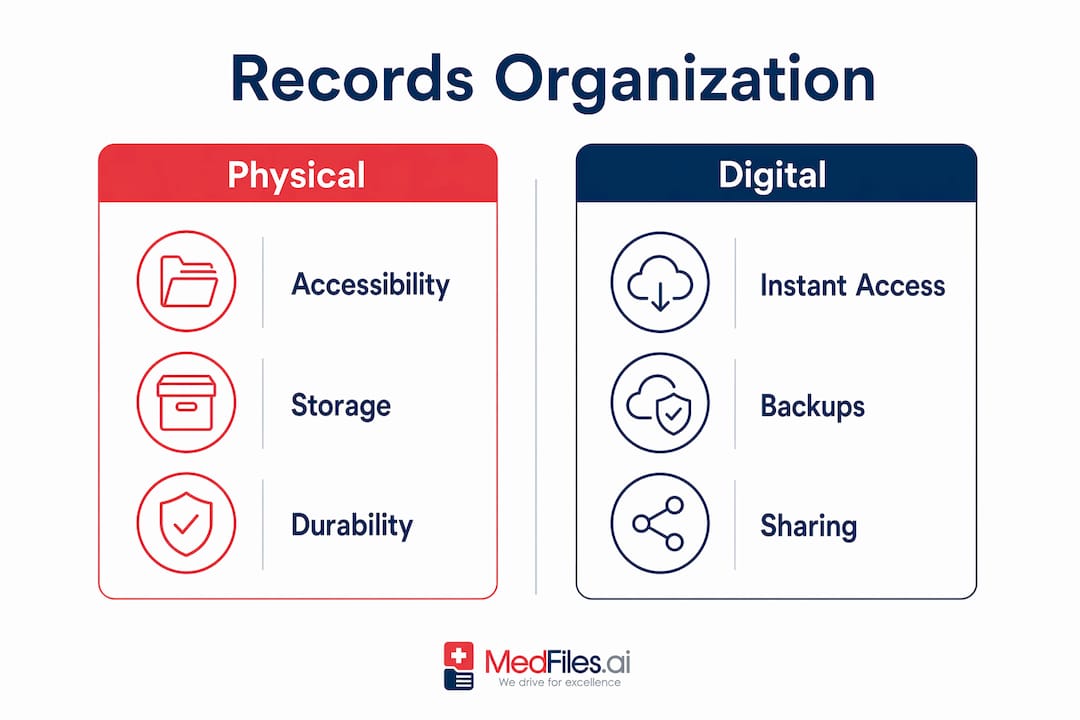
Organizing records for secure access works best when you treat digital and physical copies as partners, not substitutes. Each format covers the failure modes of the other.
What is a practical step-by-step vet visit workflow?
A closed-loop veterinary documentation workflow covers real-time note capture, structured SOAP note generation, client-friendly summaries, and automated follow-up reminders to prevent care gaps. Replicating that structure at home, even informally, produces a far more complete pet treatment history than most owners currently maintain.
Follow these steps for every vet appointment:
- Before the visit: Pull your existing records and write down current symptoms, when they started, any behavioral changes, and questions you want answered. Bring your physical folder or have your digital records accessible on your phone.
- During the appointment: Note the vet’s diagnosis, any tests ordered, treatments given, and specific instructions. If the vet prescribes medication, write down the name, dose, and duration before you leave the room.
- Immediately after: Ask for a printed or emailed visit summary. If the practice uses a platform like Vetspire or CoVet, confirm you have access to the digital record.
- At home: Update your master record with the new information. Add the diagnosis, treatment, and any follow-up dates to both your physical folder and your digital storage.
- Share with caregivers: If a family member, pet sitter, or boarding facility will care for your pet, send them a current one-page summary. A veterinary recordkeeping standard holds that a good record tells the story of care decisions clearly and concisely. Your summary should do the same.
- Schedule follow-ups: Set calendar reminders for any recommended recheck appointments, medication end dates, or vaccination due dates before you leave the clinic.
Pro Tip: Keep a running notes document on your phone titled with your pet’s name. Add a quick line after every vet call, medication change, or unusual symptom. This log becomes invaluable when a vet asks “when did this start?”
The SOAP format (Subjective, Objective, Assessment, Plan) is the standard structure vets use for clinical notes. You do not need to use it formally, but organizing your own notes into those four categories produces records that any vet can read and act on quickly.
How to prepare pet records for emergencies and transfers
Disaster planning for animal care requires legal-ready documentation, emergency recordkeeping, and coordination with emergency agencies. The limiting factor in most pet emergencies is not the vet’s skill. It is the time lost locating records and confirming authorization.
Build your emergency record kit around these items:
- One-page medical summary: Name, species, breed, age, microchip number, known allergies, current medications with doses, and your primary vet’s contact information
- Vaccination certificates: Especially rabies, which is legally required in most states for boarding and emergency shelter admission
- Signed medical release form: A pre-signed authorization specifying that all records may be released to any treating veterinarian speeds transfers and removes a common bottleneck during urgent care
- Prescription copies: For any controlled or ongoing medications
- Recent vet visit notes: The last one or two summaries give an emergency vet immediate clinical context
- Emergency contacts: Your vet, a backup vet, and a trusted person who can make decisions if you are unreachable
PetMD recommends storing both waterproof paper copies and digital backups for redundancy, because real emergencies often make one format inaccessible. A house fire destroys paper. A dead phone battery blocks digital access. Having both eliminates that risk.
For multi-pet households, CSU Veterinary Health System advises using color-coded labels and separate folders per pet to speed up identification during high-stress situations. A red folder for one pet and a blue folder for another takes seconds to grab and seconds to hand to a vet.
Keep your emergency folder near an exit, not buried in a filing cabinet. The benefits of digital storage become most obvious at 2 a.m. when your dog has eaten something toxic and you need to tell the emergency vet exactly what medications he is currently taking.
Key takeaways
A complete pet medical history workflow combines standardized data collection, routine updates, and dual-format storage to protect your pet’s care continuity in both routine and emergency situations.
| Point | Details |
|---|---|
| Capture the right data | Include microchip number, allergies, medications, and a signed release form in every record set. |
| Use dual-format storage | Keep waterproof physical copies and digital backups together to cover each format’s failure modes. |
| Document every vet visit | Follow a six-step workflow from pre-visit prep through post-visit update to build a complete treatment history. |
| Prepare an emergency kit | A one-page summary, vaccination certificates, and a pre-signed release form are the three non-negotiables. |
| Automate reminders | Use platforms like Medfiles or Otto to track vaccination due dates and medication schedules automatically. |
What most pet owners get wrong about record-keeping
Most pet owners treat medical records as something the vet handles. That assumption is the single biggest gap in pet healthcare management, and I have seen it cause real harm.
A good record does not just list what happened. According to Clinicians Brief, a veterinary medical record should “tell a story” by documenting clinical decisions, client discussions, and discharge instructions clearly. When you maintain your own version of that story, you become a far more effective advocate for your pet at every appointment.
The most common mistake is waiting until an emergency to organize records. By then, you are searching through a shoebox of papers or trying to remember which clinic handled that surgery three years ago. The second most common mistake is going fully digital without a physical backup. I have seen pet owners locked out of apps, dealing with service outages, or simply without cell service at the exact moment they needed a record.
The combination of a well-labeled physical folder and a secure digital platform is not redundant. It is the only approach that actually works across every scenario. Spend one afternoon building both, then commit to a five-minute update after every vet visit. That habit, more than any single tool, is what separates pet owners who are genuinely prepared from those who think they are.
— Team
How Medfiles can secure your pet’s medical history
Managing your pet’s records across paper folders, email attachments, and clinic portals is exhausting. Medfiles brings everything into one secure, organized place.

With Medfiles, you can store vaccination records, vet visit summaries, prescriptions, and lab results in a single digital health profile your whole family can access. Records are encrypted, organized automatically, and shareable with any vet or specialist in seconds. Multi-profile support means every pet in your household gets their own complete record. Whether you are preparing an emergency kit or switching clinics, your pet’s full history is always ready. Start organizing your pet’s records with Medfiles today and stop relying on memory when it matters most.
FAQ
What is a pet medical history workflow?
A pet medical history workflow is a structured process for collecting, storing, updating, and sharing your pet’s health records across routine care and emergencies. It typically includes a standardized data collection step, a storage system using both physical and digital formats, and a routine update cycle after every vet visit.
What documents belong in a pet emergency kit?
A pet emergency kit should include a one-page medical summary, vaccination certificates, current prescription copies, and a pre-signed record release form. PetMD recommends storing these in a waterproof pouch alongside digital copies accessible on your phone.
How often should I update my pet’s medical records?
Update your pet’s records immediately after every vet visit, medication change, or new diagnosis. A minimum review every six months catches outdated vaccination dates and expired prescriptions before they create problems at a clinic or boarding facility.
Can I share my pet’s records digitally with a new vet?
Yes. Platforms like Vetspire and Medfiles support secure digital sharing with any authorized provider. A pre-signed medical information release form removes the authorization delay that often slows urgent record transfers between clinics.
What is a SOAP note and do I need one for my pet?
A SOAP note is a structured clinical record format covering Subjective observations, Objective findings, Assessment, and Plan. Vets use it formally, but pet owners can use the same four categories informally to organize their own visit notes into a format any vet can quickly read and act on.