Efficient family health record management tips
Discover essential tips for efficient family health record management. Keep your family's medical information organized, safe, and accessible.

Efficient family health record management tips
Most families don’t realize their medical records are disorganized until a crisis hits. A child spikes a fever at midnight. A parent is rushed to the ER in an unfamiliar city. A new specialist asks for records you can’t locate. 78% of families report struggling to keep medical documents organized, and that failure often leads to delayed care, duplicated tests, and serious mistakes. The good news: digital tools and simple strategies can put you back in control. This guide walks you through what works, what to look for, and how to keep your family’s health information safe, accessible, and organized for the long term.
Table of Contents
- Why managing family health records matters
- Popular digital solutions for families
- Critical features for secure and accessible record keeping
- Overcoming challenges: Privacy, interoperability, and digital skills
- Our view: Why family health record management must evolve
- Easily start managing your family’s health records with MedFiles.ai
- Frequently asked questions
Key Takeaways
| Point | Details |
|---|---|
| Organized records improve care | Families with reliable health info see better outcomes and confidence. |
| Select secure digital tools | Using HIPAA-compliant and offline-ready apps protects privacy and ensures access. |
| Prioritize interoperability | FHIR-compatible solutions prevent data fragmentation and delays during provider transitions. |
| Routine reviews prevent disasters | Regularly check and back up records to avoid loss from system changes or emergencies. |
| Empower the whole family | Flexible permissions and collaborative tools meet needs across generations. |
Why managing family health records matters
Having set the context for the challenge, let’s explore why it matters so much for your family’s wellbeing.
Disorganized records aren’t just inconvenient. They actively harm care. When a doctor can’t see your full history, they may prescribe a medication that conflicts with something you’re already taking. They might order a lab test you had done three weeks ago at another clinic. These gaps cost time, money, and sometimes health outcomes.
Research backs this up clearly. A PHR study of 885 participants found that using a personal health record system produced significant positive impacts on access, confidence, and patient involvement in care decisions. In other words, people who had their records organized felt more empowered and were more engaged in managing their own health.
Here’s what organized records actually do for your family:
- Reduce medication errors by giving every provider a clear, current medication list
- Speed up emergency care when doctors can instantly see allergies, conditions, and past procedures
- Cut unnecessary testing by showing recent results that are still valid
- Support continuity when you switch doctors, move cities, or travel internationally
- Strengthen advocacy because you can speak up for yourself and your family members with facts in hand
“When patients can access their own records and share them confidently, they move from passive recipients of care to active participants in it. That shift changes outcomes.”
Understanding the digital health management benefits for your family goes beyond convenience. It’s about being prepared before something goes wrong, not scrambling after it already has.
The stakes are especially high for families managing chronic conditions, elderly relatives, or children with complex medical needs. A missed allergy note or an outdated diagnosis in a paper file can have real consequences. Digital management removes that risk.
Popular digital solutions for families
Now that we know why record management matters, it’s time to examine the tools that make it easier and safer.
There are several apps designed specifically to help families store, organize, and share medical information. They vary widely in features, security standards, and ease of use. Here’s a comparison of the most widely used options:
| App | Key features | HIPAA compliant | Multi-profile | Offline access |
|---|---|---|---|---|
| Primary Record | Family collaboration, portal sync | Yes | Yes | Limited |
| KinKeeper | Meds, allergies, HIPAA-verified | Yes | Yes | Yes |
| POP | AI assistant, multi-profile | Partial | Yes | Yes |
| Apple Health | Data aggregation, device sync | No | No | Yes |
| Google Health Connect | Aggregation, app integration | No | No | Yes |
| PicnicHealth | Record digitization, timeline | Yes | Limited | Limited |
Each of these popular solutions fills a different need. Primary Record excels at syncing with provider portals, making it ideal for families who see multiple specialists. KinKeeper is purpose-built for caregivers managing an aging parent’s records, with a simple interface and strong privacy controls. POP brings an AI assistant into the mix, helping you interpret records and flag potential concerns. Apple Health and Google Health Connect are best for aggregating data from wearables and fitness apps, though they lack true HIPAA compliance. PicnicHealth specializes in digitizing paper records into a clean timeline, which is excellent for families with years of paper files to convert.
The right choice depends on your family’s specific situation. A family managing an elderly grandparent with multiple conditions needs something different from a young couple tracking a child’s vaccination schedule.
Key requirements to evaluate before choosing any app:
- Security standards: Look for end-to-end encryption and HIPAA compliance, not just “secure” in the marketing
- Ease of use: If it’s hard to use, it won’t get used. Test the interface before committing
- Multi-profile support: Families need to manage records for multiple people from one account
- Sharing capabilities: Can you securely share a record with a doctor or a family member in seconds?
- Storage limits: Make sure the plan covers your full document volume, including images and scans
Understanding your family digital records workflow before picking a tool helps you choose something that fits your real habits. You might also want to explore health record alternatives to compare platforms beyond this list.
Pro Tip: Prioritize apps that are HIPAA-compliant and offer offline emergency access. If your phone loses signal during a medical emergency, your records must still be readable. Don’t compromise on either of these.
Critical features for secure and accessible record keeping
With so many options, what features truly set apart the safest and most useful systems?
Not all record management tools are built equally. Some look polished on the surface but fall short where it matters most. When evaluating any platform, these are the features that actually count.
1. HIPAA-compliant security architecture This means your data is stored with proper encryption, access controls, and audit trails. It’s the legal and ethical standard for health data in the United States. If a platform doesn’t explicitly state HIPAA compliance, assume it isn’t.
2. End-to-end encryption Your documents should be encrypted before they leave your device. That way, even if a server is breached, your data remains unreadable to attackers.
3. Role-based access controls Different family members may need different levels of access. A teenage child’s mental health records shouldn’t be automatically visible to siblings. Role-based access lets you customize who sees what.
4. FHIR interoperability FHIR (Fast Healthcare Interoperability Resources) is a technical standard that allows health data to move cleanly between different systems. Platforms that support FHIR can sync with hospital systems, lab portals, and provider EHRs without manual data entry. This is a significant time-saver and accuracy boost.
5. Offline access As mentioned above, offline access is non-negotiable for emergency preparedness. Your records need to be available even without a network connection.
6. Regular backup and version history Missing records during EHR transitions can cause serious care delays. Automatic backups and version history protect you if a document is accidentally deleted or a provider system fails during a transition.
7. Privacy for multi-generational households Families that include grandparents, adult children, and minors all living together have complex privacy needs. A platform must support granular privacy settings to handle this gracefully.
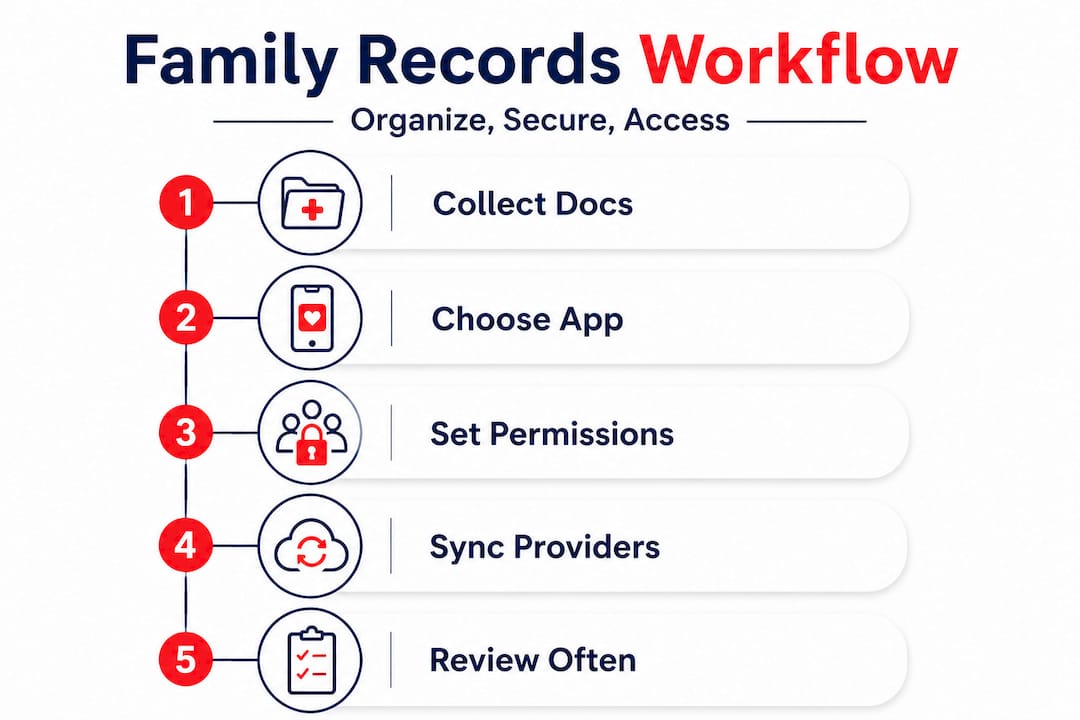
Here’s a practical framework for setting up your secure system:
- Audit your current records and identify gaps
- Choose a HIPAA-compliant platform with offline capability and FHIR support
- Set up individual profiles for each family member
- Assign access levels based on age and relationship
- Upload and organize documents by category (diagnoses, medications, lab results, imaging)
- Schedule a quarterly review to add new records and verify accuracy
Research strongly supports this approach. HIPAA-compliant platforms with FHIR interoperability consistently outperform general file storage solutions in usability, security, and long-term data preservation. Routine reviews also prevent the kind of edge-case failures that cost families the most.
For a detailed look at how to set this up, our guide on organizing secure family records walks through each step. You can also reference a complete digital records workflow for a process you can start using immediately.
Pro Tip: Schedule a 15-minute records review every three months. Add it to your calendar like any other family task. Most data loss and disorganization happens not from one big failure, but from months of small neglect.
Overcoming challenges: Privacy, interoperability, and digital skills
Even with the right tools and features, obstacles remain. Let’s tackle how to solve them.
Going digital with your health records isn’t always smooth. Three challenges come up most often for families: privacy concerns, fragmented data systems, and varying levels of digital comfort among family members.
Privacy risks and how to manage them
Sharing health records digitally always carries some risk. The honest truth is that PHR systems have real downsides: privacy breaches, inconsistent updates, clinician disinterest in patient-managed data, and data silos when interoperability is missing. These aren’t hypothetical. They happen.
To reduce your exposure:
- Use platforms with multi-factor authentication
- Never share records through unsecured email or messaging apps
- Review app permissions regularly to see what data is being shared
- Read the platform’s data usage policy before uploading sensitive documents
Data silos and interoperability barriers
Many families find that their records exist across multiple portals: one for the pediatrician, one for the cardiologist, one for the lab. These systems often don’t talk to each other. That’s the data silo problem.
The solution is choosing a platform that actively aggregates data from multiple sources using FHIR standards. It won’t always be perfect, but it dramatically reduces manual effort and the risk of missing critical information.
Digital literacy gaps within families
Not every family member is equally comfortable with technology. An 80-year-old grandparent and a 10-year-old grandchild will have very different relationships with a health record app. The best platforms account for this with simple interfaces, clear navigation, and family admin controls that let one tech-savvy member manage the system for others.
“The barrier to managing health records digitally isn’t usually technology. It’s confidence. When families feel supported and the tools are simple, adoption happens naturally.”
There’s also growing interest in decentralized approaches to health records. Blockchain-based PHR systems address centralization risks by distributing data storage so no single breach can expose everything. For families sharing records across multiple generations and devices, decentralized systems offer enhanced security and control. They’re still emerging, but worth watching as the technology matures.
Explore more about why digital health solutions work for families at every tech comfort level, and understand the specific security advantages of digital records over traditional paper-based systems.
Our view: Why family health record management must evolve
Having addressed the challenges, let’s consider a perspective most tech articles miss.
Most guides on family health records focus on which app to download. That’s useful, but it misses the bigger picture. The real problem isn’t a lack of tools. It’s a lack of systems that fit how real families actually live.
Real families don’t have one primary caregiver with unlimited time to manage health paperwork. They have two working parents, aging grandparents in another state, a child with a chronic condition, and a teenager who is old enough to want privacy over their own records. No single app was designed with all of that in mind simultaneously.
What we’ve seen repeatedly is that the families who manage records best aren’t using the most sophisticated tools. They’re using any tool consistently. A simple, HIPAA-compliant app used regularly beats a feature-rich platform that gets abandoned after three weeks.
The other thing most guides underestimate: the importance of offline readiness. In a real emergency, you may not have time to log in, retrieve a password, or wait for a page to load. The families that are truly prepared have pre-set emergency access options and offline copies of critical documents. This isn’t paranoia. It’s basic preparedness.
The next wave of health record management needs to prioritize empowerment over complexity. That means simpler onboarding, better cross-generational privacy controls, and emergency access that works without a network. It means building tools that serve families as they actually exist, not as a tech company imagines them.
Following a clear digital records workflow matters more than the platform you choose. Process beats features. Consistency beats perfection.
Easily start managing your family’s health records with MedFiles.ai
The strategies in this guide work best when paired with the right platform. MedFiles.ai was built specifically for families who need a secure, organized, and instantly accessible home for their health records.

MedFiles.ai offers HIPAA-ready infrastructure with end-to-end encryption, so your records stay private and protected. Multi-profile management means you can store and organize records for every family member, including pets, from a single account. AI-powered document analysis helps you understand what’s in your records without needing a medical background. And secure sharing with care teams means your doctors get what they need, exactly when they need it.
Whether you’re managing records for your family or coordinating care across providers, MedFiles.ai gives you the tools to do it with confidence. Start organizing today. Your future self, and your family, will thank you.
Frequently asked questions
What is the easiest way to organize family health records digitally?
Select a HIPAA-compliant app with offline access, multi-profile support, and easy sharing across devices. Options like Primary Record, KinKeeper, and POP are strong starting points depending on your family’s needs.
How can families keep health records safe and private?
Use platforms with strong encryption, customizable privacy permissions, and regular audits. HIPAA-compliant platforms with role-based access controls give each family member the right level of privacy without sacrificing accessibility.
What happens if a health record goes missing during provider switching?
Missing records during EHR transitions can delay care significantly. Always maintain your own digital backup in a family-controlled system so you’re never dependent solely on a provider’s records.
Are decentralized or blockchain health records safer?
Blockchain-based PHR systems reduce centralization risks and give families more control, especially when records need to be shared across generations and multiple devices. The technology is still maturing but shows real promise.
How can families ensure emergency access to health info?
Choose a platform with robust offline modes and pre-configured emergency sharing options. HIPAA-compliant, offline-capable apps with FHIR interoperability provide the fastest, most reliable access when every second counts.