What Is a Digital Pet Health History? Your Guide
Discover what is digital pet health history and how it provides secure access to your pet's vital medical information, ensuring better care.

What Is a Digital Pet Health History? Your Guide
A digital pet health history is a single, owner-managed, searchable timeline of your pet’s clinical records, medications, vaccinations, lab results, and daily-care notes that you can share securely with any vet, specialist, or emergency clinic. Think of it as your pet’s complete medical story, stored in one place and accessible from your phone in seconds. When a vet has that full picture before your appointment, they spend less time reconstructing history and more time actually helping your pet. And in an emergency, instant access to meds and allergies can guide faster, safer treatment decisions.
Every complete pet health history should include:
- Identification: name, species, breed, date of birth, microchip number, spay/neuter status
- Vaccinations: dates, product names, expiration or booster due dates
- Diagnoses: conditions with onset dates, treating provider, and outcomes
- Medications: current and discontinued drugs, doses, and duration
- Surgeries and procedures: dates, facility, and recovery notes
- Lab results and imaging reports: with dates and reference ranges
- Behavior and daily logs: appetite, energy, water intake, and symptom notes
- Invoices and receipts: for insurance claims and spending history
Table of Contents
- What belongs in your pet’s digital health record?
- Why does a digital pet health history matter?
- How do you create a usable digital pet health history?
- What U.S. pet owners should know about security and privacy
- How do you share records with vets, specialists, and emergency clinics?
- What do insurers, airlines, and boarding facilities actually require?
- What does the research say about clinical impact?
- How do you keep a digital pet health history current?
- Key Takeaways
- Why owner-managed records change the equation
- Medfiles keeps your pet’s full history ready when it counts
- Useful sources and next steps
What belongs in your pet’s digital health record?
A strong digital record goes beyond a stack of PDFs. Each field serves a clinical purpose.

| Category | What to capture | Why it matters |
|---|---|---|
| Identification | Microchip number, breed, DOB, spay/neuter status | Confirms identity; required for travel and boarding |
| Vaccination history | Vaccine name, date, lot number, next due date | Boarding, travel, and legal compliance |
| Diagnosis history | Condition, date, provider, treatment outcome | Prevents repeat workups at new clinics |
| Medication history | Drug, dose, start/stop dates (include discontinued) | Avoids dangerous drug interactions |
| Surgical history | Procedure, date, facility, complications | Guides anesthesia decisions |
| Lab results and imaging | Date, values, reference ranges, ordering vet | Tracks trends over time |
| Behavior and symptom logs | Daily appetite, energy, water intake, weight | Early-warning signals before labs show abnormalities |
| Invoices and receipts | Date, clinic, cost, service | Insurance claims and spending history |
Behavior logs deserve special attention. Practitioners recommend tracking daily behaviors because they reveal trends before clinical tests show abnormalities. A note that your dog’s appetite dropped three weeks before a diagnosis can change how a vet interprets the timeline entirely.
Pro Tip: Name your files consistently: YYYY-MM-DD_PetName_RecordType.pdf (e.g., 2026-03-15_Milo_BloodPanel.pdf). This makes sorting and searching fast, whether you use an app or a folder.
Why does a digital pet health history matter?
The core benefit is continuity of care. When your pet sees a new vet, a specialist, or an emergency clinic, owner-maintained records give any clinician the full picture regardless of which system holds the original files. Clinic records stay in clinic systems. Your copy travels with you.
The practical advantages stack up quickly:
- Reduced duplicate testing. Vets save significant appointment time when a pet’s history is available in advance, enabling more focused clinical discussion and faster diagnosis. Fewer repeat blood panels means lower bills.
- Emergency preparedness. Shareable records that surface meds and allergies immediately aid emergency clinics during urgent visits. A one-page summary with current medications and known allergies can prevent a dangerous drug interaction at 2 AM.
- Insurance claims. Insurers often request records to evaluate pre-existing conditions. A complete, dated timeline makes that process faster and harder to dispute.
- Travel and boarding. Airlines, international destinations, and boarding facilities all have document requirements. Having everything organized means you are not scrambling the night before.
- Cost savings. A faster diagnosis is a cheaper one. Fewer tests, shorter appointments, and less back-and-forth between providers all reduce out-of-pocket spending.
The importance of pet health history becomes clearest when something goes wrong unexpectedly. That is exactly when you want the record ready, not when you are trying to build it.
How do you create a usable digital pet health history?
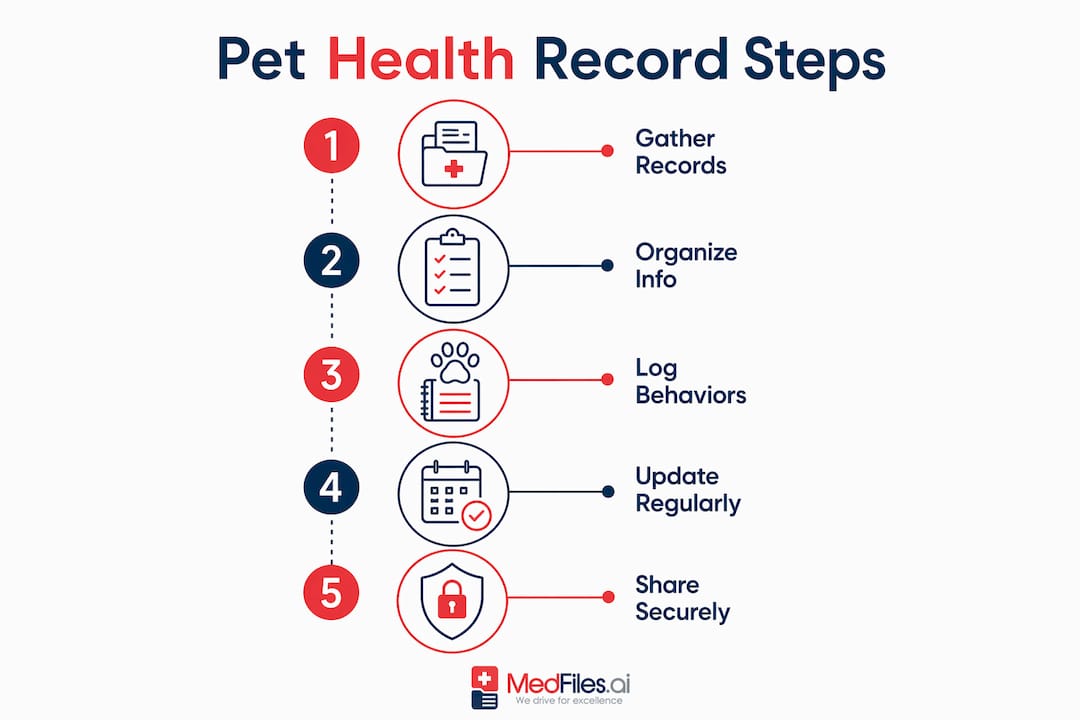
A folder of unsorted PDFs is not a health history. Here is how to build one that actually works.
- Request legacy records. Email every clinic your pet has visited in a single thread. Ask for complete records in PDF or electronic format. Most practices will send them within a few business days.
- Gather invoices and lab attachments from your email. Search your inbox for the clinic’s name. Download every attachment: lab reports, discharge summaries, prescription confirmations.
- Build a master record first. Before uploading full documents, create a one-page summary listing key dates, diagnoses, and outcomes. This becomes the first page of any shared file and the document a vet reads in the first 60 seconds.
- Tag and label every file. Extract metadata: date, record type, provider name, and your pet’s weight at the time. Structured fields and searchability are what separate a usable medical history from a data dump.
- Choose a storage method that fits your workflow. See the comparison below.
- Set a weekly update habit. Five minutes after each vet visit to attach new invoices and log changes keeps the timeline current. Let it lapse and it becomes a backlog project.
Storage options compared
| Method | Searchable | Shareable | Structured | Best for |
|---|---|---|---|---|
| Paper folder | No | No | No | Backup only |
| Generic cloud (Drive, Dropbox) | Partial | Yes | No | Simple storage, not clinical use |
| Structured pet health app | Yes | Yes | Yes | Active clinical use and sharing |
Generic cloud storage without structure creates a data dump that is hard for vets to query. A structured app with labeled fields, auto-reminders, and a chronological timeline is the difference between a folder of files and a record a clinician can actually use.
One-hour start checklist: Request records from all past clinics. Download email attachments. Create a master summary page. Upload and tag the five most recent documents. Set a calendar reminder for weekly updates.
What U.S. pet owners should know about security and privacy
HIPAA protects human health records. Veterinary records are not covered by HIPAA, but that does not mean your pet’s data has no protection. Reputable platforms apply the same HIPAA-ready security practices to pet records: end-to-end encryption, access controls, and audit logs.
When evaluating any storage platform, look for:
- End-to-end encryption so files are unreadable in transit and at rest
- Access controls that let you set view-only vs. edit permissions per recipient
- Audit logs showing who accessed the record and when
- Strong authentication (two-factor at minimum)
- Time-limited sharing links that expire after a set period
Managing sharing permissions matters as much as storage security. Send records via direct provider email or a time-limited link rather than an open URL. Use QR codes for in-clinic sharing where supported. Revoke access after a specialist visit ends.
Pro Tip: Avoid storing your pet’s full record in a single unsecured folder shared with everyone. Instead, create a view-only link for each provider and a separate edit-access profile for yourself. Medfiles supports secure, controlled sharing with exactly this kind of permission structure.
Medfiles uses HIPAA-ready infrastructure with end-to-end encryption, giving you the same level of protection for your pet’s records that you would expect for your own.
How do you share records with vets, specialists, and emergency clinics?
Speed and clarity matter most in a referral or emergency. The goal is to get the right information to the right person in under two minutes.
Prepare a one-page clinical summary that includes:
- Current medications with doses
- Known allergies and adverse reactions
- Microchip number and primary vet contact
- Most recent lab values and dates
- Surgical history with dates
This summary should be the first page of any shared PDF and the top card in any app. Structured records that surface this one-page view speed triage in emergency settings more than any complete document alone.
For routine referrals:
- Export a labeled PDF from your app or folder.
- Email it to the specialist’s intake address before the appointment.
- Confirm receipt when you arrive.
For emergencies:
- Open your digital emergency ID or one-page summary on your phone.
- Share via QR code or direct link at the front desk.
- Verbally confirm the top three items: current meds, allergies, and primary vet name.
Keep edit access for yourself only. Vets and specialists get view-only links that expire after the visit.
What do insurers, airlines, and boarding facilities actually require?
Insurance
Pet insurers commonly request complete medical records when evaluating claims or assessing pre-existing conditions. A dated, chronological timeline makes this straightforward. Keep records going back to your pet’s first vet visit. State laws often require clinics to retain records for a limited number of years, so your own copy is the only guaranteed long-term record.
Travel
Domestic travel requirements vary by airline and destination state. International travel typically requires:
- Microchip ID (ISO 11784/11785 standard for most countries)
- Rabies certificate issued within a defined window before departure
- Accredited-veterinarian health certificate completed within a specific number of days prior to travel
Start collecting travel documents at least 30 days before departure. Some destinations require 90 days or more for certain vaccinations to be valid. Confirm country-specific timelines directly with the destination’s embassy or USDA APHIS.
Boarding
Most boarding facilities require proof of current vaccinations (rabies, distemper, bordetella for dogs; FVRCP for cats). Some ask for a medication list and emergency contact. A shareable PDF or QR code with your pet’s vaccination records and current meds covers most intake requirements.
How long should you keep records? Keep them for your pet’s entire life. After your pet passes, retain records for at least three years in case of insurance disputes or estate matters.
What does the research say about clinical impact?
The evidence is consistent: vets make better decisions faster when they have a complete history. When a pet’s record is available in advance, the appointment shifts from history-taking to actual clinical work. Fewer repeat diagnostics. Faster diagnosis. Lower cost.
“Often the most vital information needed for diagnosing a pet’s condition is in their history. A historical medical record can tell a veterinarian about the trajectory of a condition and recommend the most effective treatment options. A faster diagnosis is a cheaper one, as your pet will likely need less testing.” — Papaya Veterinary Care
In emergency settings, the one-page summary is the highest-value document you can provide. A vet triaging a seizing dog does not have time to scroll through 40 pages of records. Current meds, allergies, and microchip number at the top of the file can prevent a dangerous interaction and confirm identity in seconds.
For owners managing pets with chronic conditions, daily behavior logs add a layer of data no lab panel can replicate. Tracking appetite, energy, and water intake monthly gives vets a longitudinal picture that a 15-minute annual visit simply cannot capture on its own.
Pro Tip: Pin your pet’s current medication list and allergy alert as the first item in any shared record or app. In an emergency, that is the only page that matters.
How do you keep a digital pet health history current?
A record that is six months out of date is still better than no record. But a record updated consistently is a clinical tool.
After every vet visit: Attach the invoice, upload any new lab results, and add a one-line note summarizing the visit outcome. This takes about five minutes and keeps the timeline accurate.
Monthly: Log your pet’s weight and a brief behavior note (appetite, energy, any changes). These longitudinal data points are what vets use to spot trends before they become problems.
Before travel or boarding: Verify that vaccinations are current, download a fresh PDF of the one-page summary, and confirm the microchip number is correct in the record.
After any medication change: Update the medication list immediately. An outdated drug list is more dangerous than no list at all.
Annually: Review the full record for accuracy. Check that discontinued medications are marked as such, that diagnoses have outcome notes, and that the identification section reflects any changes (new microchip, updated contact info).
A small weekly habit keeps the record clinically useful. Let it lapse and it becomes a backlog project that takes hours to reconstruct, usually at the worst possible moment.
Key Takeaways
A digital pet health history is only as useful as it is complete, current, and shareable. Build it once, maintain it consistently, and it pays off every time your pet sees a new provider.
| Point | Details |
|---|---|
| Start with a master summary | Create a one-page summary of meds, allergies, surgeries, and microchip before uploading full documents. |
| Capture behavior logs too | Daily appetite, energy, and weight trends reveal problems before lab results do. |
| Keep your own copy | Clinics retain records for limited periods; your copy is the only guaranteed lifelong record. |
| Update after every visit | Five minutes after each appointment keeps the timeline accurate and clinically useful. |
| Use Medfiles for structured storage | Medfiles provides HIPAA-ready, searchable, multi-profile storage with one-tap sharing for every vet visit and emergency. |
Why owner-managed records change the equation
The conventional wisdom is that your vet holds the record and you just show up. That model works fine until your pet needs an emergency specialist at midnight, you move across the country, or your longtime vet retires and the practice closes. At that point, the record either exists in your hands or it does not exist at all.
Owner-managed digital histories shift control where it belongs: with the person who knows the pet best and has the most at stake. A vet sees your pet for roughly 15 minutes per year. You observe them every day. The daily behavior logs, the subtle appetite changes, the medication reactions that never made it into the official chart — those live in your notes, not in any clinic’s system.
The argument against owner-managed records is usually about accuracy: what if the owner records something wrong? That concern is real but manageable. A structured platform with labeled fields and date-stamped entries is far more reliable than memory. And a record with one minor error is still more useful to an emergency vet than no record at all.
The owners who get the most clinical value from digital histories are not the ones with the most documents. They are the ones with a clean one-page summary, a current medication list, and a consistent update habit. That combination is what turns a folder of files into a tool that actually helps your pet.
Medfiles keeps your pet’s full history ready when it counts
Your pet’s records are scattered across clinics, email inboxes, and paper folders. Medfiles brings them into one secure, searchable place. Upload lab results, vaccination certificates, surgical notes, and daily logs. Medfiles organizes them automatically, tags them by type and date, and builds a chronological timeline you can share with any vet in seconds.

Multi-profile support means you can manage records for every pet (and every family member) under one account. The one-page summary feature puts current meds, allergies, and microchip number at the top of every shared file. And HIPAA-ready encryption means your data stays yours.
No paper. No scrambling. No emailing the wrong file at the wrong moment. Start your free trial at Medfiles and have your pet’s complete history ready before the next vet visit. Check pricing and plans to find the tier that fits your household.
Useful sources and next steps
Immediate actions for pet owners:
- Email every past clinic requesting complete records in PDF format
- Search your inbox for clinic names and download all attachments
- Create a one-page master summary (meds, allergies, microchip, recent labs)
- Store records in a structured app with labeled fields and search capability
- Set a recurring five-minute calendar reminder after each vet visit
Email template to request records: Key resources used in this article:
| Source | Topic covered |
|---|---|
| VCA Animal Hospitals | Clinical benefit of sharing records; reduced duplicate testing |
| Papaya Veterinary Care | Importance of historical health records for diagnosis |
| Zoetis Petcare | Record ownership and clinic retention periods |
| 1st Pet Vet | Chronic illness monitoring and behavior log value |
| Waggle / Mywaggle | Pet health timeline structure and emergency access |
| Beomelo / PawCorner | Digital storage options and structured record keeping |
| NAPHIA | Pet insurance industry data and claims guidance |